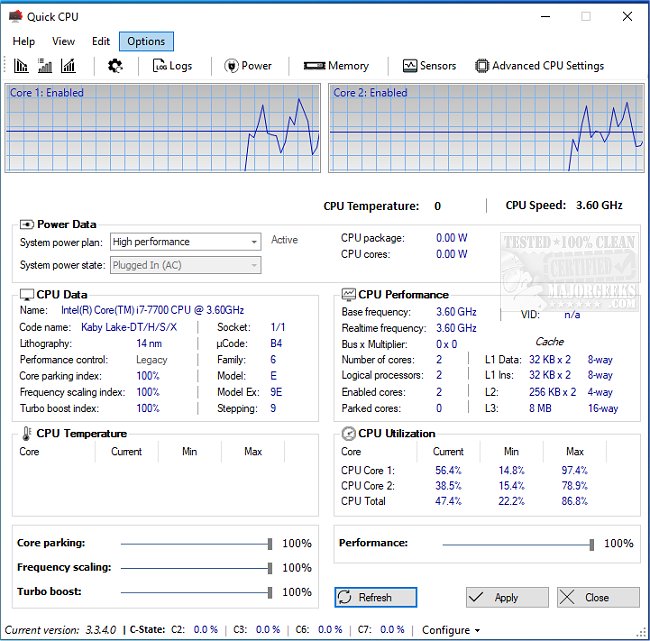
Quick CPU has just released version 6.1.0.0, a powerful tool designed to enhance and monitor various CPU and system parameters, allowing users to optimize their PC's performance effectively. This user-friendly software is ideal for both power users seeking to fine-tune their systems and casual users wanting a smooth computing experience, particularly during resource-intensive tasks like gaming or video editing. With Quick CPU, users can monitor vital metrics such as CPU temperature, core utilization, and power consumption in real-time.
Key features include advanced CPU tuning options, such as controlling core parking, enabling Turbo Boost for additional processing speed, and frequency scaling to balance performance and power savings. Quick CPU also offers preset performance modes, customizable alerts, and a highly adaptable interface with over 30 color themes. Users can easily manage Windows Power Plans and access advanced settings for deeper control, making it suitable for both novices and seasoned tech enthusiasts.
The benefits of Quick CPU are diverse: gamers can achieve smoother gameplay, content creators can expedite rendering and editing processes, and laptop users can extend battery life by optimizing power usage. Even beginners can utilize the straightforward presets to enhance their CPU performance without fear of damaging their systems, while power users can delve into advanced features for a more tailored experience.
What sets Quick CPU apart from other tools is its combination of expert-level functionality and ease of use. Unlike other software that may only focus on monitoring or limit users to pre-set configurations, Quick CPU delivers granular control and real-time insights for comprehensive system optimization. The software supports a wide range of Intel and AMD CPUs but lacks compatibility with macOS and Linux systems.
In summary, Quick CPU serves as an invaluable resource for anyone looking to unlock their computer's potential, whether for gaming, energy efficiency, or simply managing CPU settings more effectively. With its robust features and user-friendly approach, Quick CPU empowers users to take control of their system performance seamlessly. Download Quick CPU today and discover the full capabilities of your CPU!
Additionally, users seeking further insights might explore related topics, such as identifying their Intel processor and generation, learning how many cores their CPU has, or checking their computer's graphics card specifications
Key features include advanced CPU tuning options, such as controlling core parking, enabling Turbo Boost for additional processing speed, and frequency scaling to balance performance and power savings. Quick CPU also offers preset performance modes, customizable alerts, and a highly adaptable interface with over 30 color themes. Users can easily manage Windows Power Plans and access advanced settings for deeper control, making it suitable for both novices and seasoned tech enthusiasts.
The benefits of Quick CPU are diverse: gamers can achieve smoother gameplay, content creators can expedite rendering and editing processes, and laptop users can extend battery life by optimizing power usage. Even beginners can utilize the straightforward presets to enhance their CPU performance without fear of damaging their systems, while power users can delve into advanced features for a more tailored experience.
What sets Quick CPU apart from other tools is its combination of expert-level functionality and ease of use. Unlike other software that may only focus on monitoring or limit users to pre-set configurations, Quick CPU delivers granular control and real-time insights for comprehensive system optimization. The software supports a wide range of Intel and AMD CPUs but lacks compatibility with macOS and Linux systems.
In summary, Quick CPU serves as an invaluable resource for anyone looking to unlock their computer's potential, whether for gaming, energy efficiency, or simply managing CPU settings more effectively. With its robust features and user-friendly approach, Quick CPU empowers users to take control of their system performance seamlessly. Download Quick CPU today and discover the full capabilities of your CPU!
Additionally, users seeking further insights might explore related topics, such as identifying their Intel processor and generation, learning how many cores their CPU has, or checking their computer's graphics card specifications
Quick CPU 6.1.0.0 released
Quick CPU enables fine-tuning and monitoring of a myriad of essential CPU and system parameters.