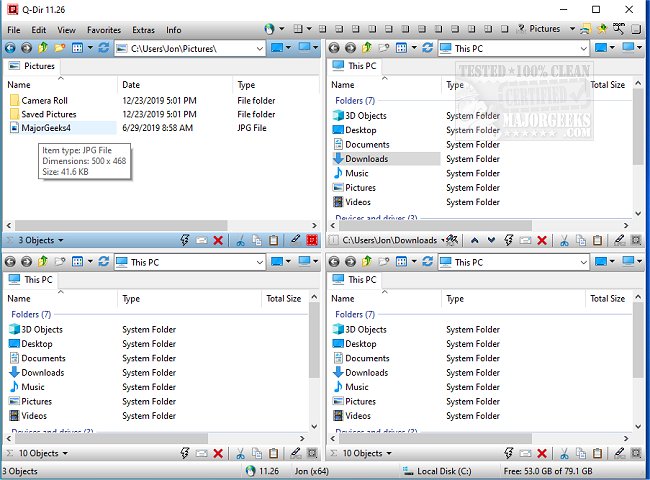
Q-Dir is a free file management tool designed to simplify the organization of files and folders across various storage devices, including hard disks, network folders, USB drives, and even floppy disks. Unlike the standard Windows File Explorer, which is adequate for basic tasks, Q-Dir—known as The Quad Explorer—provides users with enhanced speed, efficiency, and control over their file management activities.
Key Features of Q-Dir:
- Quad-Pane Interface: Manage up to four folders simultaneously, facilitating easy navigation and organization.
- Drag & Drop Support: Effortlessly move files between panels with a simple drag-and-drop action.
- Custom Layouts & Color Filters: Personalize your workspace to optimize your workflow.
- Tab Support: Open multiple folders within each panel for even more efficient management.
- Fast File Operations: Quickly copy, move, and delete files without hassle.
- Portable Version: Use Q-Dir without installation, making it perfect for on-the-go users.
- Lightweight & Resource-Friendly: Functions smoothly even on older PCs.
Optimizing Your Workflow with Q-Dir:
Q-Dir caters to a variety of users:
- Everyday Users: Simplify the organization of personal files, photos, and documents.
- IT Professionals: Efficiently manage system files, backups, and multiple drives.
- Developers & Designers: Keep project directories open for quick access and comparison.
- Power Users: Perform bulk file operations at unprecedented speeds.
- Network Administrators: Manage file transfers across multiple locations with ease.
Unlocking the Full Potential of Q-Dir:
Q-Dir is packed with features that enhance productivity:
- Favorites & Quick Access: Bookmark frequently used folders for quick navigation.
- File Preview: Quickly view text, images, and other files without opening them.
- Clipboard & Shortcut Integration: Easily copy paths and create shortcuts.
- Multi-Monitor Support: Manage files across different screens seamlessly.
- File Filters & Tree View: Use custom colors to highlight specific file types and navigate complex folder structures intuitively.
- ZIP & FTP Support: Handle compressed files and remote directories effortlessly.
- Customizable Interface: Enjoy Dark Mode and themes to tailor the appearance to your liking.
Tips for Mastering Q-Dir:
- Adjustment Period: New users may find the quad-pane interface overwhelming initially; sticking with the default layouts can help ease the transition.
- Limited Built-In Search: While Q-Dir excels in file management, users may still need to rely on Windows Search for extensive file queries.
- Emphasize Customization: Utilize hotkeys, color filters, and layouts to develop a personalized workflow.
Conclusion:
For those who find Windows File Explorer too simplistic, Q-Dir emerges as a powerful, efficient, and customizable alternative. It stands out as one of the best free file management tools available today. Download Q-Dir now and experience the difference it makes in your file management tasks!
Related Resources:
- Manage Your Default Apps or Reset All File Associations
- Reset Folder View Settings in Windows 10 & 11
- Show or Hide File Name Extensions in File Explorer Context Menu
- Display the Actual Path in Windows 10 & 11 File Explore
Key Features of Q-Dir:
- Quad-Pane Interface: Manage up to four folders simultaneously, facilitating easy navigation and organization.
- Drag & Drop Support: Effortlessly move files between panels with a simple drag-and-drop action.
- Custom Layouts & Color Filters: Personalize your workspace to optimize your workflow.
- Tab Support: Open multiple folders within each panel for even more efficient management.
- Fast File Operations: Quickly copy, move, and delete files without hassle.
- Portable Version: Use Q-Dir without installation, making it perfect for on-the-go users.
- Lightweight & Resource-Friendly: Functions smoothly even on older PCs.
Optimizing Your Workflow with Q-Dir:
Q-Dir caters to a variety of users:
- Everyday Users: Simplify the organization of personal files, photos, and documents.
- IT Professionals: Efficiently manage system files, backups, and multiple drives.
- Developers & Designers: Keep project directories open for quick access and comparison.
- Power Users: Perform bulk file operations at unprecedented speeds.
- Network Administrators: Manage file transfers across multiple locations with ease.
Unlocking the Full Potential of Q-Dir:
Q-Dir is packed with features that enhance productivity:
- Favorites & Quick Access: Bookmark frequently used folders for quick navigation.
- File Preview: Quickly view text, images, and other files without opening them.
- Clipboard & Shortcut Integration: Easily copy paths and create shortcuts.
- Multi-Monitor Support: Manage files across different screens seamlessly.
- File Filters & Tree View: Use custom colors to highlight specific file types and navigate complex folder structures intuitively.
- ZIP & FTP Support: Handle compressed files and remote directories effortlessly.
- Customizable Interface: Enjoy Dark Mode and themes to tailor the appearance to your liking.
Tips for Mastering Q-Dir:
- Adjustment Period: New users may find the quad-pane interface overwhelming initially; sticking with the default layouts can help ease the transition.
- Limited Built-In Search: While Q-Dir excels in file management, users may still need to rely on Windows Search for extensive file queries.
- Emphasize Customization: Utilize hotkeys, color filters, and layouts to develop a personalized workflow.
Conclusion:
For those who find Windows File Explorer too simplistic, Q-Dir emerges as a powerful, efficient, and customizable alternative. It stands out as one of the best free file management tools available today. Download Q-Dir now and experience the difference it makes in your file management tasks!
Related Resources:
- Manage Your Default Apps or Reset All File Associations
- Reset Folder View Settings in Windows 10 & 11
- Show or Hide File Name Extensions in File Explorer Context Menu
- Display the Actual Path in Windows 10 & 11 File Explore
Q-Dir 12.72 released
Q-Dir is a free option to make managing your files and folders easy by allowing you to quickly regulate your hard disks, network folders, USB-drives, floppy disks, and other storage devices.