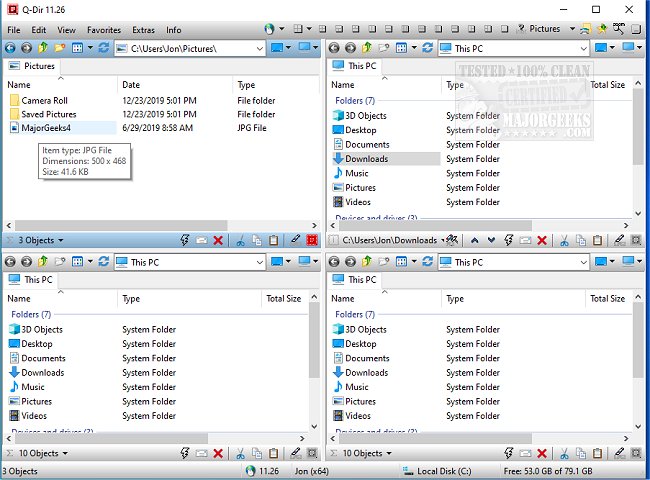
Q-Dir 12.48 has been released, offering an advanced file management solution that significantly enhances the capabilities of traditional file explorers like Windows File Explorer. This free tool is designed to simplify the management of files and folders across various storage devices, including hard disks, network folders, USB drives, and more.
Overview of Q-Dir: The Ultimate Quad-Panel File Manager
Q-Dir, known as The Quad Explorer, features a unique four-pane interface that allows users to navigate and manage multiple directories at once. This design facilitates quicker file operations such as copying and moving, enhancing overall efficiency. The software is lightweight and resource-friendly, making it suitable for use on older PCs, and offers several powerful features for both casual users and professionals alike.
Key Features:
- Quad-Pane Interface: Manage up to four folders simultaneously.
- Drag & Drop Support: Easily move files between panels.
- Custom Layouts & Color Filters: Tailor the interface to your workflow.
- Tab Support: Open multiple folders in each panel.
- Fast File Operations: Quickly copy, move, and delete files.
- Portable Version: Use without installation.
Who Can Benefit from Q-Dir?
Q-Dir is ideal for a variety of users:
- Everyday Users: Simplifies personal file management.
- IT Professionals: Streamlines system file management and backups.
- Developers & Designers: Facilitates easy access to project directories.
- Power Users: Enables rapid bulk file operations.
- Network Administrators: Assists in managing file transfers across multiple locations.
Enhancing Productivity: Additional Tools
Q-Dir includes features such as Favorites & Quick Access for bookmarking folders, a File Preview function for quick access to file contents, and Multi-Monitor Support for managing files across different screens. The software also offers built-in file filters and supports ZIP and FTP, making it versatile for various file handling needs. Users can customize their experience with Dark Mode and custom themes.
Tips for Mastering Q-Dir:
- Familiarize Yourself with the Interface: New users may find the quad-pane layout challenging initially; starting with default layouts can ease the transition.
- Utilize External Search Tools: For deep file searches, Windows Search may still be necessary, as Q-Dir does not include a built-in search function.
- Maximize Customization: Use hotkeys, color filters, and tailored layouts to optimize your workflow.
Conclusion: The Verdict on Q-Dir
For those who find Windows File Explorer lacking, Q-Dir offers a robust alternative that is fast, efficient, and highly customizable. It stands out as one of the best free file management tools available today. Download Q-Dir now and experience a transformative approach to file organization and management.
Related Resources:
- Manage Default Apps or Reset File Associations
- Reset Folder View Settings in Windows 10 & 11
- Show or Hide File Name Extensions in File Explorer
- Display the Actual Path in Windows File Explore
Overview of Q-Dir: The Ultimate Quad-Panel File Manager
Q-Dir, known as The Quad Explorer, features a unique four-pane interface that allows users to navigate and manage multiple directories at once. This design facilitates quicker file operations such as copying and moving, enhancing overall efficiency. The software is lightweight and resource-friendly, making it suitable for use on older PCs, and offers several powerful features for both casual users and professionals alike.
Key Features:
- Quad-Pane Interface: Manage up to four folders simultaneously.
- Drag & Drop Support: Easily move files between panels.
- Custom Layouts & Color Filters: Tailor the interface to your workflow.
- Tab Support: Open multiple folders in each panel.
- Fast File Operations: Quickly copy, move, and delete files.
- Portable Version: Use without installation.
Who Can Benefit from Q-Dir?
Q-Dir is ideal for a variety of users:
- Everyday Users: Simplifies personal file management.
- IT Professionals: Streamlines system file management and backups.
- Developers & Designers: Facilitates easy access to project directories.
- Power Users: Enables rapid bulk file operations.
- Network Administrators: Assists in managing file transfers across multiple locations.
Enhancing Productivity: Additional Tools
Q-Dir includes features such as Favorites & Quick Access for bookmarking folders, a File Preview function for quick access to file contents, and Multi-Monitor Support for managing files across different screens. The software also offers built-in file filters and supports ZIP and FTP, making it versatile for various file handling needs. Users can customize their experience with Dark Mode and custom themes.
Tips for Mastering Q-Dir:
- Familiarize Yourself with the Interface: New users may find the quad-pane layout challenging initially; starting with default layouts can ease the transition.
- Utilize External Search Tools: For deep file searches, Windows Search may still be necessary, as Q-Dir does not include a built-in search function.
- Maximize Customization: Use hotkeys, color filters, and tailored layouts to optimize your workflow.
Conclusion: The Verdict on Q-Dir
For those who find Windows File Explorer lacking, Q-Dir offers a robust alternative that is fast, efficient, and highly customizable. It stands out as one of the best free file management tools available today. Download Q-Dir now and experience a transformative approach to file organization and management.
Related Resources:
- Manage Default Apps or Reset File Associations
- Reset Folder View Settings in Windows 10 & 11
- Show or Hide File Name Extensions in File Explorer
- Display the Actual Path in Windows File Explore
Q-Dir 12.48 released
Q-Dir is a free option to make managing your files and folders easy by allowing you to quickly regulate your hard disks, network folders, USB-drives, floppy disks, and other storage devices.