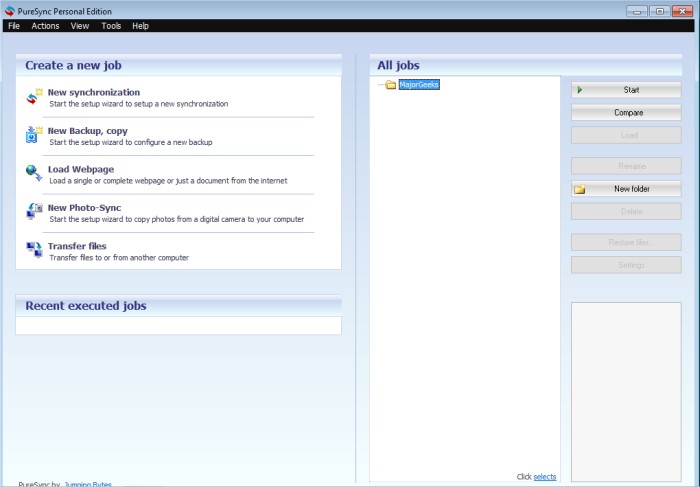
PureSync 8.5 has been released as an advanced file synchronization and backup tool, enabling users to efficiently compare, synchronize, and back up their files. This utility is user-friendly while offering robust features such as conflict detection and the ability to manage multiple backups of files and entire folders. Users have the flexibility to control the synchronization direction, ensuring a tailored experience.
The interface is designed for ease of use, featuring drag-and-drop functionality for folders and a wizard to guide users through the backup process, promoting an error-free experience. One notable feature is the Foto-Sync, specifically for digital cameras, which facilitates the transfer of only new photos, effectively preventing duplicates during backup.
Key Features of PureSync include:
- Intuitive handling
- Synchronization capabilities
- File comparison tools
- Backup saving and restoration options
- Support for subfolders and multiple folder synchronization
- Automatic synchronization and backups
- Filtering options based on criteria like date and size
- Use of environment variables in path definitions, such as %USERPROFILE%
- Path customization with date and time placeholders
- Capability to download web pages and files from the internet
- Special photo synchronization feature
- Comparison with recovery points
- File transfer functionalities
In addition to its core features, PureSync can be compared to other backup solutions, such as methods for backing up Google Drive, restoring the Windows Registry, and ensuring driver backups on systems like Windows 10 and 11. This positions PureSync as a versatile tool in the landscape of file management solutions, catering to both personal and professional needs.
Overall, PureSync 8.5 stands out with its combination of simplicity and powerful features, making it a compelling choice for users looking for a reliable file synchronization and backup tool
The interface is designed for ease of use, featuring drag-and-drop functionality for folders and a wizard to guide users through the backup process, promoting an error-free experience. One notable feature is the Foto-Sync, specifically for digital cameras, which facilitates the transfer of only new photos, effectively preventing duplicates during backup.
Key Features of PureSync include:
- Intuitive handling
- Synchronization capabilities
- File comparison tools
- Backup saving and restoration options
- Support for subfolders and multiple folder synchronization
- Automatic synchronization and backups
- Filtering options based on criteria like date and size
- Use of environment variables in path definitions, such as %USERPROFILE%
- Path customization with date and time placeholders
- Capability to download web pages and files from the internet
- Special photo synchronization feature
- Comparison with recovery points
- File transfer functionalities
In addition to its core features, PureSync can be compared to other backup solutions, such as methods for backing up Google Drive, restoring the Windows Registry, and ensuring driver backups on systems like Windows 10 and 11. This positions PureSync as a versatile tool in the landscape of file management solutions, catering to both personal and professional needs.
Overall, PureSync 8.5 stands out with its combination of simplicity and powerful features, making it a compelling choice for users looking for a reliable file synchronization and backup tool
PureSync 8.5 released
PureSync is designed to be a file synchronizer and backup tool allowing you to compare, synchronize, and backup your files.