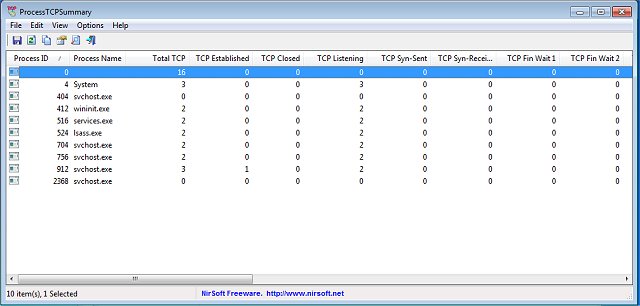
The recent release of ProcessTCPSummary version 1.25 provides users with a straightforward and portable tool for monitoring processes that have TCP connections or UDP ports in a listening state. Upon launch, the application immediately compiles and presents a detailed overview of all processes, showcasing metrics such as the total number of TCP connections, status breakdowns (including Established, Listening, Syn-Sent, and Syn-Received), and totals for both IPv4 and IPv6 TCP connections.
Additionally, ProcessTCPSummary offers insights into common port numbers and allows users to run the application in Administrator mode, which enhances its functionality by enabling the tracking of TCP/UDP data sent and received by each process, as well as real-time monitoring of send/receive speeds. This feature can be crucial for users aiming to identify any unauthorized open ports that could be exploited by cybercriminals for malicious activities like malware or ransomware attacks.
This tool is especially useful for individuals and organizations looking to maintain network security and ensure that their systems are not vulnerable to threats. For those interested in network management, related topics include how to reset TCP/IP settings, check network adapter speeds on Windows 10 and 11, and reset network configurations on these operating systems.
In summary, ProcessTCPSummary 1.25 stands out as a valuable resource for network monitoring and security, helping users maintain a vigilant approach to safeguard their systems against potential cyber threats. The ease of use and immediate functionality make it an appealing choice for both novice and advanced users alike
Additionally, ProcessTCPSummary offers insights into common port numbers and allows users to run the application in Administrator mode, which enhances its functionality by enabling the tracking of TCP/UDP data sent and received by each process, as well as real-time monitoring of send/receive speeds. This feature can be crucial for users aiming to identify any unauthorized open ports that could be exploited by cybercriminals for malicious activities like malware or ransomware attacks.
This tool is especially useful for individuals and organizations looking to maintain network security and ensure that their systems are not vulnerable to threats. For those interested in network management, related topics include how to reset TCP/IP settings, check network adapter speeds on Windows 10 and 11, and reset network configurations on these operating systems.
In summary, ProcessTCPSummary 1.25 stands out as a valuable resource for network monitoring and security, helping users maintain a vigilant approach to safeguard their systems against potential cyber threats. The ease of use and immediate functionality make it an appealing choice for both novice and advanced users alike
ProcessTCPSummary 1.25 released
ProcessTCPSummary is a simple portable option that gathers and displays all processes that have TCP connections or listening UDP ports.