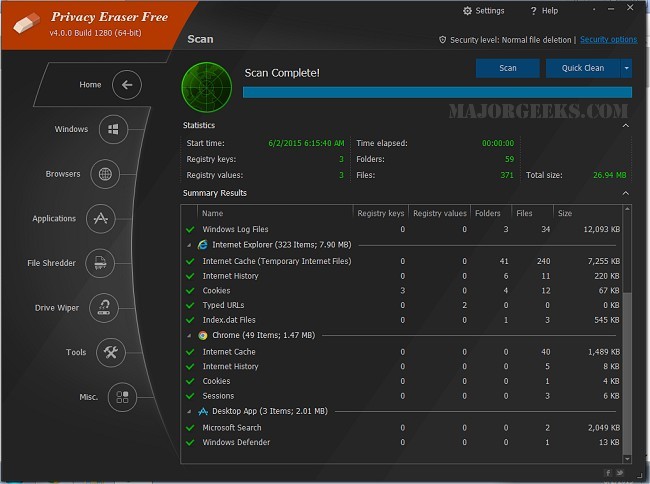
Privacy Eraser is a comprehensive privacy suite designed to enhance both your security and your computer's performance. The latest version, 6.25.0 Build 5456, emphasizes its dual functionality as a drive cleaner and a privacy protector, making it an essential tool for users keen on maintaining their digital security and system efficiency. For those who prefer visual guidance, a video tutorial is available.
Key Features of Privacy Eraser
Privacy Eraser excels in protecting users' privacy by efficiently removing traces of both online and offline activity. Its features include:
- Browser Cleaning: It cleans browsing history, cookies, cache, and other data across various browsers such as Chrome, Edge, and Firefox.
- Windows Cleanup: It handles the removal of temporary files, clipboard data, and items in the Recycle Bin.
- Third-Party Application Support: The tool cleans residual data from popular applications to prevent unnecessary storage buildup.
- Secure File Deletion: Advanced erasure methods ensure files are deleted beyond recovery.
- Registry Cleaning: It identifies and removes invalid registry entries to enhance system performance.
- Automation & Scheduling: Users can set the software to perform automatic cleaning at designated times.
Versions and Pricing
Privacy Eraser is available in both Free and Pro versions. The Free version includes essential cleaning capabilities, while the Pro version offers additional features such as real-time monitoring, automated cleaning, and premium support. The Pro version is ideal for users who require ongoing protection and maintenance.
Considerations Before Use
While Privacy Eraser is an effective tool for maintaining privacy and system performance, users should be cautious, especially when it comes to irreversible actions like file shredding and registry cleaning. It is advisable to back up important files and create a registry backup before making any changes to prevent potential system instability.
Pros and Cons
Pros:
- Supports multiple browsers and applications
- Military-grade secure file deletion
- Automates cleaning tasks
- Free version covers core features
Cons:
- Advanced features require upgrading to Pro
- Caution is necessary when cleaning the registry
Conclusion
Privacy Eraser is a robust solution for users looking to declutter their systems and enhance their privacy. The Free version provides fundamental tools, while the Pro version offers advanced functionalities for those seeking a hassle-free and automated cleaning experience. For anyone concerned about privacy and system performance, Privacy Eraser is a tool worth considering.
In addition to its features, users might explore similar tools such as CCleaner, Wise Disk Cleaner, or PrivaZer, and tips on utilizing Windows built-in features like Storage Sense for managing junk files
Key Features of Privacy Eraser
Privacy Eraser excels in protecting users' privacy by efficiently removing traces of both online and offline activity. Its features include:
- Browser Cleaning: It cleans browsing history, cookies, cache, and other data across various browsers such as Chrome, Edge, and Firefox.
- Windows Cleanup: It handles the removal of temporary files, clipboard data, and items in the Recycle Bin.
- Third-Party Application Support: The tool cleans residual data from popular applications to prevent unnecessary storage buildup.
- Secure File Deletion: Advanced erasure methods ensure files are deleted beyond recovery.
- Registry Cleaning: It identifies and removes invalid registry entries to enhance system performance.
- Automation & Scheduling: Users can set the software to perform automatic cleaning at designated times.
Versions and Pricing
Privacy Eraser is available in both Free and Pro versions. The Free version includes essential cleaning capabilities, while the Pro version offers additional features such as real-time monitoring, automated cleaning, and premium support. The Pro version is ideal for users who require ongoing protection and maintenance.
Considerations Before Use
While Privacy Eraser is an effective tool for maintaining privacy and system performance, users should be cautious, especially when it comes to irreversible actions like file shredding and registry cleaning. It is advisable to back up important files and create a registry backup before making any changes to prevent potential system instability.
Pros and Cons
Pros:
- Supports multiple browsers and applications
- Military-grade secure file deletion
- Automates cleaning tasks
- Free version covers core features
Cons:
- Advanced features require upgrading to Pro
- Caution is necessary when cleaning the registry
Conclusion
Privacy Eraser is a robust solution for users looking to declutter their systems and enhance their privacy. The Free version provides fundamental tools, while the Pro version offers advanced functionalities for those seeking a hassle-free and automated cleaning experience. For anyone concerned about privacy and system performance, Privacy Eraser is a tool worth considering.
In addition to its features, users might explore similar tools such as CCleaner, Wise Disk Cleaner, or PrivaZer, and tips on utilizing Windows built-in features like Storage Sense for managing junk files
Privacy Eraser 6.25.0 Build 5456 released
Privacy Eraser is not just a drive cleaner but also an all-in-one privacy suite that protects your privacy and optimizes your computer so it runs faster. Video tutorial available.