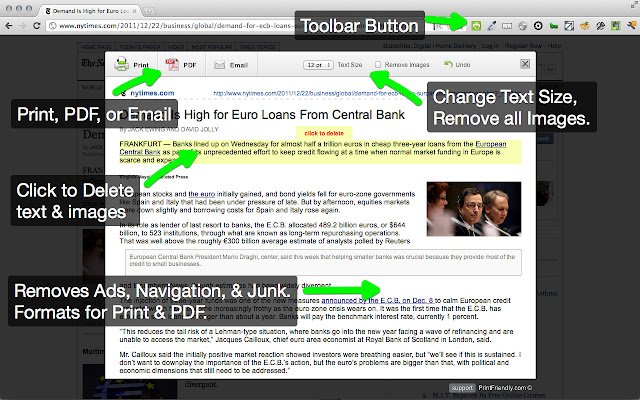
The latest version 6.11.3 of Print Friendly & PDF has been released for major web browsers including Chrome, Firefox, Edge, and Safari. This tool is designed to enhance the printing experience by cleaning and formatting web pages, ensuring that users get a clear and concise output when printing. By removing unnecessary ads, navigation elements, and other extraneous content from web pages, Print Friendly & PDF helps users conserve paper and ink.
Key features of Print Friendly & PDF include:
- Print Preview: This feature allows users to see how the printed page will look, enabling further optimization for print.
- Edit Before Printing: Users can customize their printouts by removing unwanted images and text, ensuring they only print the information they need.
- Print or Save as PDF: Users have the flexibility to either print immediately or save the content as a PDF for later use.
To use Print Friendly & PDF:
- For New Users: Simply copy and paste a URL into PrintFriendly.com to generate a print-friendly version of the page.
- For Regular Users: Adding the extension to your browser allows for one-click access to print-friendly versions of web pages.
- For Developers and Bloggers: There’s an option to add a Print Friendly button to websites or blogs, making it easy for visitors to print or save content.
In addition to the main features, users can explore related topics such as enabling two-page view for PDF documents in Google Chrome, controlling Microsoft Edge's handling of PDF and HTML files, adjusting the XPS Viewer app in Windows 10, and understanding the Adobe Acrobat Update Service.
Overall, Print Friendly & PDF is a valuable tool for anyone looking to enhance their printing processes by providing a cleaner, more efficient way to print web content
Key features of Print Friendly & PDF include:
- Print Preview: This feature allows users to see how the printed page will look, enabling further optimization for print.
- Edit Before Printing: Users can customize their printouts by removing unwanted images and text, ensuring they only print the information they need.
- Print or Save as PDF: Users have the flexibility to either print immediately or save the content as a PDF for later use.
To use Print Friendly & PDF:
- For New Users: Simply copy and paste a URL into PrintFriendly.com to generate a print-friendly version of the page.
- For Regular Users: Adding the extension to your browser allows for one-click access to print-friendly versions of web pages.
- For Developers and Bloggers: There’s an option to add a Print Friendly button to websites or blogs, making it easy for visitors to print or save content.
In addition to the main features, users can explore related topics such as enabling two-page view for PDF documents in Google Chrome, controlling Microsoft Edge's handling of PDF and HTML files, adjusting the XPS Viewer app in Windows 10, and understanding the Adobe Acrobat Update Service.
Overall, Print Friendly & PDF is a valuable tool for anyone looking to enhance their printing processes by providing a cleaner, more efficient way to print web content
Print Friendly and PDF for Chrome, Firefox, Edge, and Safari 6.11.3 released
Print Friendly & PDF for Chrome, Firefox, Edge, and Safari cleans and formats web pages for the perfect print experience.
Print Friendly and PDF for Chrome, Firefox, Edge, and Safari 6.11.3 released @ MajorGeeks