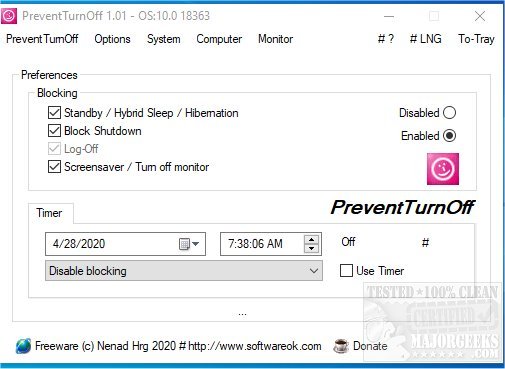
PreventTurnOff is a streamlined alternative to the Don't Sleep application, specifically designed to prevent the shutdown of computers. This new version, 3.66, features a shutdown timer coupled with a PC Anti-Blocking System, mirroring the core functionalities of Don't Sleep while simplifying the user experience. The decision to create PreventTurnOff was influenced by user feedback expressing a desire for a tool with fewer complex tasks.
PreventTurnOff serves as a straightforward shutdown timer that integrates an anti-blocking system. It operates by notifying the operating system of its ongoing critical tasks, which helps in managing screen saver activation and monitor deactivation. Additionally, it prioritizes its shutdown command to ensure that no other applications can interfere by closing before PreventTurnOff executes its own command. This design allows users to maintain control over their machine's power management without interruptions.
Key Features of PreventTurnOff:
- Ensures that the PC and monitor remain active.
- Allows for scheduled shutdowns at specific times.
- Provides quick access to energy options and settings.
Related Topics:
- Managing Sleep, Hibernate, or Shutdown options on your PC.
- Customizing the Start Menu to include Sleep, Hibernate, or Lock features in Windows 10 & 11.
- Allowing sleep mode through remote commands in Power Settings.
- Troubleshooting premature sleep issues in Windows 10 or 11.
Extension:
As technology continues to evolve, applications like PreventTurnOff become increasingly essential for users who require uninterrupted access to their devices for various tasks. This software is particularly beneficial in professional environments where ongoing processes must not be disrupted by unintended shutdowns. Future updates could expand the functionality of PreventTurnOff, potentially incorporating features like user-defined exceptions for certain applications or enhanced notifications for scheduled shutdowns. Moreover, as remote work becomes more prevalent, tools like PreventTurnOff can play a critical role in maintaining productivity by ensuring that machines remain operational when needed
PreventTurnOff serves as a straightforward shutdown timer that integrates an anti-blocking system. It operates by notifying the operating system of its ongoing critical tasks, which helps in managing screen saver activation and monitor deactivation. Additionally, it prioritizes its shutdown command to ensure that no other applications can interfere by closing before PreventTurnOff executes its own command. This design allows users to maintain control over their machine's power management without interruptions.
Key Features of PreventTurnOff:
- Ensures that the PC and monitor remain active.
- Allows for scheduled shutdowns at specific times.
- Provides quick access to energy options and settings.
Related Topics:
- Managing Sleep, Hibernate, or Shutdown options on your PC.
- Customizing the Start Menu to include Sleep, Hibernate, or Lock features in Windows 10 & 11.
- Allowing sleep mode through remote commands in Power Settings.
- Troubleshooting premature sleep issues in Windows 10 or 11.
Extension:
As technology continues to evolve, applications like PreventTurnOff become increasingly essential for users who require uninterrupted access to their devices for various tasks. This software is particularly beneficial in professional environments where ongoing processes must not be disrupted by unintended shutdowns. Future updates could expand the functionality of PreventTurnOff, potentially incorporating features like user-defined exceptions for certain applications or enhanced notifications for scheduled shutdowns. Moreover, as remote work becomes more prevalent, tools like PreventTurnOff can play a critical role in maintaining productivity by ensuring that machines remain operational when needed
PreventTurnOff 3.66 released
PreventTurnOff is a simplified version of Don't Sleep designed to prevent the shutdown of your machine.