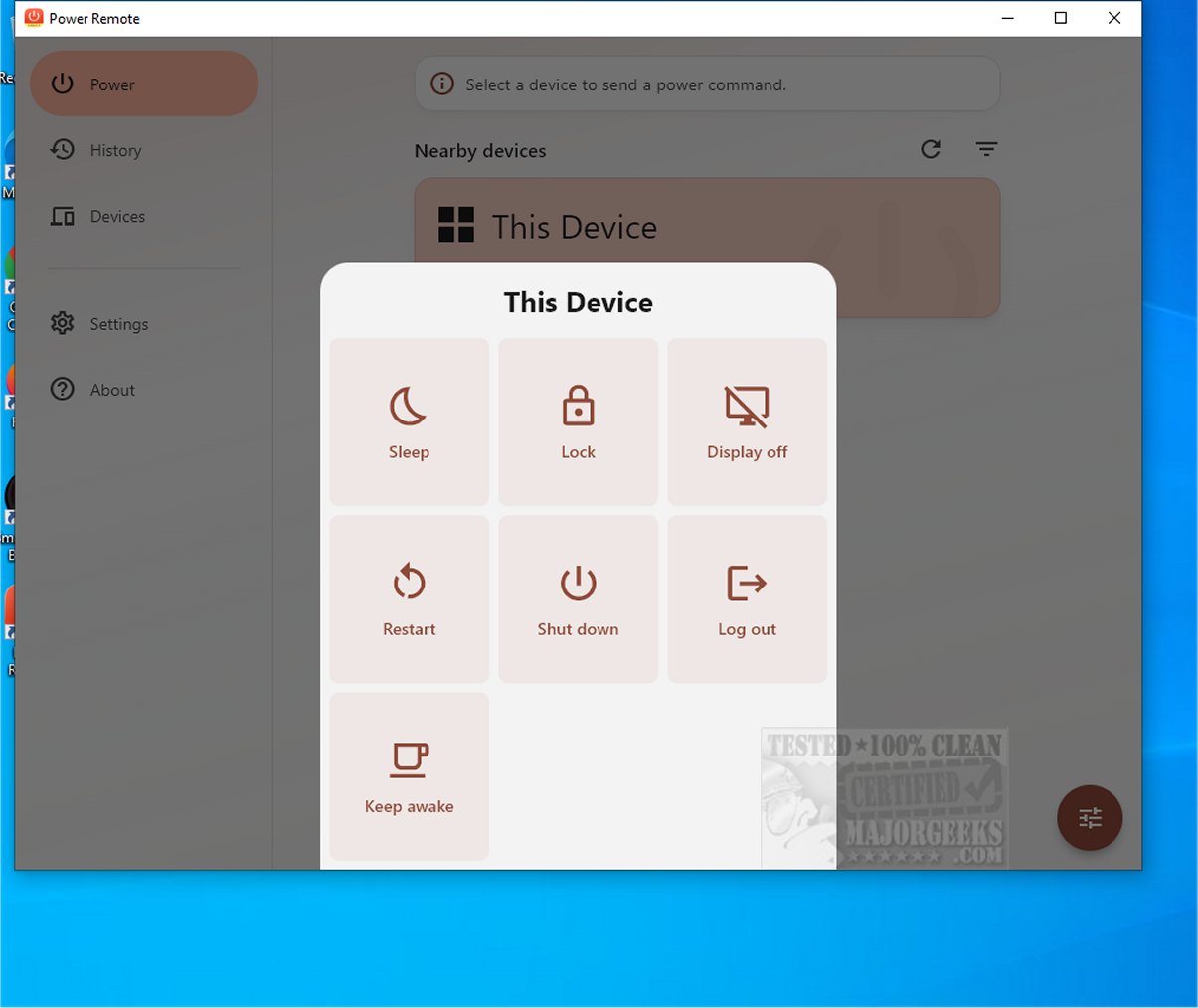
Power Remote is an advanced application that transforms smartphones, tablets, and other devices into secure remote controls for Windows PCs and Macs. This innovative tool enables users to manage their devices effortlessly from a distance, enhancing both convenience and efficiency in personal and professional environments.
Easy Setup and Usage
Setting up Power Remote is a breeze. Users simply need to pair their trusted devices once, allowing them to send vital power commands over their local network or Wi-Fi. This functionality includes features such as putting computers to sleep, waking them up, locking them for security, restarting, shutting down, logging out, turning off the display, and even keeping the computer awake with a customizable timer.
Key Features:
- Power Actions in One Tap: Execute commands like Sleep, Wake, Lock, Restart, Shut Down, Log Out, Display Off, Display On, and Keep Awake with just one tap from a trusted device.
- Wake-on-LAN Support: Remotely wake a sleeping computer using a magic packet, provided the necessary hardware supports it.
- Timed Keep Awake: Set a timer to keep a computer awake for a specified duration, making it ideal for various tasks like downloads and presentations.
- Secure Local Pairing: Devices must be paired securely to send commands, ensuring only trusted devices have access.
- No Cloud Account Required: Power Remote operates fully locally, requiring no internet account or cloud relay.
- Encrypted Requests: Commands are transmitted securely with end-to-end encryption, maintaining privacy.
- Nearby Device Discovery: Automatically detects supported devices on the network, with the option to manually add devices by IP address.
- Command History: Users can review and repeat recent commands, making it easy to manage ongoing tasks.
- Cross-Platform Compatibility: Operates on Android, iOS, Mac, and Windows, targeting compatible PCs and Macs within the same network.
- User-friendly Interface: Customizable themes, device filters, and background behavior settings enhance user experience.
Enhancing Productivity from Anywhere
Power Remote is especially useful when computers are out of reach. Users can complete work comfortably from their couch, wake their desktops just in time for use, secure workstations when stepping away, or shut down media PCs post-viewing. The application ensures that essential tasks like downloads and backups remain active without interruptions, significantly boosting productivity in today’s multitasking digital landscape.
Conclusion
Power Remote is an ideal solution for managing power without cloud dependency. Whether for home use, small offices, or media setups, it offers practical control at your fingertips. Users juggling multiple devices or aiming to optimize power usage will find Power Remote essential in maintaining oversight of their devices and networks, ultimately simplifying their digital lives.
Future Directions
Looking ahead, future updates for Power Remote could include expanded compatibility with smart home devices, integration with voice control systems for hands-free operation, and enhanced analytics for monitoring device performance and power usage trends. These advancements could further solidify Power Remote as a pivotal tool in modern digital management, catering to the evolving needs of tech-savvy users
Easy Setup and Usage
Setting up Power Remote is a breeze. Users simply need to pair their trusted devices once, allowing them to send vital power commands over their local network or Wi-Fi. This functionality includes features such as putting computers to sleep, waking them up, locking them for security, restarting, shutting down, logging out, turning off the display, and even keeping the computer awake with a customizable timer.
Key Features:
- Power Actions in One Tap: Execute commands like Sleep, Wake, Lock, Restart, Shut Down, Log Out, Display Off, Display On, and Keep Awake with just one tap from a trusted device.
- Wake-on-LAN Support: Remotely wake a sleeping computer using a magic packet, provided the necessary hardware supports it.
- Timed Keep Awake: Set a timer to keep a computer awake for a specified duration, making it ideal for various tasks like downloads and presentations.
- Secure Local Pairing: Devices must be paired securely to send commands, ensuring only trusted devices have access.
- No Cloud Account Required: Power Remote operates fully locally, requiring no internet account or cloud relay.
- Encrypted Requests: Commands are transmitted securely with end-to-end encryption, maintaining privacy.
- Nearby Device Discovery: Automatically detects supported devices on the network, with the option to manually add devices by IP address.
- Command History: Users can review and repeat recent commands, making it easy to manage ongoing tasks.
- Cross-Platform Compatibility: Operates on Android, iOS, Mac, and Windows, targeting compatible PCs and Macs within the same network.
- User-friendly Interface: Customizable themes, device filters, and background behavior settings enhance user experience.
Enhancing Productivity from Anywhere
Power Remote is especially useful when computers are out of reach. Users can complete work comfortably from their couch, wake their desktops just in time for use, secure workstations when stepping away, or shut down media PCs post-viewing. The application ensures that essential tasks like downloads and backups remain active without interruptions, significantly boosting productivity in today’s multitasking digital landscape.
Conclusion
Power Remote is an ideal solution for managing power without cloud dependency. Whether for home use, small offices, or media setups, it offers practical control at your fingertips. Users juggling multiple devices or aiming to optimize power usage will find Power Remote essential in maintaining oversight of their devices and networks, ultimately simplifying their digital lives.
Future Directions
Looking ahead, future updates for Power Remote could include expanded compatibility with smart home devices, integration with voice control systems for hands-free operation, and enhanced analytics for monitoring device performance and power usage trends. These advancements could further solidify Power Remote as a pivotal tool in modern digital management, catering to the evolving needs of tech-savvy users
Power Remote 1.0.2 released
Power Remote is a cutting-edge application that turns your smartphone, tablet, or other device into a secure remote control for Windows PCs and Macs. This innovative tool allows users to manage their devices seamlessly from a distance, enhancing convenience and efficiency in both personal and professional settings.