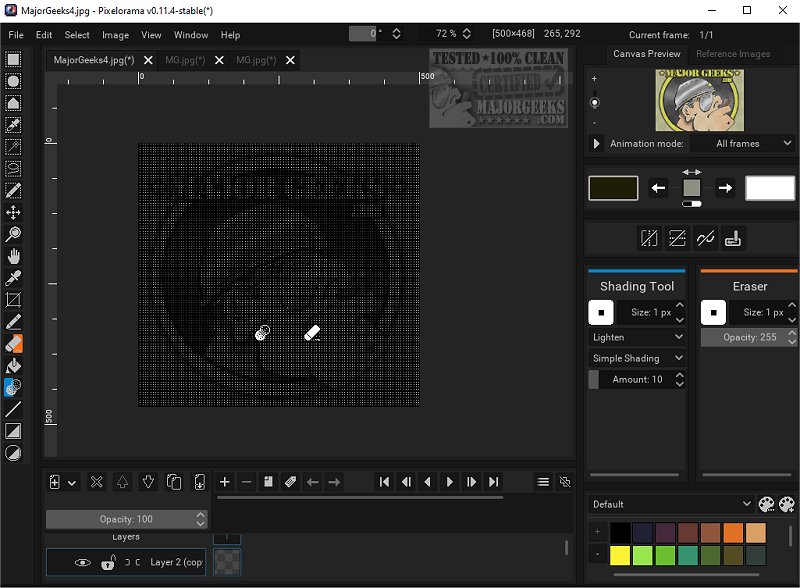
Pixelorama, an open-source art tool tailored for pixel art creation, has released its version 1.2. This software is designed to cater to both novice and seasoned artists, offering a wide array of features that make it a versatile choice for graphic design and artistry. Notably, a portable version of Pixelorama is also available for users who prefer mobility in their software.
Comprehensive Feature Set
Pixelorama is equipped with an extensive toolkit that enhances the user experience. The software allows users to effortlessly customize their tool mappings with just one click, streamlining their workflow. Its animation capabilities include a timeline with layers and frames, onion skinning, and the innovative ability to draw during playback, facilitating an intuitive animation process. This makes it easier for artists to experiment with motion and timing in their work.
Pixel-Perfect Precision
The application’s pixel-perfect mode is essential for artists focused on precise pixel lines, ensuring the integrity of their designs. Users can select from pre-made color palettes or import their own, providing a vast array of colors to choose from. Additionally, Pixelorama features various image manipulation effects that help refine and enhance artwork quality.
Advanced Algorithms and 3D Layers
To improve pixel art quality, Pixelorama incorporates multiple rotation and scaling algorithms, such as cleanEdge, OmniScale, and rotxel. These tools enhance the visual appeal of pixel art. The inclusion of 3D layers allows for the integration of 3D shapes and models into a 2D workspace, broadening creative avenues for artists.
User-Friendly Customization
The customizable interface of Pixelorama lets users tailor the software according to their preferences and workflow requirements. Artists can export their work in various formats like PNG, GIFs, and animated PNGs, adding to the software’s versatility in sharing and utilizing artwork. Additionally, the ability to import sprite sheets and images as separate frames simplifies the integration of external assets.
Guides and Autosave Features
Pixelorama also provides a flexible drawing canvas with various guides, including rectangular and isometric grids, along with a tile mode that aids in pattern creation. An autosave feature ensures that users’ work is continuously saved, with data recovery options available in case of unexpected software crashes.
Final Thoughts
Pixelorama equips artists with the necessary tools to create stunning sprites, intricate tiles, engaging animations, and beautiful pixel art. The software encourages creativity, allowing users to transform their artistic visions into reality. With the added option of a portable version, Pixelorama is an excellent choice for artists seeking flexibility and power in their creative endeavors. Whether you are a hobbyist or a professional, Pixelorama makes pixel art accessible and enjoyable
Comprehensive Feature Set
Pixelorama is equipped with an extensive toolkit that enhances the user experience. The software allows users to effortlessly customize their tool mappings with just one click, streamlining their workflow. Its animation capabilities include a timeline with layers and frames, onion skinning, and the innovative ability to draw during playback, facilitating an intuitive animation process. This makes it easier for artists to experiment with motion and timing in their work.
Pixel-Perfect Precision
The application’s pixel-perfect mode is essential for artists focused on precise pixel lines, ensuring the integrity of their designs. Users can select from pre-made color palettes or import their own, providing a vast array of colors to choose from. Additionally, Pixelorama features various image manipulation effects that help refine and enhance artwork quality.
Advanced Algorithms and 3D Layers
To improve pixel art quality, Pixelorama incorporates multiple rotation and scaling algorithms, such as cleanEdge, OmniScale, and rotxel. These tools enhance the visual appeal of pixel art. The inclusion of 3D layers allows for the integration of 3D shapes and models into a 2D workspace, broadening creative avenues for artists.
User-Friendly Customization
The customizable interface of Pixelorama lets users tailor the software according to their preferences and workflow requirements. Artists can export their work in various formats like PNG, GIFs, and animated PNGs, adding to the software’s versatility in sharing and utilizing artwork. Additionally, the ability to import sprite sheets and images as separate frames simplifies the integration of external assets.
Guides and Autosave Features
Pixelorama also provides a flexible drawing canvas with various guides, including rectangular and isometric grids, along with a tile mode that aids in pattern creation. An autosave feature ensures that users’ work is continuously saved, with data recovery options available in case of unexpected software crashes.
Final Thoughts
Pixelorama equips artists with the necessary tools to create stunning sprites, intricate tiles, engaging animations, and beautiful pixel art. The software encourages creativity, allowing users to transform their artistic visions into reality. With the added option of a portable version, Pixelorama is an excellent choice for artists seeking flexibility and power in their creative endeavors. Whether you are a hobbyist or a professional, Pixelorama makes pixel art accessible and enjoyable
Pixelorama 1.2 released
Pixelorama is an Open Source art tool designed specifically for creating pixel art. It provides a comprehensive set of features perfect for both beginners and experienced artists, making it an accessible and versatile option for graphic design and artistry. We also have the portable version.