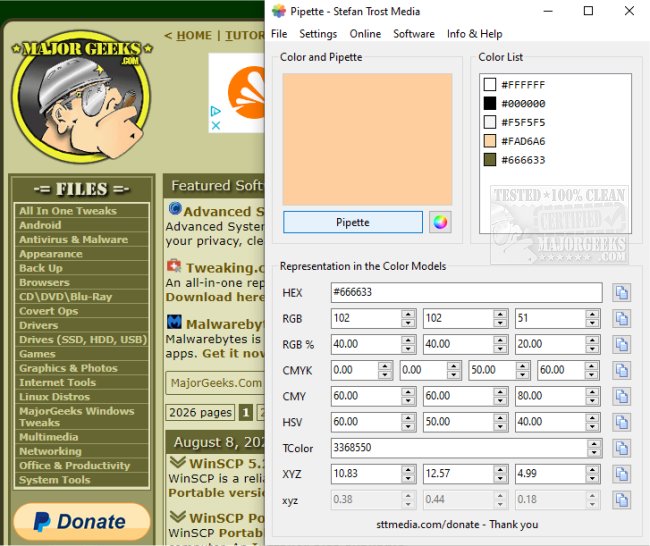
The newly released version 26.9.6 of Pipette is a portable application designed for users to easily select, identify, copy, and save colors from various sources, including websites and images. This user-friendly tool provides detailed information about the selected color, including its RGB, CMY, CMYK, HSV, TColor, and XYZ values. Users can conveniently copy these values to the clipboard for use in other projects.
One of Pipette's key features is its ability to automatically save the selected colors in a list, which allows users to access them during future sessions. To use the application, you simply click the designated Pipette button to activate a crosshair cursor, click on your desired color, and the corresponding values will populate in their respective fields.
In addition to its core functionality, Pipette includes links to other software created by the author and offers color charts for reference. Users are encouraged to support the development of Pipette through donations on the author's website.
To enhance the functionality of Pipette, future updates could consider integrating features such as color palette generation, the ability to export color lists in various formats, or enhanced sharing options for collaborative projects. Furthermore, developing mobile compatibility could extend its utility for designers and artists on-the-go
One of Pipette's key features is its ability to automatically save the selected colors in a list, which allows users to access them during future sessions. To use the application, you simply click the designated Pipette button to activate a crosshair cursor, click on your desired color, and the corresponding values will populate in their respective fields.
In addition to its core functionality, Pipette includes links to other software created by the author and offers color charts for reference. Users are encouraged to support the development of Pipette through donations on the author's website.
To enhance the functionality of Pipette, future updates could consider integrating features such as color palette generation, the ability to export color lists in various formats, or enhanced sharing options for collaborative projects. Furthermore, developing mobile compatibility could extend its utility for designers and artists on-the-go
Pipette 26.9.6 released
Pipette lets you pick, identify, copy, and save colors from websites, images, etc., from a portable app.