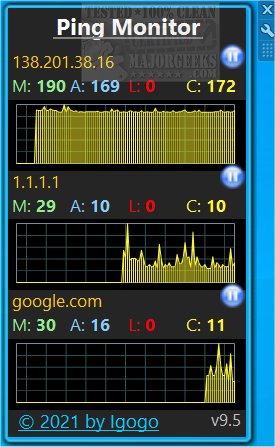
Ping Monitor 10.5 has been released, offering users the capability to monitor up to fifteen servers, whether they are local or remote. This tool pings each selected server at intervals defined by the user, presenting the response data in both graphical and numerical formats. Users can view critical metrics such as maximum, average, and current ping times, as well as track the number of errors encountered during the pinging process.
An additional feature allows users to log results for each server, enabling better tracking over time. The interface is user-friendly, making it accessible even to those who are not tech-savvy. Users can refresh server information or graphs with a simple double-click and can easily pause or resume monitoring for each server. Importantly, Ping Monitor supports both IPv4 and IPv6 addresses, ensuring compatibility with a wide range of network configurations.
For those using Windows 8.1 or 10 who encounter issues during installation, it may be necessary to use tools like Desktop Gadgets Revived for successful operation.
Overall, Ping Monitor 10.5 stands out as a versatile and practical tool for network monitoring, providing essential insights into server performance and connectivity.
In addition to its primary features, future updates could enhance Ping Monitor by integrating more advanced alert systems for downtime or latency issues, real-time notifications via email or SMS, and the ability to monitor additional metrics like bandwidth usage or server load. This would make the tool even more indispensable for IT professionals and businesses that rely on server uptime and performance
An additional feature allows users to log results for each server, enabling better tracking over time. The interface is user-friendly, making it accessible even to those who are not tech-savvy. Users can refresh server information or graphs with a simple double-click and can easily pause or resume monitoring for each server. Importantly, Ping Monitor supports both IPv4 and IPv6 addresses, ensuring compatibility with a wide range of network configurations.
For those using Windows 8.1 or 10 who encounter issues during installation, it may be necessary to use tools like Desktop Gadgets Revived for successful operation.
Overall, Ping Monitor 10.5 stands out as a versatile and practical tool for network monitoring, providing essential insights into server performance and connectivity.
In addition to its primary features, future updates could enhance Ping Monitor by integrating more advanced alert systems for downtime or latency issues, real-time notifications via email or SMS, and the ability to monitor additional metrics like bandwidth usage or server load. This would make the tool even more indispensable for IT professionals and businesses that rely on server uptime and performance
Ping Monitor 10.5 released
Ping Monitor permits you to monitor up to fifteen servers locally, and/or remotely.