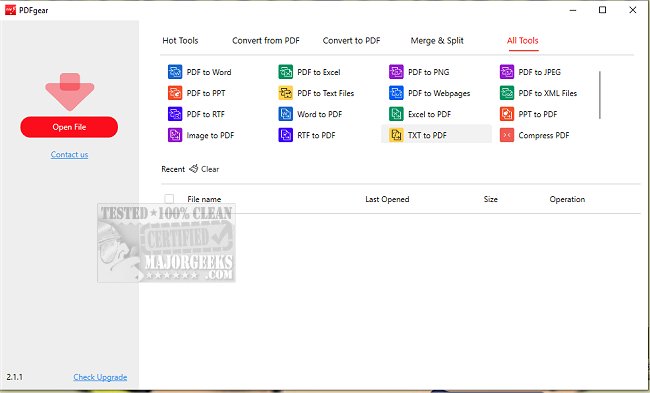
PDFgear has released version 2.1.16, enhancing its capabilities as a comprehensive desktop PDF editor. The tool allows users to manage their PDF files efficiently, providing functions to convert, edit, merge, split, organize, sign, and annotate documents, all without any associated costs or sign-up requirements.
One of PDFgear's standout features is its text editing functionality, which enables users to modify PDF text similarly to Microsoft Word, allowing for easy alterations, image replacements, and paragraph deletions without losing formatting. Additionally, users can convert over 60 different image and document formats with a single click, including Word, Excel, PowerPoint, and various image types. The batch conversion feature is particularly useful for enhancing productivity by saving time.
The introduction of PDFgear Copilot further streamlines the user experience by allowing natural language interaction, enabling users to communicate effortlessly with the software. The integration of AI, specifically with GPT 3.5, empowers users to summarize lengthy research documents, extract essential information, proofread, and even rewrite content within their PDFs effectively. This AI capability also allows for conversational interaction with PDF files, making it user-friendly and efficient.
Moreover, PDFgear includes a powerful Optical Character Recognition (OCR) feature that facilitates the editing of scanned PDFs and converts them into editable Microsoft Word files, providing additional flexibility for users dealing with scanned documents.
Overall, PDFgear stands out as an accessible and versatile PDF management tool that caters to a wide range of user needs, from casual users to professionals, all while being completely free of charge. As digital document management continues to grow in importance, tools like PDFgear are essential for enhancing productivity and simplifying workflows.
Looking ahead, future updates could see even more advanced AI features, collaborative tools for team-based projects, and integrations with cloud storage services to further streamline PDF management and enhance user collaboration
One of PDFgear's standout features is its text editing functionality, which enables users to modify PDF text similarly to Microsoft Word, allowing for easy alterations, image replacements, and paragraph deletions without losing formatting. Additionally, users can convert over 60 different image and document formats with a single click, including Word, Excel, PowerPoint, and various image types. The batch conversion feature is particularly useful for enhancing productivity by saving time.
The introduction of PDFgear Copilot further streamlines the user experience by allowing natural language interaction, enabling users to communicate effortlessly with the software. The integration of AI, specifically with GPT 3.5, empowers users to summarize lengthy research documents, extract essential information, proofread, and even rewrite content within their PDFs effectively. This AI capability also allows for conversational interaction with PDF files, making it user-friendly and efficient.
Moreover, PDFgear includes a powerful Optical Character Recognition (OCR) feature that facilitates the editing of scanned PDFs and converts them into editable Microsoft Word files, providing additional flexibility for users dealing with scanned documents.
Overall, PDFgear stands out as an accessible and versatile PDF management tool that caters to a wide range of user needs, from casual users to professionals, all while being completely free of charge. As digital document management continues to grow in importance, tools like PDFgear are essential for enhancing productivity and simplifying workflows.
Looking ahead, future updates could see even more advanced AI features, collaborative tools for team-based projects, and integrations with cloud storage services to further streamline PDF management and enhance user collaboration
PDFgear 2.1.16 released
PDFgear provides a comprehensive desktop PDF editor that allows you to convert, edit, merge, split, organize, sign, annotate, and more.