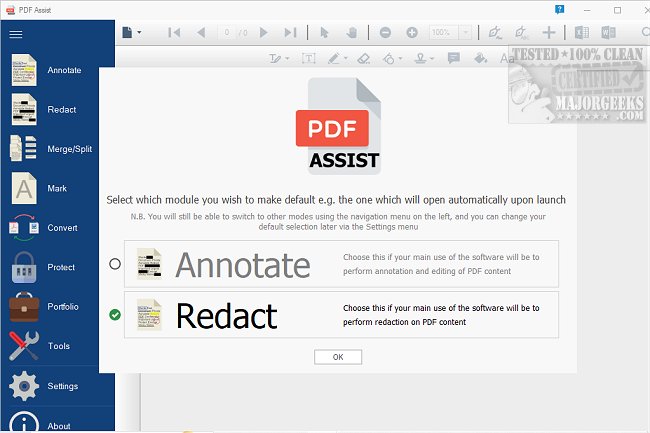
PDF Assist 3.0 is a robust and versatile tool designed for managing various tasks related to PDF files. This software streamlines the process of securely redacting sensitive information, automatically identifying and removing common data types such as National Insurance numbers, UTR tax references, phone numbers, and dates. Unlike other tools that merely mask sensitive information, PDF Assist ensures that the selected content is completely removed.
The user interface of PDF Assist is organized and intuitive, with features easily accessible from a left-side menu, allowing for a smooth and efficient user experience.
Key Features:
1. Annotation Tools: Users can enhance their PDF documents with a variety of annotation options including highlighting, underlining, strikethroughs, and squiggly text markup. Additional capabilities allow for freehand drawing and the addition of shapes, text callouts, stamps, sticky notes, and both text and ink signatures.
2. Merge and Split Functionality: PDF Assist excels in managing document organization by offering simple methods to split and merge PDF files. This functionality is beneficial for users needing to separate pages from longer documents or consolidate multiple PDFs into a single file, all while maintaining a user-friendly experience.
3. Form Filling: The tool provides automated updates without requiring administrative privileges, with options to manage updates on a per-machine basis. This ensures a streamlined update process while adhering to company policies regarding system management.
4. PDF Protection: Security features include the ability to encrypt and password-protect PDF files, giving users control over access, printing, and modifications. Existing protected PDFs can also be easily modified to remove restrictions for accessibility.
5. Watermarking: To enhance professionalism, users can add personalized or pre-existing watermarks to their documents, which serves both as a branding tool and a security feature.
Overall, PDF Assist 3.0 offers a comprehensive suite of features that make it an excellent choice for individuals and businesses that handle numerous PDF documents. Although it is not free, the perpetual license is a valuable investment for efficient PDF management.
Future Enhancements: Looking ahead, potential improvements could include advanced collaboration tools for team editing, integration with cloud storage services for easier accessibility, and enhanced AI capabilities for smarter document analysis and organization. Additionally, expanding the compatibility with other document formats may further broaden its usability and appeal to a wider audience
The user interface of PDF Assist is organized and intuitive, with features easily accessible from a left-side menu, allowing for a smooth and efficient user experience.
Key Features:
1. Annotation Tools: Users can enhance their PDF documents with a variety of annotation options including highlighting, underlining, strikethroughs, and squiggly text markup. Additional capabilities allow for freehand drawing and the addition of shapes, text callouts, stamps, sticky notes, and both text and ink signatures.
2. Merge and Split Functionality: PDF Assist excels in managing document organization by offering simple methods to split and merge PDF files. This functionality is beneficial for users needing to separate pages from longer documents or consolidate multiple PDFs into a single file, all while maintaining a user-friendly experience.
3. Form Filling: The tool provides automated updates without requiring administrative privileges, with options to manage updates on a per-machine basis. This ensures a streamlined update process while adhering to company policies regarding system management.
4. PDF Protection: Security features include the ability to encrypt and password-protect PDF files, giving users control over access, printing, and modifications. Existing protected PDFs can also be easily modified to remove restrictions for accessibility.
5. Watermarking: To enhance professionalism, users can add personalized or pre-existing watermarks to their documents, which serves both as a branding tool and a security feature.
Overall, PDF Assist 3.0 offers a comprehensive suite of features that make it an excellent choice for individuals and businesses that handle numerous PDF documents. Although it is not free, the perpetual license is a valuable investment for efficient PDF management.
Future Enhancements: Looking ahead, potential improvements could include advanced collaboration tools for team editing, integration with cloud storage services for easier accessibility, and enhanced AI capabilities for smarter document analysis and organization. Additionally, expanding the compatibility with other document formats may further broaden its usability and appeal to a wider audience
PDF Assist 3.0 released
PDF Assist is a comprehensive PDF tool that enables you to perform various tasks on your PDF files.