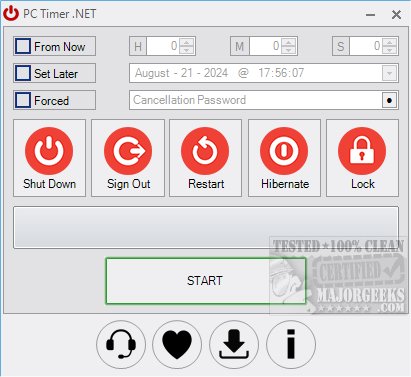
PC Timer .NET Edition has just released version 19.5, a user-friendly and portable tool designed for scheduling various PC shutdown operations. With this application, users can easily set their computers to shut down, sign out, restart, or lock at designated times, all without the need for command line commands. The software features a password option for cancellation, ensuring that scheduled tasks proceed without interruption.
Using PC Timer .NET Edition is straightforward: users select their desired action, specify the time for execution, set a password if desired, and simply click 'start' to activate the timer. Its intuitive interface and ease of use make it an excellent solution for anyone looking to manage their PC's power operations efficiently.
Moreover, this new version continues to support various functionalities that enhance user experience. It stands out among similar tools by prioritizing simplicity and reliability for scheduling needs.
In addition to PC Timer .NET Edition, users may also find value in exploring a variety of related topics, such as different methods for restarting or shutting down Windows 10 and 11, understanding boot types (fast startup, full shutdown, or hibernate), and creating shortcuts for startup applications. Overall, this release positions PC Timer .NET Edition as a practical tool for those seeking to optimize their computer management tasks.
Looking ahead, future updates could potentially include enhancements such as more customizable scheduling options, integration with other software for better automation, and improved user interface features to further streamline the user experience
Using PC Timer .NET Edition is straightforward: users select their desired action, specify the time for execution, set a password if desired, and simply click 'start' to activate the timer. Its intuitive interface and ease of use make it an excellent solution for anyone looking to manage their PC's power operations efficiently.
Moreover, this new version continues to support various functionalities that enhance user experience. It stands out among similar tools by prioritizing simplicity and reliability for scheduling needs.
In addition to PC Timer .NET Edition, users may also find value in exploring a variety of related topics, such as different methods for restarting or shutting down Windows 10 and 11, understanding boot types (fast startup, full shutdown, or hibernate), and creating shortcuts for startup applications. Overall, this release positions PC Timer .NET Edition as a practical tool for those seeking to optimize their computer management tasks.
Looking ahead, future updates could potentially include enhancements such as more customizable scheduling options, integration with other software for better automation, and improved user interface features to further streamline the user experience
PC Timer .NET Edition 19.5 released
PC Timer .NET Edition is a portable tool that allows scheduled PC shutdown operations from an efficient interface.