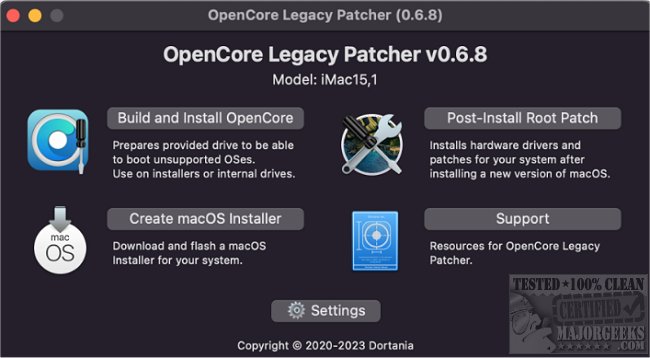
OpenCore Legacy Patcher (OCLP) has recently released version 2.5.0, allowing users to install macOS Big Sur and newer versions on older Macs dating back to 2007, even those that are unsupported by Apple. This tool is particularly useful for running macOS Monterey on 2012 MacBook Pros and earlier models. It serves as a workaround for the limitations imposed by Apple, which ceases to sign updates for machines older than approximately eight years. OCLP achieves this by using a custom EFI loader that simulates a newer Mac, thereby bypassing the firmware checks that would typically prevent the installation.
To use OpenCore Legacy Patcher, users need a USB flash drive of at least 16 GB, formatted as Mac OS Extended (Journaled) with a GUID partition map, along with the official macOS Monterey installer obtained from the App Store. The process involves utilizing OCLP to create a bootable installer, applying the necessary patches, and troubleshooting common issues.
The step-by-step process begins with launching the OCLP application and selecting the Monterey app and the USB drive to create the installer. The patcher will run the necessary commands to copy the files to the USB drive while ensuring a proper GUID layout. Users are prompted to select patches for legacy Macs, allowing OCLP to add essential kernel extensions that emulate hardware missing from older Macs. After creating the installer, users must install OpenCore onto the USB, which includes generating a configuration file that specifies the quirks necessary for installation.
Upon rebooting the Mac and selecting the OpenCore entry from the boot menu, users can proceed with the installation of macOS Monterey. After the system is operational, users are advised to run OCLP again to apply post-install patches that enhance graphics, Wi-Fi, and audio functionality.
However, users may encounter challenges such as USB recognition issues, kernel panics due to unsupported GPUs, or Wi-Fi connectivity problems, which can usually be resolved with specific configurations or additional extensions.
Overall, OpenCore Legacy Patcher is a valuable tool for tech-savvy users who wish to keep their older Macs functional with modern operating systems, despite the complexities involved. While it may not revive every feature of legacy hardware, it provides a means to run a current OS with continued security updates. For those primarily seeking a new operating system experience, lightweight Linux distributions might offer a simpler alternative without the intricacies associated with OCLP.
In conclusion, OCLP 2.5.0 opens up new possibilities for older Mac users, allowing them to extend the life of their devices while engaging with modern macOS features. Users are encouraged to back up their data and explore this option, enjoying the satisfaction of circumventing Apple's hardware restrictions
To use OpenCore Legacy Patcher, users need a USB flash drive of at least 16 GB, formatted as Mac OS Extended (Journaled) with a GUID partition map, along with the official macOS Monterey installer obtained from the App Store. The process involves utilizing OCLP to create a bootable installer, applying the necessary patches, and troubleshooting common issues.
The step-by-step process begins with launching the OCLP application and selecting the Monterey app and the USB drive to create the installer. The patcher will run the necessary commands to copy the files to the USB drive while ensuring a proper GUID layout. Users are prompted to select patches for legacy Macs, allowing OCLP to add essential kernel extensions that emulate hardware missing from older Macs. After creating the installer, users must install OpenCore onto the USB, which includes generating a configuration file that specifies the quirks necessary for installation.
Upon rebooting the Mac and selecting the OpenCore entry from the boot menu, users can proceed with the installation of macOS Monterey. After the system is operational, users are advised to run OCLP again to apply post-install patches that enhance graphics, Wi-Fi, and audio functionality.
However, users may encounter challenges such as USB recognition issues, kernel panics due to unsupported GPUs, or Wi-Fi connectivity problems, which can usually be resolved with specific configurations or additional extensions.
Overall, OpenCore Legacy Patcher is a valuable tool for tech-savvy users who wish to keep their older Macs functional with modern operating systems, despite the complexities involved. While it may not revive every feature of legacy hardware, it provides a means to run a current OS with continued security updates. For those primarily seeking a new operating system experience, lightweight Linux distributions might offer a simpler alternative without the intricacies associated with OCLP.
In conclusion, OCLP 2.5.0 opens up new possibilities for older Mac users, allowing them to extend the life of their devices while engaging with modern macOS features. Users are encouraged to back up their data and explore this option, enjoying the satisfaction of circumventing Apple's hardware restrictions
OpenCore Legacy Patcher 2.5.0 released
OpenCore Legacy Patcher enables macOS Big Sur and newer versions to be installed on Macs as old as 2007, even if they are no longer supported by Apple.