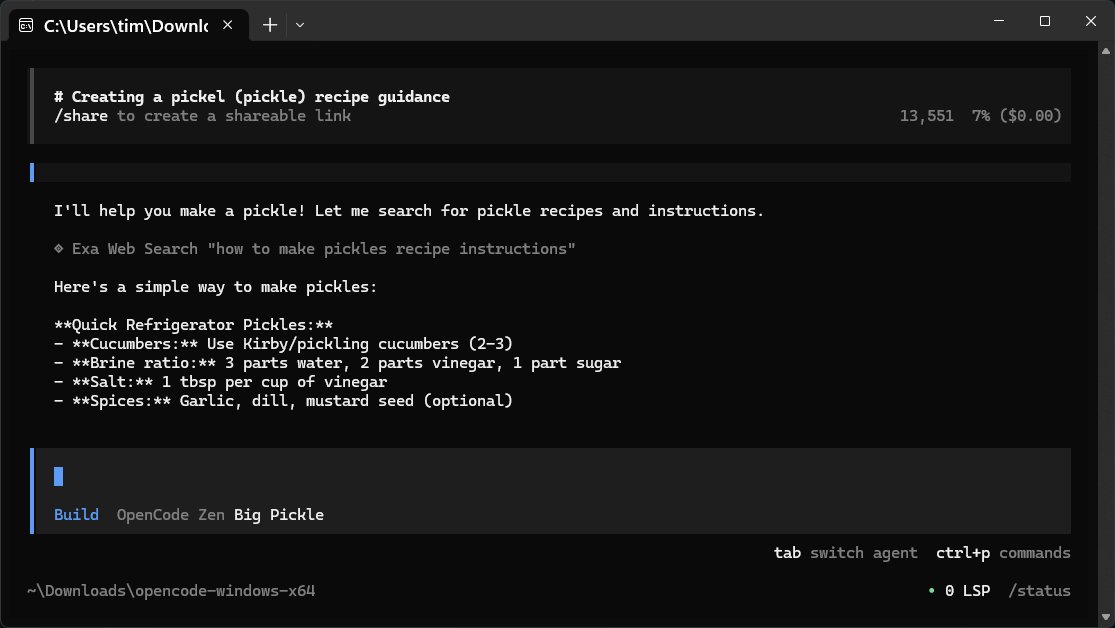
OpenCode is a free, open-source AI assistant designed to run directly on your computer, helping developers with coding tasks such as writing code, debugging, and understanding project files. It functions as a command-line companion that interprets your instructions in plain English, handling the technical complexities behind the scenes. This tool supports multiple programming languages and operates solely on your system, ensuring privacy for work projects.
Key Features of OpenCode:
- User-Friendly: OpenCode is efficient and straightforward to use, without the need for complex setup processes typical of many AI tools.
- Open Source: As an open-source product, it allows users to customize and adapt it according to their needs.
- Compatibility: It works well with a variety of coding languages and IDEs, allowing for flexibility in the development environment.
- Local Operation: Since it operates locally, there are no concerns regarding data privacy and security associated with cloud-based services.
OpenCode is particularly appealing because it circumvents the usual limitations of AI tools that often require user accounts, cloud syncing, and subscription fees. Users can simply download the software, unzip it, and start coding.
How OpenCode Operates:
The program does not come with its own large language model (LLM) or built-in knowledge base, but instead, connects to online repositories as needed. This design keeps the application lightweight and requires an internet connection to function. Users are encouraged to refer to the manual and documentation to maximize their experience.
Integrating Different LLMs:
OpenCode allows users to connect with over 75 different LLMs, including popular options like OpenAI and Anthropic, through LM Studio or Ollama. Users can easily switch between models based on their requirements, ensuring they have access to the most suitable tool for the task at hand.
Tips for Effective Use:
1. Secure your API keys and treat them like sensitive information.
2. Configure multiple providers for varied tasks, from quick queries to in-depth analysis.
3. Take advantage of the export feature for saving sessions, as OpenCode does not save them automatically.
4. Use the built-in export function for quick content retrieval instead of relying on traditional copy-paste methods.
Local Integration:
OpenCode seamlessly integrates with local models like LM Studio, which enables users to maintain their data and operations entirely within their own systems. This flexibility allows developers to choose between cloud-based or locally hosted models based on their preferences.
Conclusion:
OpenCode stands out as a fast, flexible coding assistant that empowers developers while keeping control over their coding environment. While some users may crave a more sophisticated GUI or require additional computational power, the tool remains highly effective for those comfortable with command-line interfaces. For any issues, the MajorGeeks forums provide a supportive community for users seeking assistance.
In summary, OpenCode 1.1.60 is an innovative tool for developers looking for a no-frills, efficient coding assistant that prioritizes privacy, speed, and versatility
Key Features of OpenCode:
- User-Friendly: OpenCode is efficient and straightforward to use, without the need for complex setup processes typical of many AI tools.
- Open Source: As an open-source product, it allows users to customize and adapt it according to their needs.
- Compatibility: It works well with a variety of coding languages and IDEs, allowing for flexibility in the development environment.
- Local Operation: Since it operates locally, there are no concerns regarding data privacy and security associated with cloud-based services.
OpenCode is particularly appealing because it circumvents the usual limitations of AI tools that often require user accounts, cloud syncing, and subscription fees. Users can simply download the software, unzip it, and start coding.
How OpenCode Operates:
The program does not come with its own large language model (LLM) or built-in knowledge base, but instead, connects to online repositories as needed. This design keeps the application lightweight and requires an internet connection to function. Users are encouraged to refer to the manual and documentation to maximize their experience.
Integrating Different LLMs:
OpenCode allows users to connect with over 75 different LLMs, including popular options like OpenAI and Anthropic, through LM Studio or Ollama. Users can easily switch between models based on their requirements, ensuring they have access to the most suitable tool for the task at hand.
Tips for Effective Use:
1. Secure your API keys and treat them like sensitive information.
2. Configure multiple providers for varied tasks, from quick queries to in-depth analysis.
3. Take advantage of the export feature for saving sessions, as OpenCode does not save them automatically.
4. Use the built-in export function for quick content retrieval instead of relying on traditional copy-paste methods.
Local Integration:
OpenCode seamlessly integrates with local models like LM Studio, which enables users to maintain their data and operations entirely within their own systems. This flexibility allows developers to choose between cloud-based or locally hosted models based on their preferences.
Conclusion:
OpenCode stands out as a fast, flexible coding assistant that empowers developers while keeping control over their coding environment. While some users may crave a more sophisticated GUI or require additional computational power, the tool remains highly effective for those comfortable with command-line interfaces. For any issues, the MajorGeeks forums provide a supportive community for users seeking assistance.
In summary, OpenCode 1.1.60 is an innovative tool for developers looking for a no-frills, efficient coding assistant that prioritizes privacy, speed, and versatility
OpenCode 1.1.60 released
OpenCode is a free, Open Source AI assistant that runs on your computer and helps you write code, fix bugs, and understand what your files are doing.