The Oobabooga Text Generation Web UI has recently released version 4.9, offering users a locally hosted and customizable interface for working with large language models (LLMs). This web UI is ideal for those who want to have a ChatGPT-style environment without the concerns of cloud data privacy. Utilizing Gradio, a Python library for creating web-based interfaces, Oobabooga enables users to control prompts, select models, and generate text in a straightforward chat-like format.
Key features of Oobabooga include the ability to run models locally without an internet connection, switch between various backend models seamlessly, fine-tune models with LoRA support, and utilize OpenAI-compatible APIs. Users can enhance their experience with built-in extensions that cater to multimodal tasks and streaming capabilities. Notably, Oobabooga allows users to save chat histories, tweak generation settings, and access a range of models from platforms like Hugging Face.
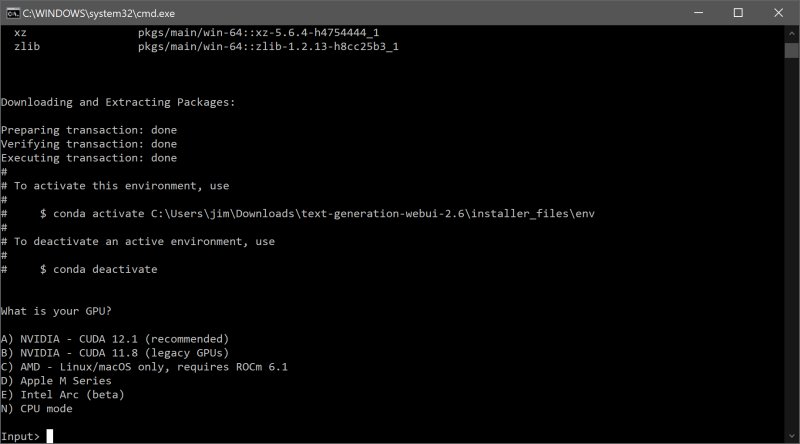
Installation is user-friendly but does require some technical knowledge. Users must ensure they have sufficient disk space, as the installation can grow significantly beyond the initial 28MB download. After unzipping the program, users select the appropriate file for their operating system and specify their GPU vendor. Once setup is complete, the web interface is accessible via a local URL.
To run a model, users can download models from repositories like Hugging Face either manually or through a built-in script. Models must be placed in the designated folder for the app to recognize and utilize them. Recommendations for models include Mistral 7B for those with robust hardware and Tiny Llama for users with less powerful systems.
Pros of using Oobabooga include its local and private environment, support for multiple backends and extensions, and the flexibility to swap models easily. However, it may require significant system resources and has a learning curve for setup, with some extensions needing additional installations.
Overall, Oobabooga Text Generation Web UI serves as an excellent tool for AI enthusiasts, researchers, and developers interested in experimenting with LLMs without relying on cloud services. It fosters a personalized AI exploration environment on users' machines, making it a valuable asset for anyone engaged in AI-related projects.
Extension:
As the landscape of AI technologies continues to evolve, tools like Oobabooga are becoming increasingly important for researchers and developers who prioritize data privacy and control over their AI experiments. With advancements in LLMs and their applications across various fields, the demand for localized solutions is likely to grow. This trend may motivate the development of more user-friendly interfaces and enhanced functionalities that cater to a broader audience, including those with limited technical backgrounds.
Additionally, the importance of community support and documentation cannot be overstated. As more users adopt tools like Oobabooga, the creation of comprehensive tutorials, forums, and user guides will help facilitate smoother onboarding experiences. Furthermore, the integration of collaborative features could promote knowledge sharing among users, leading to the development of innovative applications and use cases for LLMs.
Looking ahead, the impact of Oobabooga and similar platforms could extend beyond individual use, potentially influencing educational institutions and businesses to adopt LLMs for training, content creation, and customer engagement. As AI technology democratizes, tools that enable local experimentation and customization will play a vital role in shaping the future of AI development and application
Key features of Oobabooga include the ability to run models locally without an internet connection, switch between various backend models seamlessly, fine-tune models with LoRA support, and utilize OpenAI-compatible APIs. Users can enhance their experience with built-in extensions that cater to multimodal tasks and streaming capabilities. Notably, Oobabooga allows users to save chat histories, tweak generation settings, and access a range of models from platforms like Hugging Face.
Installation is user-friendly but does require some technical knowledge. Users must ensure they have sufficient disk space, as the installation can grow significantly beyond the initial 28MB download. After unzipping the program, users select the appropriate file for their operating system and specify their GPU vendor. Once setup is complete, the web interface is accessible via a local URL.
To run a model, users can download models from repositories like Hugging Face either manually or through a built-in script. Models must be placed in the designated folder for the app to recognize and utilize them. Recommendations for models include Mistral 7B for those with robust hardware and Tiny Llama for users with less powerful systems.
Pros of using Oobabooga include its local and private environment, support for multiple backends and extensions, and the flexibility to swap models easily. However, it may require significant system resources and has a learning curve for setup, with some extensions needing additional installations.
Overall, Oobabooga Text Generation Web UI serves as an excellent tool for AI enthusiasts, researchers, and developers interested in experimenting with LLMs without relying on cloud services. It fosters a personalized AI exploration environment on users' machines, making it a valuable asset for anyone engaged in AI-related projects.
Extension:
As the landscape of AI technologies continues to evolve, tools like Oobabooga are becoming increasingly important for researchers and developers who prioritize data privacy and control over their AI experiments. With advancements in LLMs and their applications across various fields, the demand for localized solutions is likely to grow. This trend may motivate the development of more user-friendly interfaces and enhanced functionalities that cater to a broader audience, including those with limited technical backgrounds.
Additionally, the importance of community support and documentation cannot be overstated. As more users adopt tools like Oobabooga, the creation of comprehensive tutorials, forums, and user guides will help facilitate smoother onboarding experiences. Furthermore, the integration of collaborative features could promote knowledge sharing among users, leading to the development of innovative applications and use cases for LLMs.
Looking ahead, the impact of Oobabooga and similar platforms could extend beyond individual use, potentially influencing educational institutions and businesses to adopt LLMs for training, content creation, and customer engagement. As AI technology democratizes, tools that enable local experimentation and customization will play a vital role in shaping the future of AI development and application
Oobabooga Text Generation Web UI 4.9 released
Oobabooga Text Generation Web UI is a locally hosted, customizable interface designed for working with large language models (LLMs).