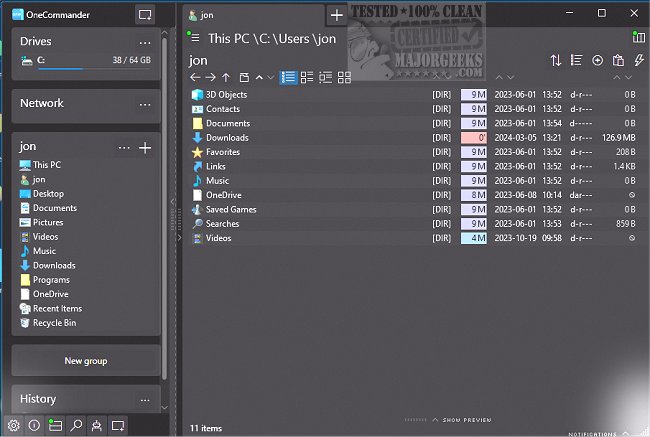
OneCommander 3.107.2.0 has been launched, presenting a highly advanced and intuitive file management tool designed for Windows 10 and 11. This software offers a modern interface, allowing users to efficiently navigate, copy, move, delete, rename files, and execute batch operations. Key features include support for multiple tabs, dual-pane browsing, a built-in terminal emulator, and enhanced search functionalities, catering especially to power users and professionals.
The program is not a UWP app, utilizing DirectX for improved performance and supports long Unicode path names, overcoming the standard Windows limitation. OneCommander also facilitates file organization through project groups, dynamic columns for metadata, and the ability to save named windows for easy access to layouts and tabs. Users can even create to-do tasks and notes within folders, and customize the interface with user-editable themes and icons.
Extension of OneCommander Features and Benefits
In addition to its existing features, OneCommander is continuously evolving to enhance user experience. Future updates may include integration with cloud storage services, enabling seamless file management across multiple devices. This would allow users to access their files from anywhere, while maintaining the same organizational structure they use on their local machines.
Moreover, the addition of AI-driven functionalities could further streamline workflows, such as automated file sorting based on user-defined criteria or predictive text features that assist with file naming. Enhanced collaboration tools could also be introduced, allowing users to easily share files or folders with colleagues while maintaining control over permissions and access.
As the digital landscape continues to grow, OneCommander is poised to adapt, ensuring that it remains a reliable and powerful file management solution. With its user-friendly design and comprehensive feature set, it not only enhances productivity but also provides a customizable environment that evolves with user needs. Whether you are a casual user or a professional, OneCommander is equipped to handle diverse file management requirements, making it an invaluable addition to any Windows setup
The program is not a UWP app, utilizing DirectX for improved performance and supports long Unicode path names, overcoming the standard Windows limitation. OneCommander also facilitates file organization through project groups, dynamic columns for metadata, and the ability to save named windows for easy access to layouts and tabs. Users can even create to-do tasks and notes within folders, and customize the interface with user-editable themes and icons.
Extension of OneCommander Features and Benefits
In addition to its existing features, OneCommander is continuously evolving to enhance user experience. Future updates may include integration with cloud storage services, enabling seamless file management across multiple devices. This would allow users to access their files from anywhere, while maintaining the same organizational structure they use on their local machines.
Moreover, the addition of AI-driven functionalities could further streamline workflows, such as automated file sorting based on user-defined criteria or predictive text features that assist with file naming. Enhanced collaboration tools could also be introduced, allowing users to easily share files or folders with colleagues while maintaining control over permissions and access.
As the digital landscape continues to grow, OneCommander is poised to adapt, ensuring that it remains a reliable and powerful file management solution. With its user-friendly design and comprehensive feature set, it not only enhances productivity but also provides a customizable environment that evolves with user needs. Whether you are a casual user or a professional, OneCommander is equipped to handle diverse file management requirements, making it an invaluable addition to any Windows setup
OneCommander 3.107.2.0 released
OneCommander lets you access a highly advanced and sophisticated file management tool that offers a modern and intuitive user interface.