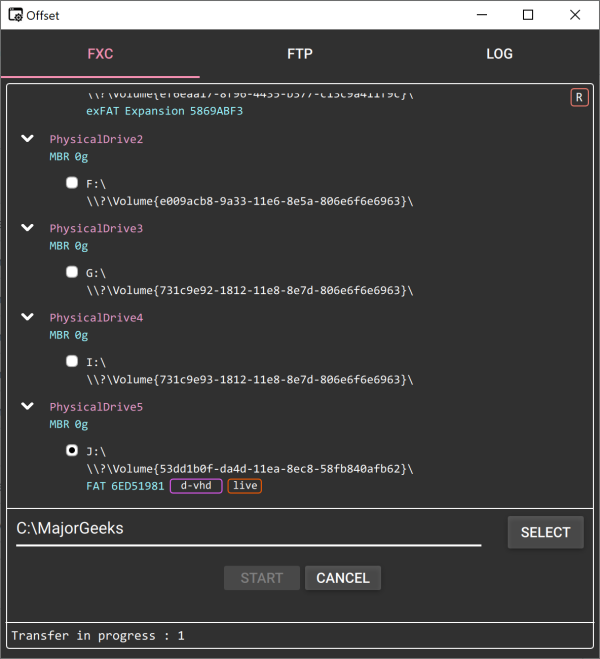
Offset 2.3 has been released, offering users a portable volume image backup tool specifically designed for Windows operating systems. This tool allows users to create a complete replica, or volume image, of all files, folders, and disk volumes on their computer. The volume image includes vital system configurations, applications, settings, and all associated data, making it possible to restore the entire system to its original state, inclusive of installed programs and their configurations.
While the volume image backup method provides a comprehensive safety net for system protection, it does come with notable limitations. One major drawback is the inability to restore individual files or programs; restoration can only be performed on the entire volume image. Additionally, larger systems may require substantial storage space for their volume images.
Offset’s user-friendly, minimalistic interface allows for quick and easy backup creation, either to a local drive or via FTP servers for secure offsite storage. As a portable application, users can simply unzip the software and run it from their chosen location. To initiate a backup, users select the desired volume and ensure the backup destination has adequate space.
It's worth noting that Offset does not include a built-in restore function, as the backups are stored as virtual disks. Users can, however, access their backup files by mounting them or utilizing virtualization software like Virtual PC or Hyper-V, or by extracting files using tools such as 7-Zip. Offset supports both MBR and GPT partitions, along with various virtual disk formats including d-vhd, f-vhd, d-vhdx, and raw formats.
In conclusion, while Offset 2.3 offers a robust solution for comprehensive system backups, users should be aware of its limitations regarding file restoration and storage requirements. It serves well for those looking to maintain a complete backup of their operating system and data, ensuring peace of mind against data loss. For users interested in more targeted backup solutions, additional tools may be necessary to complement Offset's capabilities
While the volume image backup method provides a comprehensive safety net for system protection, it does come with notable limitations. One major drawback is the inability to restore individual files or programs; restoration can only be performed on the entire volume image. Additionally, larger systems may require substantial storage space for their volume images.
Offset’s user-friendly, minimalistic interface allows for quick and easy backup creation, either to a local drive or via FTP servers for secure offsite storage. As a portable application, users can simply unzip the software and run it from their chosen location. To initiate a backup, users select the desired volume and ensure the backup destination has adequate space.
It's worth noting that Offset does not include a built-in restore function, as the backups are stored as virtual disks. Users can, however, access their backup files by mounting them or utilizing virtualization software like Virtual PC or Hyper-V, or by extracting files using tools such as 7-Zip. Offset supports both MBR and GPT partitions, along with various virtual disk formats including d-vhd, f-vhd, d-vhdx, and raw formats.
In conclusion, while Offset 2.3 offers a robust solution for comprehensive system backups, users should be aware of its limitations regarding file restoration and storage requirements. It serves well for those looking to maintain a complete backup of their operating system and data, ensuring peace of mind against data loss. For users interested in more targeted backup solutions, additional tools may be necessary to complement Offset's capabilities
Offset 2.3 released
Offset is a portable volume image backup tool for Windows.