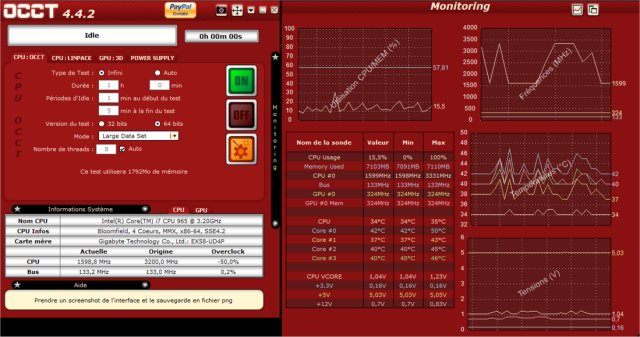
The latest version of OCCT (OverClock Checking Tool) 16.1.7 is now available, offering users a comprehensive suite to benchmark, overclock, and monitor their PC components effectively. Tailored for overclockers, system builders, and hardware enthusiasts, OCCT serves as an essential utility that ensures your PC operates reliably under stress.
Key Features of OCCT:
1. Stress Testing: OCCT conducts rigorous stress tests on your CPU, GPU, RAM, and power supply, ensuring they can withstand maximum loads.
2. Hardware Monitoring: The tool provides real-time insights into temperatures, voltages, and power consumption, helping identify potential overheating or instability issues.
3. Power Supply Testing: Simulates extreme loads to evaluate the PSU’s performance and longevity.
4. Benchmarking: Allows users to assess performance enhancements following hardware upgrades.
5. Error Detection: Identifies faulty components through targeted stress tests that highlight system instability.
Practical Applications:
- Troubleshooting Crashes: Helps diagnose the cause of random system crashes and freezes.
- New Builds Verification: Ensures newly built PCs are stable before daily use.
- Overheating Diagnosis: Pinpoints components responsible for excessive heat.
- Power Supply Stability Check: Assesses whether the PSU can support peak demands.
- Post-BIOS Update Stability: Validates stability after BIOS modifications that affect voltages and timings.
- Laptop Cooling Efficiency: Tests the effectiveness of laptop cooling systems.
- Performance Benchmarking: Compares system performance pre- and post-upgrade.
- Workstation Stress Testing: Ideal for professionals in video editing, 3D rendering, and game development.
- Preventative Maintenance: Regular tests can reveal aging components before they fail.
- Undervolting Stability Test: Confirms system reliability under reduced voltage conditions.
Pros and Cons:
Pros:
- Comprehensive stress testing for various components.
- Real-time monitoring with detailed graphs.
- Useful for both overclocking and stability troubleshooting.
- Free version available with essential functionalities.
Cons:
- Some advanced features require a paid version.
- Can stress hardware to extreme levels; caution is advised.
- May not be as user-friendly for beginners compared to other tools.
Conclusion:
For anyone dedicated to ensuring the stability and performance of their system, OCCT is an invaluable tool. It functions like a virtual personal trainer for your PC, pushing it to its limits and providing essential feedback for improvement. Whether you are an avid overclocker or simply want a dependable machine, OCCT is the tool to download and put your system to the ultimate test.
Future Extensions:
Moving forward, OCCT could enhance its user interface to be more beginner-friendly, integrate AI-driven diagnostics for smarter troubleshooting, and expand its benchmarking capabilities to keep up with evolving hardware trends. Users also might benefit from community-driven forums or support channels for sharing results and advice on optimization techniques
Key Features of OCCT:
1. Stress Testing: OCCT conducts rigorous stress tests on your CPU, GPU, RAM, and power supply, ensuring they can withstand maximum loads.
2. Hardware Monitoring: The tool provides real-time insights into temperatures, voltages, and power consumption, helping identify potential overheating or instability issues.
3. Power Supply Testing: Simulates extreme loads to evaluate the PSU’s performance and longevity.
4. Benchmarking: Allows users to assess performance enhancements following hardware upgrades.
5. Error Detection: Identifies faulty components through targeted stress tests that highlight system instability.
Practical Applications:
- Troubleshooting Crashes: Helps diagnose the cause of random system crashes and freezes.
- New Builds Verification: Ensures newly built PCs are stable before daily use.
- Overheating Diagnosis: Pinpoints components responsible for excessive heat.
- Power Supply Stability Check: Assesses whether the PSU can support peak demands.
- Post-BIOS Update Stability: Validates stability after BIOS modifications that affect voltages and timings.
- Laptop Cooling Efficiency: Tests the effectiveness of laptop cooling systems.
- Performance Benchmarking: Compares system performance pre- and post-upgrade.
- Workstation Stress Testing: Ideal for professionals in video editing, 3D rendering, and game development.
- Preventative Maintenance: Regular tests can reveal aging components before they fail.
- Undervolting Stability Test: Confirms system reliability under reduced voltage conditions.
Pros and Cons:
Pros:
- Comprehensive stress testing for various components.
- Real-time monitoring with detailed graphs.
- Useful for both overclocking and stability troubleshooting.
- Free version available with essential functionalities.
Cons:
- Some advanced features require a paid version.
- Can stress hardware to extreme levels; caution is advised.
- May not be as user-friendly for beginners compared to other tools.
Conclusion:
For anyone dedicated to ensuring the stability and performance of their system, OCCT is an invaluable tool. It functions like a virtual personal trainer for your PC, pushing it to its limits and providing essential feedback for improvement. Whether you are an avid overclocker or simply want a dependable machine, OCCT is the tool to download and put your system to the ultimate test.
Future Extensions:
Moving forward, OCCT could enhance its user interface to be more beginner-friendly, integrate AI-driven diagnostics for smarter troubleshooting, and expand its benchmarking capabilities to keep up with evolving hardware trends. Users also might benefit from community-driven forums or support channels for sharing results and advice on optimization techniques
OCCT 16.1.7 released
OCCT (OverClock Checking Tool) will let you benchmark, overclock, and monitor your system components.