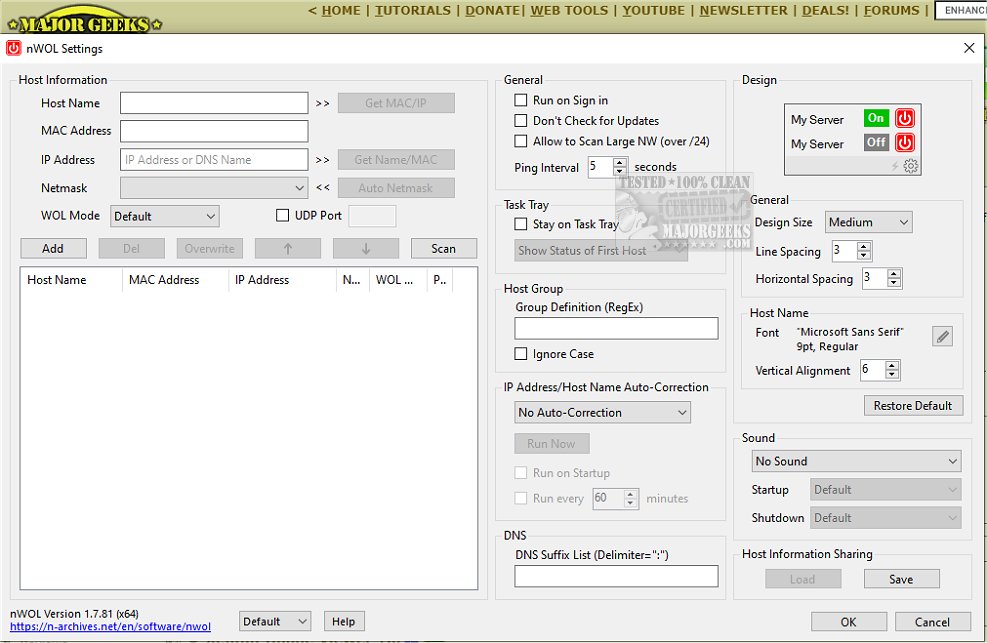
The recent release of nWOL versions 2.1.91 and 1.7.81 enhances the functionality of the Wake on LAN (WOL) feature, allowing users to remotely power on computers through an efficient and user-friendly interface. Wake on LAN is a technology that permits remote booting of computers from a low-power state, enabling access to files or applications without physical presence at the machine. It works by sending a specially crafted network message, known as a magic packet, to the target device.
nWOL is specifically designed as a WOL client, offering a range of specialized tools to meet diverse user needs. Its streamlined interface allows for easy customization of host information, including hostname, MAC and IP addresses, netmask, and preferred WOL mode. Users can also perform manual scans of all hosts within their active local area network (LAN), providing a comprehensive overview of connected devices.
Among its notable features, nWOL includes:
- A straightforward user interface for intuitive operation.
- Rapid scanning capabilities to discover MAC addresses, IP addresses, and host names quickly.
- Automatic detection of IP address changes, eliminating the need for fixed IP assignments.
- The ability to send magic packets to remote hosts beyond a router.
- Support for DNS and Dynamic DNS.
- Real-time monitoring of remote host statuses, with updates visible in the task tray.
- Sound notifications for host startup and shutdown events.
- Customizable design options for the main window, including font and layout adjustments.
- Display of elapsed time since the magic packet was sent.
- Support for custom destination UDP port numbers for magic packets.
- A command-line application, "nWOLc.exe," for advanced users to execute commands through the command prompt or batch files.
Overall, nWOL empowers users to turn on their computers from anywhere, providing a wealth of robust functions while maintaining an intuitive interface. It is especially beneficial for remote management and energy efficiency, ensuring that devices remain inactive when not in use.
To extend the discussion, users may also benefit from exploring related topics such as enabling or disabling Wake on LAN in Windows 10 and 11, creating WLAN reports, resetting network settings, or resetting TCP/IP. These topics can help users maximize their network management capabilities and ensure optimal performance while using remote access technologies like nWOL
nWOL is specifically designed as a WOL client, offering a range of specialized tools to meet diverse user needs. Its streamlined interface allows for easy customization of host information, including hostname, MAC and IP addresses, netmask, and preferred WOL mode. Users can also perform manual scans of all hosts within their active local area network (LAN), providing a comprehensive overview of connected devices.
Among its notable features, nWOL includes:
- A straightforward user interface for intuitive operation.
- Rapid scanning capabilities to discover MAC addresses, IP addresses, and host names quickly.
- Automatic detection of IP address changes, eliminating the need for fixed IP assignments.
- The ability to send magic packets to remote hosts beyond a router.
- Support for DNS and Dynamic DNS.
- Real-time monitoring of remote host statuses, with updates visible in the task tray.
- Sound notifications for host startup and shutdown events.
- Customizable design options for the main window, including font and layout adjustments.
- Display of elapsed time since the magic packet was sent.
- Support for custom destination UDP port numbers for magic packets.
- A command-line application, "nWOLc.exe," for advanced users to execute commands through the command prompt or batch files.
Overall, nWOL empowers users to turn on their computers from anywhere, providing a wealth of robust functions while maintaining an intuitive interface. It is especially beneficial for remote management and energy efficiency, ensuring that devices remain inactive when not in use.
To extend the discussion, users may also benefit from exploring related topics such as enabling or disabling Wake on LAN in Windows 10 and 11, creating WLAN reports, resetting network settings, or resetting TCP/IP. These topics can help users maximize their network management capabilities and ensure optimal performance while using remote access technologies like nWOL
nWOL 2.1.91 / 1.7.81 released
nWOL allows users to remotely power on a computer through the Wake on LAN feature through an efficient interface.