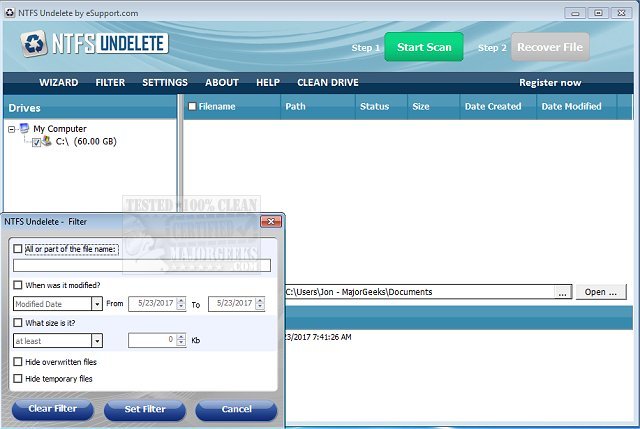
The latest version of NTFS Undelete, 4.0.26.213, has been released, offering users a simple and efficient solution for recovering deleted files. This application allows users to restore files with just a few clicks, making it accessible even for those who may not be tech-savvy. NTFS Undelete is particularly useful for retrieving files that have been deleted from hard drives, even after the Recycle Bin has been emptied. It supports a wide range of file types and is compatible with devices that utilize NTFS or FAT file systems.
In addition to recovering accidentally deleted files, NTFS Undelete is effective in situations where a quick format has been performed on a device. The application works seamlessly with various removable media, such as USB thumb drives and SD cards from digital cameras. It can recover lost files from both internal and external storage options, including IDE/ATA/SCSI hard drives, SSDs, and other digital media devices.
NTFS Undelete employs advanced technologies to ensure successful file recovery, regardless of the complexity of the recovery task. The program features several capabilities, including:
- Compatibility with FAT12, FAT16, FAT32, NTFS, and NTFS5 file systems.
- The ability to list files and images based on various criteria, such as name, path, status, size, and date created or modified.
- A quick and safe scanning process for selected storage devices.
- A preview option for deleted files, images, and plain text documents.
- Enhanced photo recovery through SmartScan technology.
- Fast recovery of lost or deleted files, often within minutes.
Overall, NTFS Undelete is a powerful tool for anyone needing to recover lost data, making it a valuable addition to any user's software toolkit for data management and recovery. Future versions may incorporate additional features, such as improved user interfaces, expanded file format support, and even more robust recovery algorithms to enhance performance and user experience
In addition to recovering accidentally deleted files, NTFS Undelete is effective in situations where a quick format has been performed on a device. The application works seamlessly with various removable media, such as USB thumb drives and SD cards from digital cameras. It can recover lost files from both internal and external storage options, including IDE/ATA/SCSI hard drives, SSDs, and other digital media devices.
NTFS Undelete employs advanced technologies to ensure successful file recovery, regardless of the complexity of the recovery task. The program features several capabilities, including:
- Compatibility with FAT12, FAT16, FAT32, NTFS, and NTFS5 file systems.
- The ability to list files and images based on various criteria, such as name, path, status, size, and date created or modified.
- A quick and safe scanning process for selected storage devices.
- A preview option for deleted files, images, and plain text documents.
- Enhanced photo recovery through SmartScan technology.
- Fast recovery of lost or deleted files, often within minutes.
Overall, NTFS Undelete is a powerful tool for anyone needing to recover lost data, making it a valuable addition to any user's software toolkit for data management and recovery. Future versions may incorporate additional features, such as improved user interfaces, expanded file format support, and even more robust recovery algorithms to enhance performance and user experience
NTFS Undelete 4.0.26.213 released
NTFS Undelete is an application that allows you to undelete files in just a few clicks.