The latest version of Networx, both Pro and Free editions, has been launched, offering users enhanced capabilities to monitor and manage their network connections. Whether you are using an Ethernet connection or a dial-up PPP, Networx provides a comprehensive suite of tools to track bandwidth usage and internet speed.
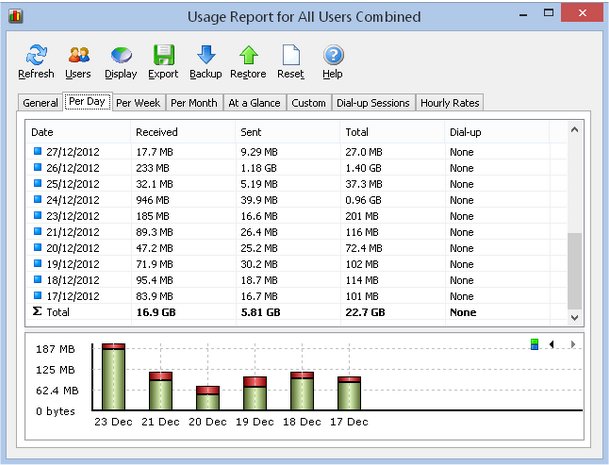
This software is essential for identifying potential network issues, ensuring compliance with ISP bandwidth limits, and monitoring suspicious activities that may indicate cybersecurity threats, such as trojan horses or hacking attempts. The application visualizes incoming and outgoing traffic through detailed line charts and logs data for historical analysis, enabling users to review daily, weekly, and monthly bandwidth usage, as well as dial-up duration statistics. Reports generated can be exported in multiple formats, including HTML, MS Word, and Excel, facilitating further analysis.
Key Features of Networx:
- User-Friendly Interface: Offers clear graphic and numeric displays for easy interpretation.
- Comprehensive Usage Reports: Exportable to various formats for detailed analysis.
- Real-Time Monitoring: Close supervision of upload and download activities.
- Wide Compatibility: Supports a range of connection types including dial-up, ISDN, cable modems, ADSL, and Ethernet cards.
- Network Testing Tools: Advanced net stat display applications to assess internet connection performance.
- User Alerts and Automation: Options to notify users or automatically disconnect from the internet when activity exceeds set thresholds.
- Speed Meter: Accurately measures download times and calculates average transfer rates.
- Detailed Session Tracking: Maintains a journal of dial-up sessions with in-depth information.
- Adware-Free: Networx is free to use and does not contain any adware, spyware, or malware.
In addition to these existing features, future updates of Networx could further enhance user experience by incorporating advanced analytics powered by machine learning, allowing for predictive assessments of network performance and potential issues. Integration with smart home devices could also be a valuable addition, enabling users to monitor and manage their entire network ecosystem from a single interface. As the digital landscape evolves, Networx aims to adapt and provide robust solutions for all network management needs
This software is essential for identifying potential network issues, ensuring compliance with ISP bandwidth limits, and monitoring suspicious activities that may indicate cybersecurity threats, such as trojan horses or hacking attempts. The application visualizes incoming and outgoing traffic through detailed line charts and logs data for historical analysis, enabling users to review daily, weekly, and monthly bandwidth usage, as well as dial-up duration statistics. Reports generated can be exported in multiple formats, including HTML, MS Word, and Excel, facilitating further analysis.
Key Features of Networx:
- User-Friendly Interface: Offers clear graphic and numeric displays for easy interpretation.
- Comprehensive Usage Reports: Exportable to various formats for detailed analysis.
- Real-Time Monitoring: Close supervision of upload and download activities.
- Wide Compatibility: Supports a range of connection types including dial-up, ISDN, cable modems, ADSL, and Ethernet cards.
- Network Testing Tools: Advanced net stat display applications to assess internet connection performance.
- User Alerts and Automation: Options to notify users or automatically disconnect from the internet when activity exceeds set thresholds.
- Speed Meter: Accurately measures download times and calculates average transfer rates.
- Detailed Session Tracking: Maintains a journal of dial-up sessions with in-depth information.
- Adware-Free: Networx is free to use and does not contain any adware, spyware, or malware.
In addition to these existing features, future updates of Networx could further enhance user experience by incorporating advanced analytics powered by machine learning, allowing for predictive assessments of network performance and potential issues. Integration with smart home devices could also be a valuable addition, enabling users to monitor and manage their entire network ecosystem from a single interface. As the digital landscape evolves, Networx aims to adapt and provide robust solutions for all network management needs
Networx 26.5 Pro / 5.5 Free released
Networx allows you to monitor all your network connections or a specific network connection (such as Ethernet or PPP).