MyLanViewer Network/IP Scanner version 6.7.3 has been released, enhancing its capabilities as a comprehensive tool for scanning network and IP addresses. This software is designed to identify IP addresses, MAC addresses, and shared folders of devices on both wired and wireless networks.
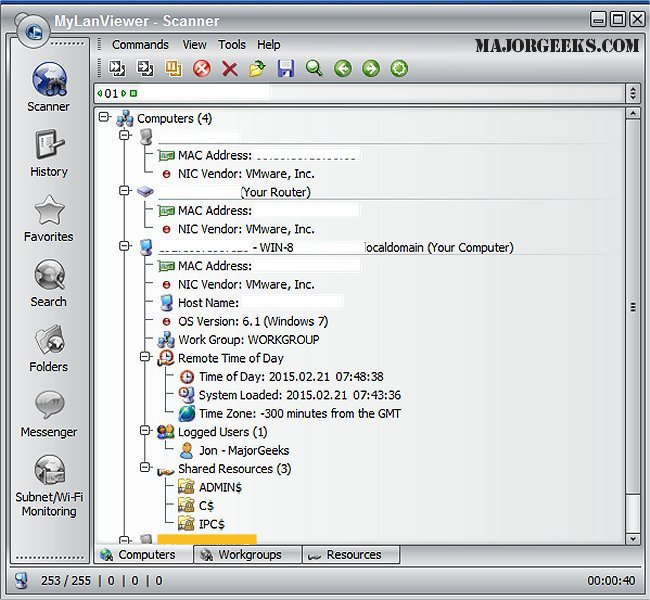
The application presents scanned network devices in a user-friendly interface that resembles a buddy-list, showcasing essential details such as computer names, IP addresses, MAC addresses, network interface card (NIC) vendors, operating system versions, logged-in users, and shared folders.
In addition to these features, MyLanViewer Network/IP Scanner offers several advanced functionalities including remote shutdown, wake-on-LAN capabilities, workstation locking, user log-off, sleep and hibernation options, rebooting, and power-off controls. It also monitors IP addresses, providing notifications when the status of any connected device changes.
Users can access shared folders, manage user sessions, disable shared folders, view netstat information, and detect unauthorized DHCP servers. The tool is capable of monitoring all devices on a subnet, including hidden ones, and alerts users when new devices connect to the network, making it an invaluable resource for network management and security.
The software is noted for its straightforward installation process and aesthetically pleasing interface, making it accessible for both novice and experienced users.
In addition to its core features, users may find it beneficial to explore related topics such as generating WLAN reports in Windows, checking wireless network signal strength, and managing wireless network profiles in Windows operating systems. Overall, MyLanViewer Network/IP Scanner provides a robust solution for network monitoring and management, ensuring users have comprehensive oversight of their network environments
The application presents scanned network devices in a user-friendly interface that resembles a buddy-list, showcasing essential details such as computer names, IP addresses, MAC addresses, network interface card (NIC) vendors, operating system versions, logged-in users, and shared folders.
In addition to these features, MyLanViewer Network/IP Scanner offers several advanced functionalities including remote shutdown, wake-on-LAN capabilities, workstation locking, user log-off, sleep and hibernation options, rebooting, and power-off controls. It also monitors IP addresses, providing notifications when the status of any connected device changes.
Users can access shared folders, manage user sessions, disable shared folders, view netstat information, and detect unauthorized DHCP servers. The tool is capable of monitoring all devices on a subnet, including hidden ones, and alerts users when new devices connect to the network, making it an invaluable resource for network management and security.
The software is noted for its straightforward installation process and aesthetically pleasing interface, making it accessible for both novice and experienced users.
In addition to its core features, users may find it beneficial to explore related topics such as generating WLAN reports in Windows, checking wireless network signal strength, and managing wireless network profiles in Windows operating systems. Overall, MyLanViewer Network/IP Scanner provides a robust solution for network monitoring and management, ensuring users have comprehensive oversight of their network environments
MyLanViewer Network/IP Scanner 6.7.3 released
MyLanViewer Network/IP Scanner is a powerful Netbios and LAN/Network IP address scanner that assists in locating IP addresses, MAC addresses, and shared folders of computers on your wired or wireless (Wi-Fi) network.