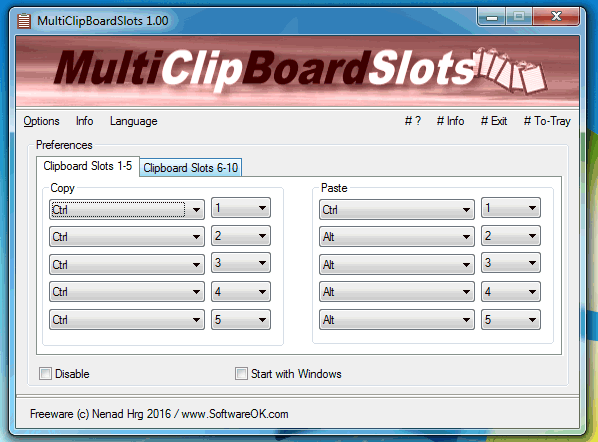
MultiClipBoardSlots 3.61 has been released, enhancing the functionality of the standard Clipboard by allowing users to access up to 10 Clipboard Memory Slots. This portable program enables easy insertion of text, images, and other objects across various applications without the risk of losing previously copied items, as is common with the default Clipboard, which can be overwritten by other programs. Users can utilize predefined keyboard shortcuts for each Clipboard Memory Slot, which can be customized to fit individual preferences.
Key features of MultiClipBoardSlots include its compact size, installation and uninstallation functions, user-friendly interface, customizable keyboard shortcuts, portability, and support for multiple languages.
In addition to its primary functionality, users may find it helpful to learn how to copy the path of a file or folder to the Clipboard, clear their Clipboard history using shortcuts, or disable Clipboard history in Windows 10 and 11. These related topics offer further insight into managing Clipboard operations effectively.
The release of MultiClipBoardSlots 3.61 not only streamlines the process of managing multiple copied items but also enhances productivity for users who frequently switch between different applications. As digital workflows continue to evolve, tools like MultiClipBoardSlots become increasingly valuable for those looking to optimize their efficiency and reduce the time spent on repetitive tasks
Key features of MultiClipBoardSlots include its compact size, installation and uninstallation functions, user-friendly interface, customizable keyboard shortcuts, portability, and support for multiple languages.
In addition to its primary functionality, users may find it helpful to learn how to copy the path of a file or folder to the Clipboard, clear their Clipboard history using shortcuts, or disable Clipboard history in Windows 10 and 11. These related topics offer further insight into managing Clipboard operations effectively.
The release of MultiClipBoardSlots 3.61 not only streamlines the process of managing multiple copied items but also enhances productivity for users who frequently switch between different applications. As digital workflows continue to evolve, tools like MultiClipBoardSlots become increasingly valuable for those looking to optimize their efficiency and reduce the time spent on repetitive tasks
MultiClipBoardSlots 3.61 released
MultiClipBoardSlots is a small portable program that allows you to extend the Clipboard for up to 10 Clipboard Memory Slots.