MSI Viewer is a powerful utility that allows users to inspect the contents of MSI (Microsoft Installer) packages without the need to run the actual installer. Built on the lessmsi project, it provides a streamlined approach for users who require specific files from applications without going through the entire installation process.
Key Features and Benefits
One of the primary advantages of MSI Viewer is its ability to extract individual components from larger applications. This is particularly useful when a user needs a single file but wants to avoid the hassle of installing and later uninstalling the complete application. With MSI Viewer, users can efficiently access and retrieve the necessary components with ease.
How to Use MSI Viewer
To utilize MSI Viewer, users simply launch the application and select the desired MSI file they wish to examine. The program then presents a detailed list of all files contained within that package. This feature significantly simplifies the process of locating specific components, saving users time and effort in navigating through unnecessary files.
Once the desired files are identified, users can easily extract them by clicking the "Extract" button. This process is straightforward, allowing for direct access to the files without any installation overhead. Consequently, users can sidestep the cumbersome task of uninstallation that typically follows a full installation.
Context Menu Integration
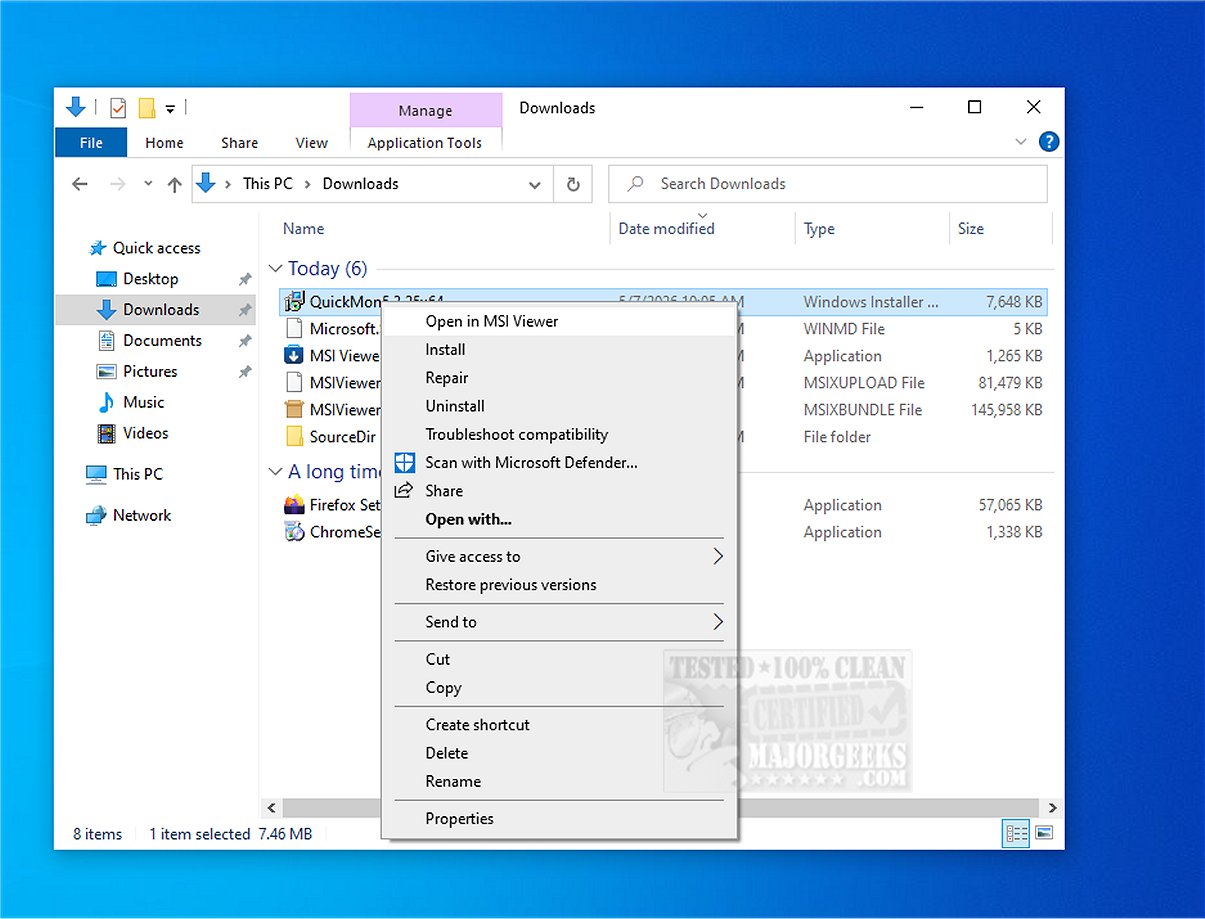
MSI Viewer also enhances user experience with context menu integration, allowing for even quicker access to its functionalities. This feature enables users to interact with MSI files directly from their file explorer, making the extraction process even more convenient.
Geek Verdict
Overall, MSI Viewer is an indispensable tool for anyone needing to investigate MSI installer packages without executing the installer. It serves as an excellent option for users looking to inspect contents for potential threats or simply retrieve necessary files. Its user-friendly interface and efficient file access capabilities make it a standout solution for analyzing MSI files.
Further Reading and Related Tools
For users interested in further expanding their file management skills, additional resources include guides on extracting, creating, and using various archive formats, such as CAB and RAR files, as well as understanding LZMA compression. These resources complement the functionalities offered by MSI Viewer, providing a comprehensive toolkit for file management on Windows systems
Key Features and Benefits
One of the primary advantages of MSI Viewer is its ability to extract individual components from larger applications. This is particularly useful when a user needs a single file but wants to avoid the hassle of installing and later uninstalling the complete application. With MSI Viewer, users can efficiently access and retrieve the necessary components with ease.
How to Use MSI Viewer
To utilize MSI Viewer, users simply launch the application and select the desired MSI file they wish to examine. The program then presents a detailed list of all files contained within that package. This feature significantly simplifies the process of locating specific components, saving users time and effort in navigating through unnecessary files.
Once the desired files are identified, users can easily extract them by clicking the "Extract" button. This process is straightforward, allowing for direct access to the files without any installation overhead. Consequently, users can sidestep the cumbersome task of uninstallation that typically follows a full installation.
Context Menu Integration
MSI Viewer also enhances user experience with context menu integration, allowing for even quicker access to its functionalities. This feature enables users to interact with MSI files directly from their file explorer, making the extraction process even more convenient.
Geek Verdict
Overall, MSI Viewer is an indispensable tool for anyone needing to investigate MSI installer packages without executing the installer. It serves as an excellent option for users looking to inspect contents for potential threats or simply retrieve necessary files. Its user-friendly interface and efficient file access capabilities make it a standout solution for analyzing MSI files.
Further Reading and Related Tools
For users interested in further expanding their file management skills, additional resources include guides on extracting, creating, and using various archive formats, such as CAB and RAR files, as well as understanding LZMA compression. These resources complement the functionalities offered by MSI Viewer, providing a comprehensive toolkit for file management on Windows systems
MSI Viewer 3.1 released
MSI Viewer is designed to help you examine the contents of MSI installer packages without running the installer. It is based on the lessmsi project and provides a practical solution for efficiently accessing individual files from MSI files.