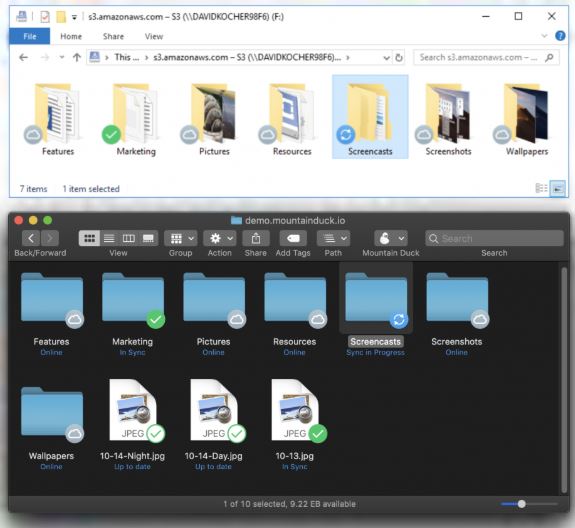
Mountain Duck is a powerful utility designed for Windows and macOS that enables users to mount remote storage services such as FTP, SFTP, WebDAV, Amazon S3, and Google Cloud as local drives. By doing so, it allows users to seamlessly open, save, and edit files directly from their cloud storage without the need for cumbersome syncing or switching between applications. This software is particularly beneficial for those who work with remote servers and cloud storage, providing a more efficient workflow.
What is Mountain Duck?
Acting as a bridge between your desktop and cloud storage, Mountain Duck simplifies file management by treating remote servers as local drives. This means that when you mount a service, such as Google Drive, it appears as a drive (e.g., D:) on your computer, allowing you to interact with files just like they are stored on your hard drive. There’s no need for manual uploads or downloads; you can edit files directly within your preferred applications.
Why You Should Consider Mountain Duck
For individuals frequently handling remote files, Mountain Duck can drastically improve productivity. Instead of downloading and uploading files repeatedly, users can work directly on their cloud files, making the process smoother and more intuitive. Whether you're managing documents on Google Drive or working with code on a remote server, Mountain Duck integrates seamlessly with your existing tools.
Free Trial and Features
Mountain Duck offers a fully functional 14-day trial, allowing users to explore its capabilities without any limitations. The trial includes access to all supported protocols, smart caching, offline access, file versioning, Cryptomator encryption, and more—without requiring a credit card.
Key Features:
- Supports a variety of protocols, including FTP, SFTP, WebDAV, and cloud services like Azure and Backblaze B2.
- Deep integration with Finder and Explorer for a local file experience.
- Smart caching ensures files remain accessible even during connection drops.
- Direct saving from any application, including advanced software like Photoshop and Visual Studio.
- Bookmarking capabilities for quick access to frequently used servers.
- Utilizes the OS's keychain or Credential Manager for secure logins.
- Quick access through a menu bar or taskbar launcher.
Usage Scenarios
Imagine needing to edit a configuration file on a Linux server. Instead of using an FTP client, you can mount it as a drive, edit it in Notepad++, and save changes effortlessly. This capability extends to archiving project files directly to Amazon S3 without the need for additional software.
Pros & Cons
*Pros:*
- Comprehensive support for major cloud and server protocols.
- Seamless integration with existing applications.
- Offline access during connectivity issues.
*Cons:*
- Requires a purchase after the trial period.
- New users may face a learning curve in remote mounting.
- Performance may be impacted by slow networks or servers.
Final Verdict
Mountain Duck is an invaluable tool for those who regularly engage with cloud storage and remote files, transforming the often chaotic experience into one that feels local and straightforward. The generous 14-day trial provides an opportunity to fully evaluate its features without any gimmicks. If you're tired of the hassles associated with syncing apps and manual uploads, Mountain Duck is definitely worth trying out.
Extension Ideas:
Future iterations of Mountain Duck could enhance user experience by introducing features such as automated file version control, improved performance metrics, or even AI-driven suggestions for optimizing workflow based on user habits. Additionally, expanding support for emerging cloud services and enhancing collaboration features could further solidify Mountain Duck's position as a leader in remote storage management
What is Mountain Duck?
Acting as a bridge between your desktop and cloud storage, Mountain Duck simplifies file management by treating remote servers as local drives. This means that when you mount a service, such as Google Drive, it appears as a drive (e.g., D:) on your computer, allowing you to interact with files just like they are stored on your hard drive. There’s no need for manual uploads or downloads; you can edit files directly within your preferred applications.
Why You Should Consider Mountain Duck
For individuals frequently handling remote files, Mountain Duck can drastically improve productivity. Instead of downloading and uploading files repeatedly, users can work directly on their cloud files, making the process smoother and more intuitive. Whether you're managing documents on Google Drive or working with code on a remote server, Mountain Duck integrates seamlessly with your existing tools.
Free Trial and Features
Mountain Duck offers a fully functional 14-day trial, allowing users to explore its capabilities without any limitations. The trial includes access to all supported protocols, smart caching, offline access, file versioning, Cryptomator encryption, and more—without requiring a credit card.
Key Features:
- Supports a variety of protocols, including FTP, SFTP, WebDAV, and cloud services like Azure and Backblaze B2.
- Deep integration with Finder and Explorer for a local file experience.
- Smart caching ensures files remain accessible even during connection drops.
- Direct saving from any application, including advanced software like Photoshop and Visual Studio.
- Bookmarking capabilities for quick access to frequently used servers.
- Utilizes the OS's keychain or Credential Manager for secure logins.
- Quick access through a menu bar or taskbar launcher.
Usage Scenarios
Imagine needing to edit a configuration file on a Linux server. Instead of using an FTP client, you can mount it as a drive, edit it in Notepad++, and save changes effortlessly. This capability extends to archiving project files directly to Amazon S3 without the need for additional software.
Pros & Cons
*Pros:*
- Comprehensive support for major cloud and server protocols.
- Seamless integration with existing applications.
- Offline access during connectivity issues.
*Cons:*
- Requires a purchase after the trial period.
- New users may face a learning curve in remote mounting.
- Performance may be impacted by slow networks or servers.
Final Verdict
Mountain Duck is an invaluable tool for those who regularly engage with cloud storage and remote files, transforming the often chaotic experience into one that feels local and straightforward. The generous 14-day trial provides an opportunity to fully evaluate its features without any gimmicks. If you're tired of the hassles associated with syncing apps and manual uploads, Mountain Duck is definitely worth trying out.
Extension Ideas:
Future iterations of Mountain Duck could enhance user experience by introducing features such as automated file version control, improved performance metrics, or even AI-driven suggestions for optimizing workflow based on user habits. Additionally, expanding support for emerging cloud services and enhancing collaboration features could further solidify Mountain Duck's position as a leader in remote storage management
Mountain Duck 5.3.2 released
Mountain Duck lets you mount remote storage like FTP, SFTP, WebDAV, Amazon S3, and more as local disks on Windows and macOS, so any file‑based app can open, save, or edit files directly in the cloud.