Minimal Image Viewer is a lightweight image viewing application developed in C++ specifically for Windows users. The software prioritizes performance and a minimalist aesthetic, utilizing native Windows APIs and the Windows Imaging Component (WIC) to deliver a reliable and efficient image viewing experience.
Upon launching Minimal Image Viewer, users are presented with a sleek black, borderless window that facilitates image import through either drag-and-drop functionality or by accessing the classic “Open” dialog via the right-click context menu. This design choice enhances user experience by allowing easy navigation when selecting image files.
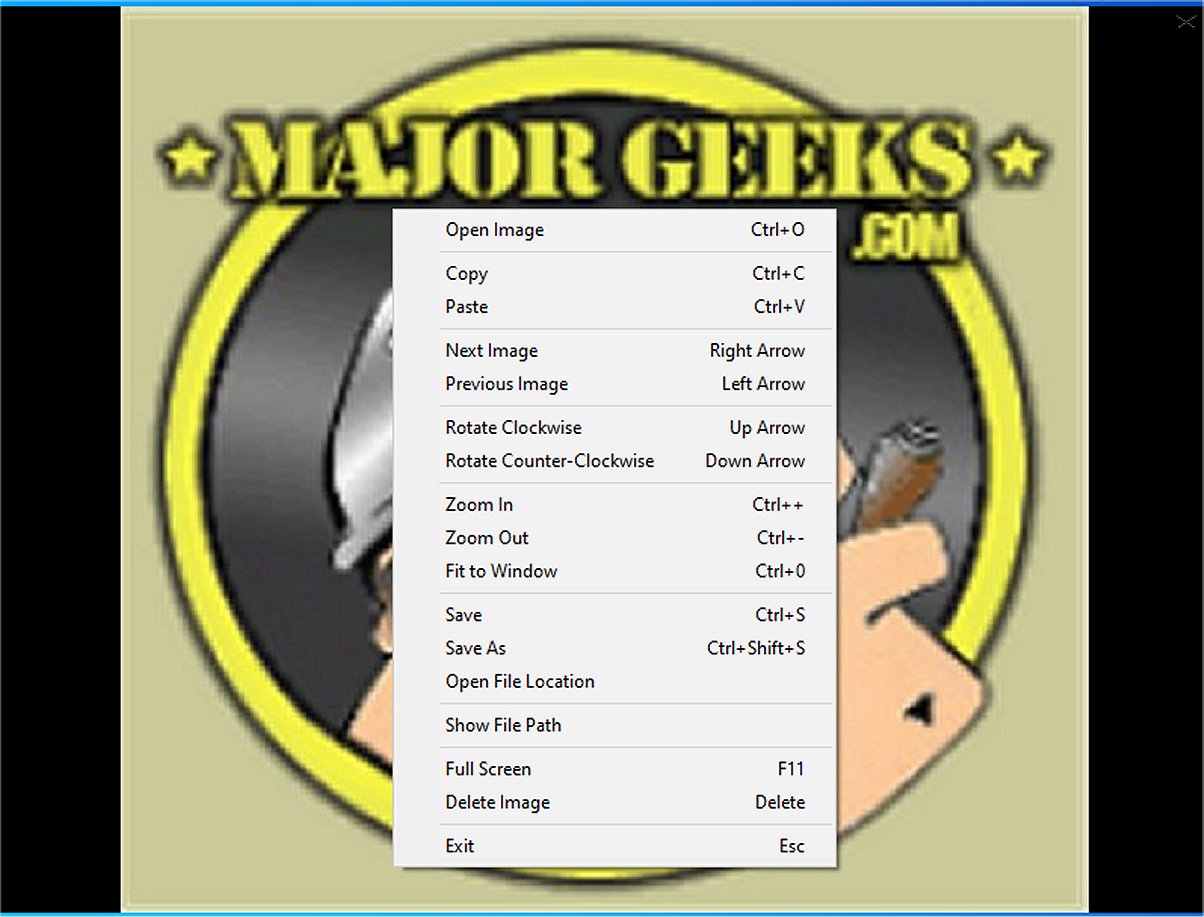
Context Menu Operations: The application provides a limited yet useful set of options through the context menu, including the ability to copy the currently displayed image to the clipboard or paste an image from the clipboard into the viewer.
Image Navigation: Users can easily browse through all compatible images in a selected folder, leveraging the Windows Imaging Component to ensure support for various graphic formats.
Viewing Functionality: Minimal Image Viewer includes essential features such as:
- Rotating images clockwise or counterclockwise.
- Adjusting zoom levels and fitting images to the window.
- Switching to full-screen mode for an immersive viewing experience.
- Saving images to different locations or deleting them for better organization.
The application is designed for ease of use with several keyboard shortcuts:
- Open: Ctrl+O or right-click → "Open Image"
- Navigate: Left/Right arrows or right-click → "Next/Previous Image"
- Zoom: Ctrl++/-, mouse wheel, or right-click → "Zoom In/Out"; Ctrl+0 or double-click to fit
- Rotate: Up/Down arrows or right-click → "Rotate Clockwise/Counterclockwise"
- Save: Ctrl+S or right-click → "Save Image" (preserves original format)
- Delete: Delete key or right-click → "Delete Image" (to Recycle Bin)
- Full-Screen: F11 or right-click → "Full Screen"
- Move/Resize: Drag window or edges (non-full-screen)
- Exit: Esc or right-click → "Exit"
- Copy: Ctrl+C
- Paste: Ctrl+V
Overall, Minimal Image Viewer is celebrated for its minimalistic design that fosters a distraction-free viewing environment. Its offline functionality further enhances user privacy, making it an appealing choice for those who prioritize data security while enjoying their image collections.
In summary, Minimal Image Viewer 1.7.2 stands out as a practical tool for users seeking a straightforward image viewing solution without the clutter of more complex applications. Its combination of user-friendly design, essential functionalities, and privacy considerations make it a valuable addition to the toolkit of any Windows user interested in efficient image management.
As the application evolves, potential updates could include enhanced support for more image formats, improved editing capabilities, and a customizable interface to cater to individual user preferences. Such developments could further solidify Minimal Image Viewer’s position as a go-to application for image viewing on Windows platforms
Upon launching Minimal Image Viewer, users are presented with a sleek black, borderless window that facilitates image import through either drag-and-drop functionality or by accessing the classic “Open” dialog via the right-click context menu. This design choice enhances user experience by allowing easy navigation when selecting image files.
Key Features of Minimal Image Viewer
Context Menu Operations: The application provides a limited yet useful set of options through the context menu, including the ability to copy the currently displayed image to the clipboard or paste an image from the clipboard into the viewer.
Image Navigation: Users can easily browse through all compatible images in a selected folder, leveraging the Windows Imaging Component to ensure support for various graphic formats.
Viewing Functionality: Minimal Image Viewer includes essential features such as:
- Rotating images clockwise or counterclockwise.
- Adjusting zoom levels and fitting images to the window.
- Switching to full-screen mode for an immersive viewing experience.
- Saving images to different locations or deleting them for better organization.
Control Shortcuts
The application is designed for ease of use with several keyboard shortcuts:
- Open: Ctrl+O or right-click → "Open Image"
- Navigate: Left/Right arrows or right-click → "Next/Previous Image"
- Zoom: Ctrl++/-, mouse wheel, or right-click → "Zoom In/Out"; Ctrl+0 or double-click to fit
- Rotate: Up/Down arrows or right-click → "Rotate Clockwise/Counterclockwise"
- Save: Ctrl+S or right-click → "Save Image" (preserves original format)
- Delete: Delete key or right-click → "Delete Image" (to Recycle Bin)
- Full-Screen: F11 or right-click → "Full Screen"
- Move/Resize: Drag window or edges (non-full-screen)
- Exit: Esc or right-click → "Exit"
- Copy: Ctrl+C
- Paste: Ctrl+V
User Experience
Overall, Minimal Image Viewer is celebrated for its minimalistic design that fosters a distraction-free viewing environment. Its offline functionality further enhances user privacy, making it an appealing choice for those who prioritize data security while enjoying their image collections.
Conclusion
In summary, Minimal Image Viewer 1.7.2 stands out as a practical tool for users seeking a straightforward image viewing solution without the clutter of more complex applications. Its combination of user-friendly design, essential functionalities, and privacy considerations make it a valuable addition to the toolkit of any Windows user interested in efficient image management.
Future Prospects
As the application evolves, potential updates could include enhanced support for more image formats, improved editing capabilities, and a customizable interface to cater to individual user preferences. Such developments could further solidify Minimal Image Viewer’s position as a go-to application for image viewing on Windows platforms
Minimal Image Viewer 1.7.2 released
Minimal Image Viewer is an image viewing application developed in C++ that is specifically designed for Windows. It is designed with a focus on both performance and minimalism. By utilizing native Windows APIs, along with the Windows Imaging Component (WIC), the application provides reliable functionality for users seeking an efficient way to view images.