Minimal Image Viewer is a lightweight image viewing application tailored for Windows, developed in C++. Emphasizing performance and minimalism, it leverages native Windows APIs and the Windows Imaging Component (WIC) to deliver a reliable image viewing experience for users who value simplicity and efficiency.
Upon launching Minimal Image Viewer, users encounter a sleek, black, borderless window that prioritizes a distraction-free environment. The application allows image import through convenient drag-and-drop functionality or via the right-click context menu, which provides access to the traditional “Open” dialog for browsing and selecting image files.
Context Menu and Navigation
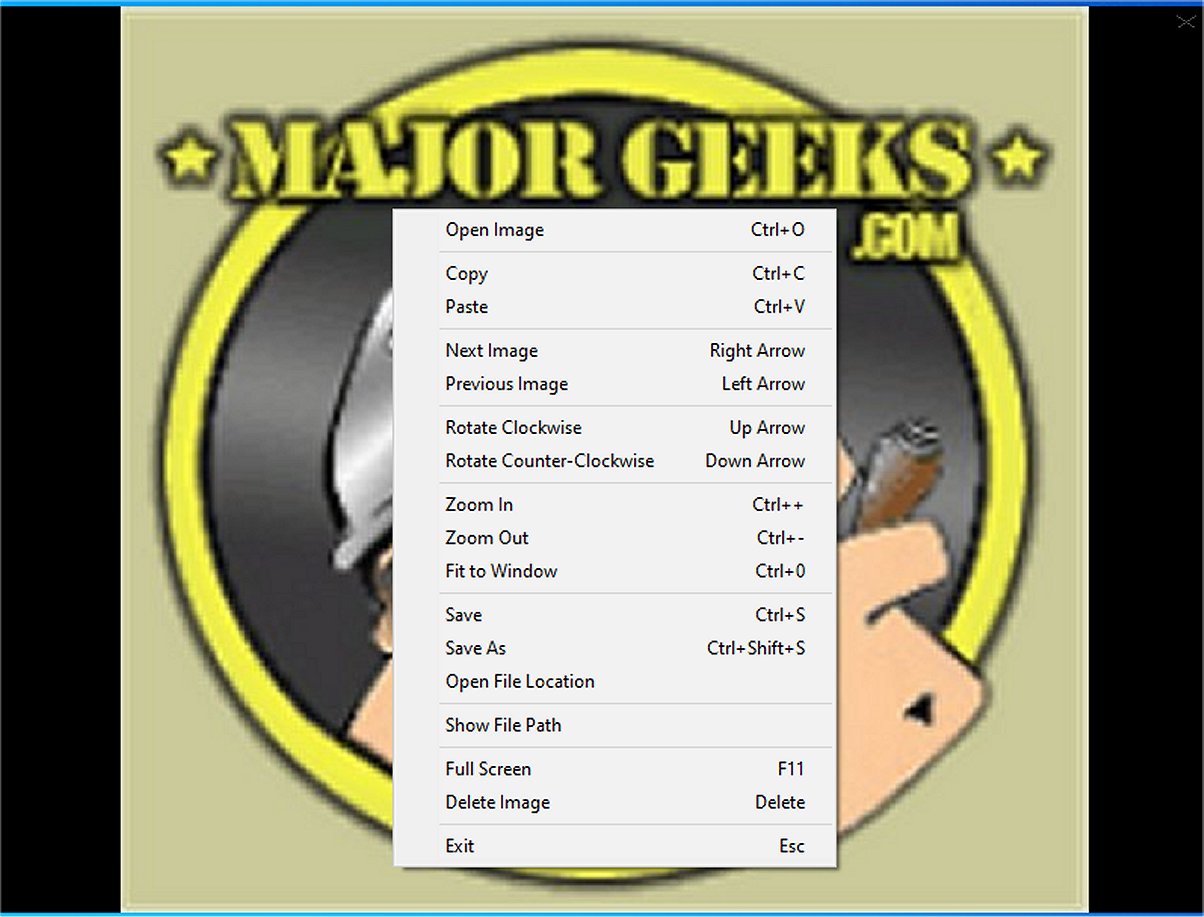
The context menu in Minimal Image Viewer offers a handful of options designed for ease of use. Users can copy the currently displayed image to the clipboard or paste an image from the clipboard directly into the viewer. Navigation within the application is straightforward, enabling users to cycle through all compatible images in the selected directory seamlessly. The application supports a broad range of file formats, ensuring users can view various graphic types without hassle.
Viewing functionalities, while minimal, are practical. Users have the ability to rotate images, adjust zoom levels, fit images to the window, or engage full-screen mode for immersive viewing. Additionally, users can easily save images to a new location or delete them with simple shortcuts, promoting efficient organization of their photo collections.
User Controls
Minimal Image Viewer offers intuitive controls for a streamlined experience:
- Open an image: Ctrl+O or right-click → "Open Image"
- Navigate images: Left/Right arrows or right-click → "Next/Previous Image"
- Zoom in/out: Ctrl++/-, mouse wheel, or right-click → "Zoom In/Out"; Ctrl+0 or double-click to fit
- Rotate images: Up/Down arrows or right-click → "Rotate Clockwise/Counterclockwise"
- Save images: Ctrl+S or right-click → "Save Image" (keeps original format)
- Delete images: Delete key or right-click → "Delete Image" (moves to Recycle Bin)
- Full-screen mode: F11 or right-click → "Full Screen"
- Move/resize: Drag window or edges (when not in full-screen)
- Exit application: Esc or right-click → "Exit"
- Copy: Ctrl+C
- Paste: Ctrl+V
Overall Impression
In summary, Minimal Image Viewer stands out as an efficient, minimalist tool that prioritizes user experience and data privacy. Operating fully offline, it allows users to enjoy their image collections without distractions or privacy concerns, making it an ideal choice for anyone seeking a straightforward image viewer.
Future Enhancements and Considerations
Looking ahead, the developers could consider adding features such as:
- Extended file format support for niche image types.
- Customization options for the interface, allowing users to select themes or layouts.
- Advanced image editing capabilities for quick adjustments like cropping or filtering.
- Integration with cloud storage services for easier access to images across devices.
These enhancements could further enrich the user experience and broaden the application’s appeal, ensuring that Minimal Image Viewer remains competitive in a market filled with diverse image viewing tools
Upon launching Minimal Image Viewer, users encounter a sleek, black, borderless window that prioritizes a distraction-free environment. The application allows image import through convenient drag-and-drop functionality or via the right-click context menu, which provides access to the traditional “Open” dialog for browsing and selecting image files.
Context Menu and Navigation
The context menu in Minimal Image Viewer offers a handful of options designed for ease of use. Users can copy the currently displayed image to the clipboard or paste an image from the clipboard directly into the viewer. Navigation within the application is straightforward, enabling users to cycle through all compatible images in the selected directory seamlessly. The application supports a broad range of file formats, ensuring users can view various graphic types without hassle.
Viewing functionalities, while minimal, are practical. Users have the ability to rotate images, adjust zoom levels, fit images to the window, or engage full-screen mode for immersive viewing. Additionally, users can easily save images to a new location or delete them with simple shortcuts, promoting efficient organization of their photo collections.
User Controls
Minimal Image Viewer offers intuitive controls for a streamlined experience:
- Open an image: Ctrl+O or right-click → "Open Image"
- Navigate images: Left/Right arrows or right-click → "Next/Previous Image"
- Zoom in/out: Ctrl++/-, mouse wheel, or right-click → "Zoom In/Out"; Ctrl+0 or double-click to fit
- Rotate images: Up/Down arrows or right-click → "Rotate Clockwise/Counterclockwise"
- Save images: Ctrl+S or right-click → "Save Image" (keeps original format)
- Delete images: Delete key or right-click → "Delete Image" (moves to Recycle Bin)
- Full-screen mode: F11 or right-click → "Full Screen"
- Move/resize: Drag window or edges (when not in full-screen)
- Exit application: Esc or right-click → "Exit"
- Copy: Ctrl+C
- Paste: Ctrl+V
Overall Impression
In summary, Minimal Image Viewer stands out as an efficient, minimalist tool that prioritizes user experience and data privacy. Operating fully offline, it allows users to enjoy their image collections without distractions or privacy concerns, making it an ideal choice for anyone seeking a straightforward image viewer.
Future Enhancements and Considerations
Looking ahead, the developers could consider adding features such as:
- Extended file format support for niche image types.
- Customization options for the interface, allowing users to select themes or layouts.
- Advanced image editing capabilities for quick adjustments like cropping or filtering.
- Integration with cloud storage services for easier access to images across devices.
These enhancements could further enrich the user experience and broaden the application’s appeal, ensuring that Minimal Image Viewer remains competitive in a market filled with diverse image viewing tools
Minimal Image Viewer 1.4 released
Minimal Image Viewer is an image viewing application developed in C++ that is specifically designed for Windows. It is designed with a focus on both performance and minimalism. By utilizing native Windows APIs, along with the Windows Imaging Component (WIC), the application provides reliable functionality for users seeking an efficient way to view images.