MemoryCleaner version 2.0.3 has been released, offering an easy-to-use solution for optimizing your computer's memory with just a single click. The application features a simple yet effective user interface that caters to users of all skill levels, presenting real-time statistics for both physical and virtual memory alongside a prominent clean button.
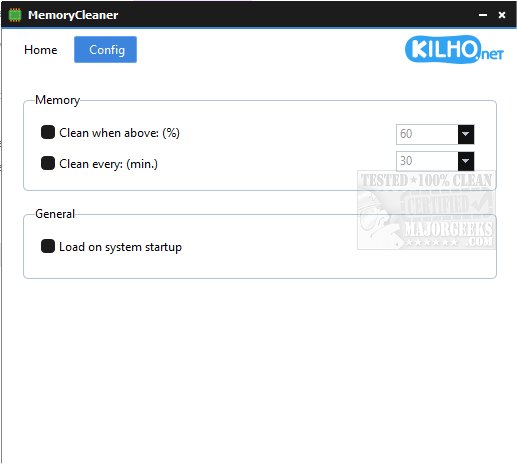
Users can customize their experience with a few configuration options, including automatic cleaning based on a user-defined memory usage threshold or at specific time intervals. Additionally, MemoryCleaner can be set to launch automatically when the system starts, enhancing convenience for users who want to ensure their memory is regularly maintained.
This tool stands out for its simplicity and effectiveness, making it an ideal choice for those looking to perform routine memory management without complex procedures. For users seeking similar functionality, alternatives like Windows Repair that includes a free memory cleaner, as well as guidance on resolving low memory errors in Windows 10 and 11, are also available.
As technology continues to evolve, MemoryCleaner could benefit from future updates that might introduce advanced features, such as detailed memory usage reports, the ability to prioritize certain applications, or integration with system performance monitoring tools. Such enhancements would make it an even more powerful tool for users looking to optimize their machine's performance
Users can customize their experience with a few configuration options, including automatic cleaning based on a user-defined memory usage threshold or at specific time intervals. Additionally, MemoryCleaner can be set to launch automatically when the system starts, enhancing convenience for users who want to ensure their memory is regularly maintained.
This tool stands out for its simplicity and effectiveness, making it an ideal choice for those looking to perform routine memory management without complex procedures. For users seeking similar functionality, alternatives like Windows Repair that includes a free memory cleaner, as well as guidance on resolving low memory errors in Windows 10 and 11, are also available.
As technology continues to evolve, MemoryCleaner could benefit from future updates that might introduce advanced features, such as detailed memory usage reports, the ability to prioritize certain applications, or integration with system performance monitoring tools. Such enhancements would make it an even more powerful tool for users looking to optimize their machine's performance
MemoryCleaner 2.0.3 released
MemoryCleaner is a straightforward tool to help your machine's memory with a single click.