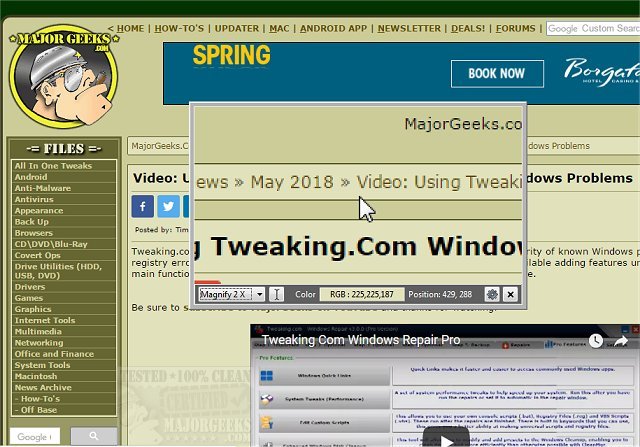
Magnifixer 15.1 has been released, offering users an advanced utility for screen magnification enhanced with various additional features. This tool allows users to direct the magnification to any area on their screen and select a zoom level that best fits their needs, providing up to 40x magnification to reduce eye strain effectively.
Key functionalities of Magnifixer include the ability to invert images, track the caret position, adjust window transparency, copy magnified images to the clipboard, and add crosshairs. Users can also choose between color displays in HTML or RGB modes, making it versatile for different applications. The utility is compatible with dual monitor setups and boasts a user-friendly interface, allowing for quick access to magnified views without the necessity of zooming in on the entire page. This makes it particularly useful for reading text and working with detailed graphics.
In addition to these features, users may appreciate tips to optimize their experience, such as keyboard shortcuts for quick access, and suggestions for integration with other accessibility tools. Furthermore, Magnifixer could expand its capabilities in future updates by including options for saving custom zoom settings or enhancing compatibility with various file formats for magnified content. Overall, Magnifixer 15.1 stands out as a valuable tool for anyone needing precise visual assistance on their screens
Key functionalities of Magnifixer include the ability to invert images, track the caret position, adjust window transparency, copy magnified images to the clipboard, and add crosshairs. Users can also choose between color displays in HTML or RGB modes, making it versatile for different applications. The utility is compatible with dual monitor setups and boasts a user-friendly interface, allowing for quick access to magnified views without the necessity of zooming in on the entire page. This makes it particularly useful for reading text and working with detailed graphics.
In addition to these features, users may appreciate tips to optimize their experience, such as keyboard shortcuts for quick access, and suggestions for integration with other accessibility tools. Furthermore, Magnifixer could expand its capabilities in future updates by including options for saving custom zoom settings or enhancing compatibility with various file formats for magnified content. Overall, Magnifixer 15.1 stands out as a valuable tool for anyone needing precise visual assistance on their screens
Magnifixer 15.1 released
Magnifixer is a utility for screen magnification with some additional useful options.