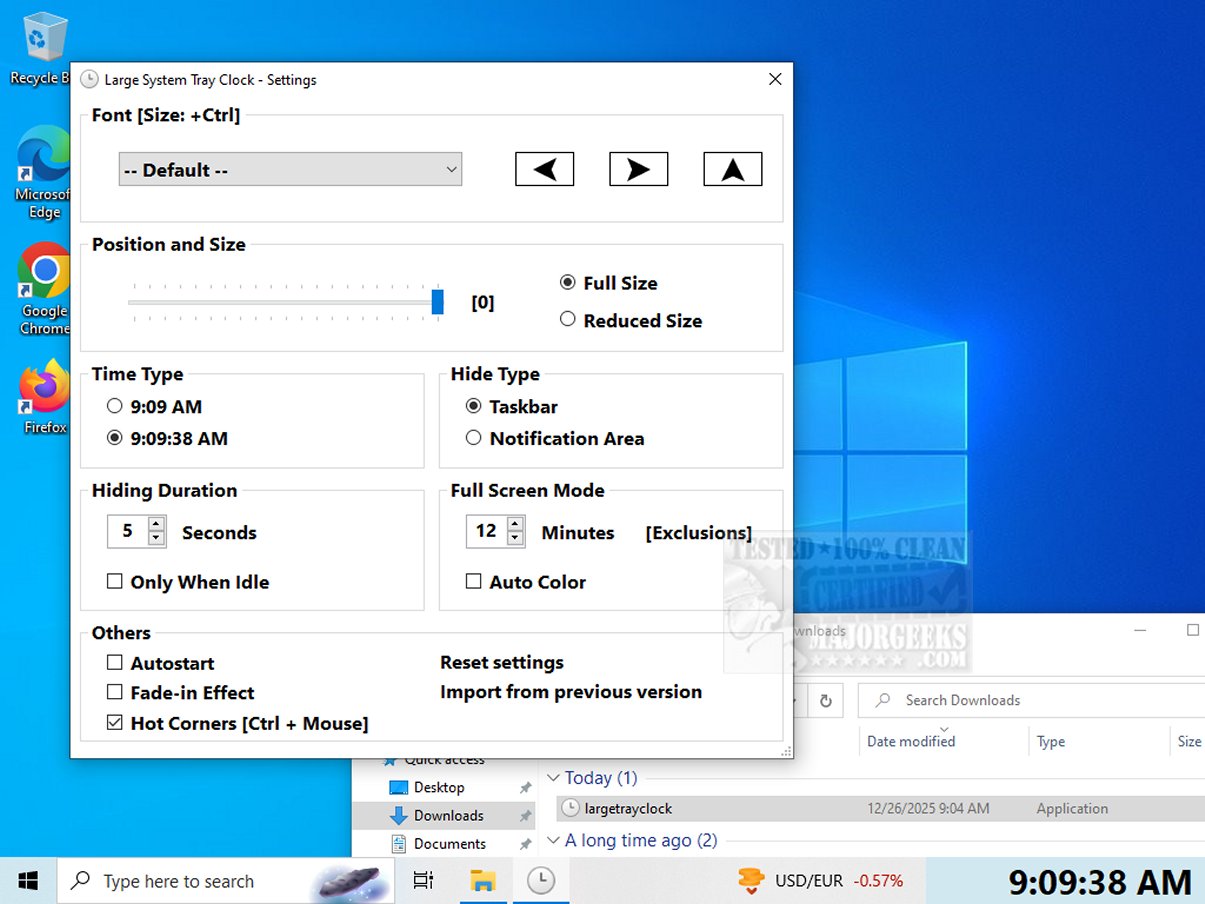
A new version of Large System Tray Clock, specifically 1.1.1.14, has been launched to enhance the visibility of the clock in the system tray for Windows 10 and 11 users. This utility was developed to overcome the limitations of customization and accessibility that come with the default clock settings provided by Microsoft.
Enhanced Visibility for All Users
Large System Tray Clock primarily caters to visually impaired individuals by offering a significantly larger and more legible time display. This enlarged clock effectively replaces the default small clock, occupying more space in the tray area to ensure that users can easily read the time without straining their eyes.
Customization and Convenience
Users are empowered to personalize various features of the Large System Tray Clock, including the font style, size, and position on the screen. It also offers the option to display the time with or without seconds. A standout feature is the ability to set the clock to launch automatically with Windows, streamlining the user experience by eliminating the need for manual activation each time.
Notable Features: Full-Screen Mode
One of the key highlights of the Large System Tray Clock is its full-screen mode, which displays the time across the entire screen after a predetermined period of inactivity. This feature is particularly useful for users who may not be positioned directly in front of their monitors but still wish to quickly check the time. The user-friendly interface allows easy toggling of this mode, enhancing overall convenience. Additionally, the clock supports hot corners, enabling users to view the enlarged clock from any corner of the screen, thereby allowing for quick time checks from various angles.
Key Features of Large System Tray Clock:
- Displays prominently in the taskbar notification area for easy access.
- Maintains taskbar functionality while hiding automatically when needed, reappearing after a user-defined delay.
- Offers flexibility to show the clock in screen corners or full-screen mode.
- Installation is not required, making it user-friendly.
Conclusion: A Tool for Everyone
In summary, Large System Tray Clock is more than just a basic clock; it serves as an essential tool for anyone seeking improved visibility and accessibility. With its thoughtfully designed interface and features, it stands out as a vital resource for individuals with visual impairments, while also promoting inclusivity. Users can elevate their experience and stay aware of time effortlessly, ensuring that they never lose track of their day again.
Related Resources:
- How to Show Multiple Clocks on Windows
- How to Fix Incorrect Date or Time With Windows Clock
- How to Show Time Only on the Windows 10 & 11 Taskbar
- How to Remove the Clock From Windows 10 & 11 Taskbar
This release of Large System Tray Clock represents a significant step forward in enhancing user accessibility and improving the overall user experience on Windows platforms
Enhanced Visibility for All Users
Large System Tray Clock primarily caters to visually impaired individuals by offering a significantly larger and more legible time display. This enlarged clock effectively replaces the default small clock, occupying more space in the tray area to ensure that users can easily read the time without straining their eyes.
Customization and Convenience
Users are empowered to personalize various features of the Large System Tray Clock, including the font style, size, and position on the screen. It also offers the option to display the time with or without seconds. A standout feature is the ability to set the clock to launch automatically with Windows, streamlining the user experience by eliminating the need for manual activation each time.
Notable Features: Full-Screen Mode
One of the key highlights of the Large System Tray Clock is its full-screen mode, which displays the time across the entire screen after a predetermined period of inactivity. This feature is particularly useful for users who may not be positioned directly in front of their monitors but still wish to quickly check the time. The user-friendly interface allows easy toggling of this mode, enhancing overall convenience. Additionally, the clock supports hot corners, enabling users to view the enlarged clock from any corner of the screen, thereby allowing for quick time checks from various angles.
Key Features of Large System Tray Clock:
- Displays prominently in the taskbar notification area for easy access.
- Maintains taskbar functionality while hiding automatically when needed, reappearing after a user-defined delay.
- Offers flexibility to show the clock in screen corners or full-screen mode.
- Installation is not required, making it user-friendly.
Conclusion: A Tool for Everyone
In summary, Large System Tray Clock is more than just a basic clock; it serves as an essential tool for anyone seeking improved visibility and accessibility. With its thoughtfully designed interface and features, it stands out as a vital resource for individuals with visual impairments, while also promoting inclusivity. Users can elevate their experience and stay aware of time effortlessly, ensuring that they never lose track of their day again.
Related Resources:
- How to Show Multiple Clocks on Windows
- How to Fix Incorrect Date or Time With Windows Clock
- How to Show Time Only on the Windows 10 & 11 Taskbar
- How to Remove the Clock From Windows 10 & 11 Taskbar
This release of Large System Tray Clock represents a significant step forward in enhancing user accessibility and improving the overall user experience on Windows platforms
Large System Tray Clock 1.1.1.14 released
Large System Tray Clock is a utility designed to improve the visibility of the clock in the Windows 10 and 11 systray. It aims to address the limited customization and accessibility features of Microsoft's default system tray clock.