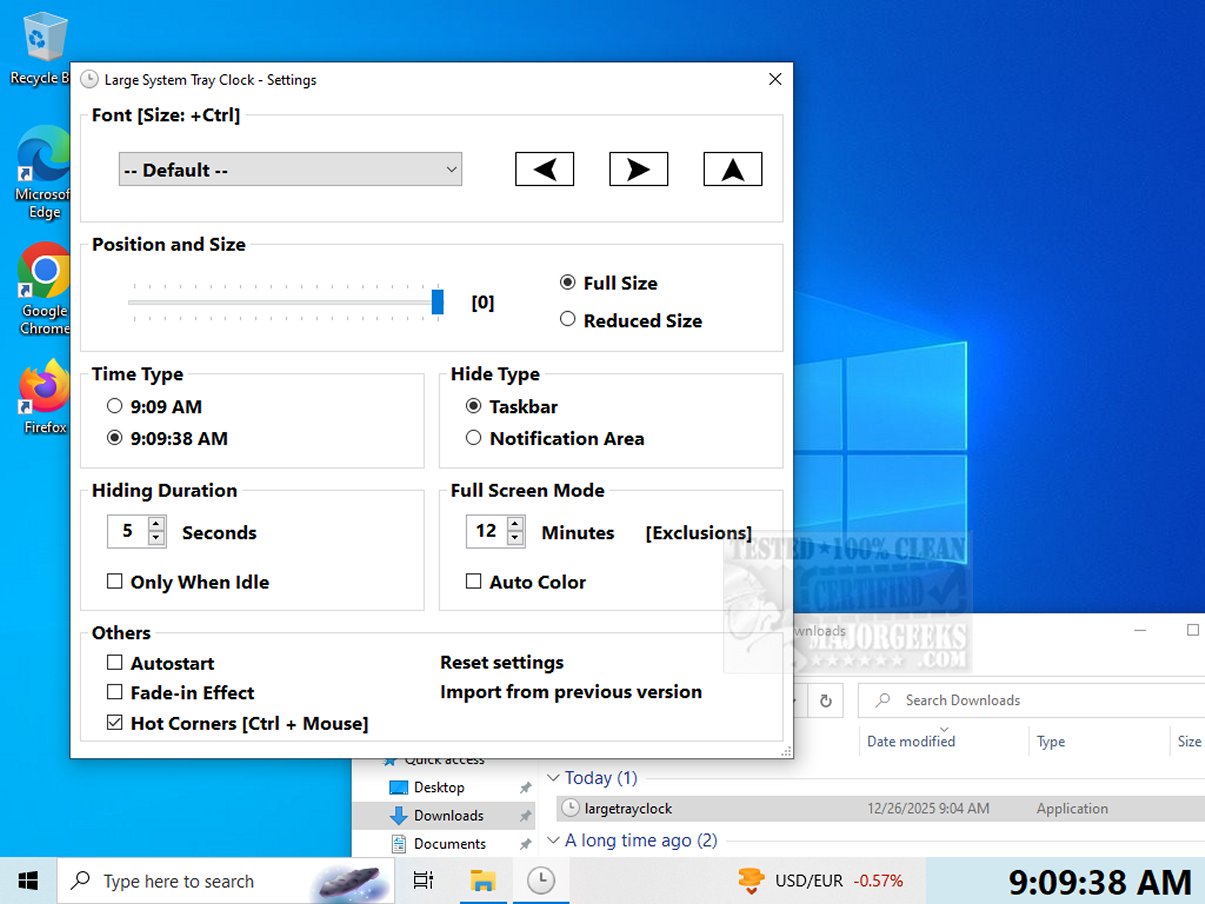
The newly released version 1.1.1.10 of Large System Tray Clock is a utility designed to enhance the visibility of the clock located in the system tray of Windows 10 and 11. This application addresses the limited customization options and accessibility features present in Microsoft's default system tray clock, making it particularly beneficial for visually impaired users or those seeking greater flexibility in how they view the time.
Key Features and Customization Options
Large System Tray Clock offers a larger and more readable time display, replacing the original smaller clock with an enlarged version that occupies more space in the tray. This ensures users can easily see the time without straining their eyes. The application allows users to customize various elements, including font style, position, and size, and even provides an option to display the time with or without seconds. Additionally, it can be set to automatically launch with Windows, streamlining the user experience.
One of the standout features of Large System Tray Clock is its full-screen mode, which can be activated to show the time prominently on the entire screen after a period of inactivity. This is particularly useful for users who may not be directly in front of their monitors yet still wish to check the time quickly. The user-friendly interface allows for easy toggling of the full-screen mode, and the software supports hot corners, enabling the clock to be displayed in any corner of the screen for added convenience.
Main Features Recap:
- Large, easy-to-read clock in the taskbar notification area.
- Full-screen mode available for better visibility.
- Clock hides automatically while retaining taskbar functionality.
- Customizable display options without requiring installation.
Conclusion: A Must-Have for Enhanced Accessibility
Large System Tray Clock serves as a vital tool for anyone needing improved clock visibility and accessibility. With its thoughtfully designed interface, it stands out as an essential companion, especially for individuals with visual impairments. By prioritizing clarity and convenience, this application ensures users can easily keep track of time, enhancing their overall experience with Windows.
Related Topics:
- How to Show Multiple Clocks on Windows
- How to Fix Incorrect Date or Time With Windows Clock
- How to Show Time Only on the Windows 10 & 11 Taskbar
- How to Remove the Clock From Windows 10 & 11 Taskbar
In summary, Large System Tray Clock not only enhances time visibility but also promotes inclusivity, ensuring that everyone can efficiently manage their daily activities without losing track of time
Key Features and Customization Options
Large System Tray Clock offers a larger and more readable time display, replacing the original smaller clock with an enlarged version that occupies more space in the tray. This ensures users can easily see the time without straining their eyes. The application allows users to customize various elements, including font style, position, and size, and even provides an option to display the time with or without seconds. Additionally, it can be set to automatically launch with Windows, streamlining the user experience.
One of the standout features of Large System Tray Clock is its full-screen mode, which can be activated to show the time prominently on the entire screen after a period of inactivity. This is particularly useful for users who may not be directly in front of their monitors yet still wish to check the time quickly. The user-friendly interface allows for easy toggling of the full-screen mode, and the software supports hot corners, enabling the clock to be displayed in any corner of the screen for added convenience.
Main Features Recap:
- Large, easy-to-read clock in the taskbar notification area.
- Full-screen mode available for better visibility.
- Clock hides automatically while retaining taskbar functionality.
- Customizable display options without requiring installation.
Conclusion: A Must-Have for Enhanced Accessibility
Large System Tray Clock serves as a vital tool for anyone needing improved clock visibility and accessibility. With its thoughtfully designed interface, it stands out as an essential companion, especially for individuals with visual impairments. By prioritizing clarity and convenience, this application ensures users can easily keep track of time, enhancing their overall experience with Windows.
Related Topics:
- How to Show Multiple Clocks on Windows
- How to Fix Incorrect Date or Time With Windows Clock
- How to Show Time Only on the Windows 10 & 11 Taskbar
- How to Remove the Clock From Windows 10 & 11 Taskbar
In summary, Large System Tray Clock not only enhances time visibility but also promotes inclusivity, ensuring that everyone can efficiently manage their daily activities without losing track of time
Large System Tray Clock 1.1.1.10 released
Large System Tray Clock is a utility designed to improve the visibility of the clock in the Windows 10 and 11 systray. It aims to address the limited customization and accessibility features of Microsoft's default system tray clock.