KTimer 2.0.1 has been released, offering users a simple yet effective tool to schedule automatic shutdowns for their computers at designated times. This feature not only helps in conserving energy but also ensures that computers are not left running unnecessarily, enhancing overall efficiency and providing convenience for users who might forget to turn off their devices.
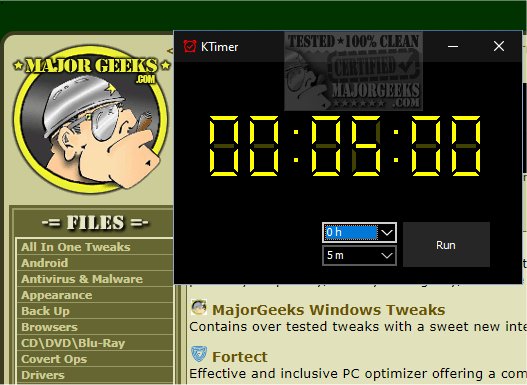
Upon launching KTimer by double-clicking its executable file, users are greeted with an intuitive countdown timer interface. The timer visually displays the remaining time in hours, minutes, and seconds, which allows for precise management based on individual needs. Users can easily customize the countdown duration to suit various tasks, making KTimer especially useful for lengthy processes that do not require constant supervision.
Once the desired countdown is set, KTimer can be configured to trigger an automatic shutdown when the timer reaches zero. This functionality is particularly beneficial when users wish to leave their computers running for tasks that may take considerable time, eliminating the need for manual time monitoring. However, it is crucial to note that once the timer is initiated by pressing the “Run” button, the countdown cannot be paused or modified. When the timer concludes, the computer will shut down immediately and forcefully, closing all open applications and processes without saving any unsaved work—hence, users are advised to save their work before starting the timer.
KTimer is designed with simplicity in mind, focusing solely on the shutdown function without offering additional options like restarting, hibernating, or entering sleep mode. Its key features include the ability to automatically shut down the computer at a specified time and the capability to capture the screen just before shutdown.
In addition to the main functionalities, users may also find related features and guides useful, such as managing sleep, hibernation, or shutdown settings in Windows 10 and 11, troubleshooting devices that won’t turn on, or resolving boot issues following power outages.
Overall, KTimer 2.0.1 stands out as a straightforward solution for users looking to manage their computer usage efficiently. Its focused functionality makes it a reliable tool for ensuring that computers are only running when needed, ultimately contributing to energy savings and user convenience.
Extended Features and Future Updates:
Future updates to KTimer could include features such as customizable notifications prior to shutdown, options for saving work automatically, and integration with other system management tools. Additionally, a mobile version could be developed to allow users to schedule shutdowns remotely, adding another layer of convenience and control over their computer usage
Upon launching KTimer by double-clicking its executable file, users are greeted with an intuitive countdown timer interface. The timer visually displays the remaining time in hours, minutes, and seconds, which allows for precise management based on individual needs. Users can easily customize the countdown duration to suit various tasks, making KTimer especially useful for lengthy processes that do not require constant supervision.
Once the desired countdown is set, KTimer can be configured to trigger an automatic shutdown when the timer reaches zero. This functionality is particularly beneficial when users wish to leave their computers running for tasks that may take considerable time, eliminating the need for manual time monitoring. However, it is crucial to note that once the timer is initiated by pressing the “Run” button, the countdown cannot be paused or modified. When the timer concludes, the computer will shut down immediately and forcefully, closing all open applications and processes without saving any unsaved work—hence, users are advised to save their work before starting the timer.
KTimer is designed with simplicity in mind, focusing solely on the shutdown function without offering additional options like restarting, hibernating, or entering sleep mode. Its key features include the ability to automatically shut down the computer at a specified time and the capability to capture the screen just before shutdown.
In addition to the main functionalities, users may also find related features and guides useful, such as managing sleep, hibernation, or shutdown settings in Windows 10 and 11, troubleshooting devices that won’t turn on, or resolving boot issues following power outages.
Overall, KTimer 2.0.1 stands out as a straightforward solution for users looking to manage their computer usage efficiently. Its focused functionality makes it a reliable tool for ensuring that computers are only running when needed, ultimately contributing to energy savings and user convenience.
Extended Features and Future Updates:
Future updates to KTimer could include features such as customizable notifications prior to shutdown, options for saving work automatically, and integration with other system management tools. Additionally, a mobile version could be developed to allow users to schedule shutdowns remotely, adding another layer of convenience and control over their computer usage
KTimer 2.0.1 released
KTimer allows you to schedule your computer to shut down automatically at a designated time.