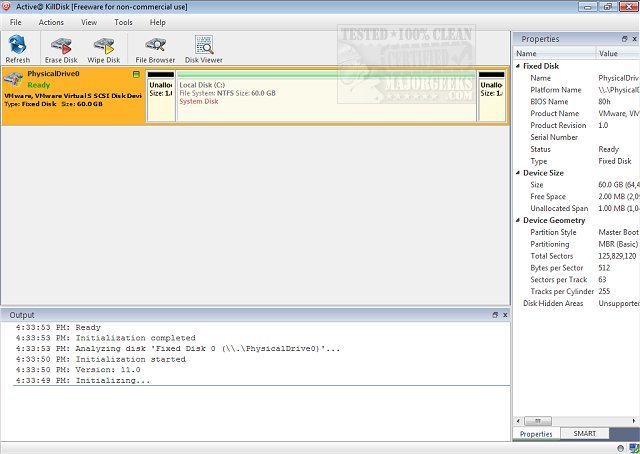
Active@ KillDisk has recently released version 26.0.15.0, enhancing its reputation as a robust and efficient software solution for securely erasing data across various storage devices, including hard disks, solid-state drives (SSDs), and USB drives. This software is specifically designed to permanently eliminate data, ensuring that deleted files and folders cannot be recovered, even with advanced recovery tools.
Key Functions of Active@ KillDisk:
1. Data Sanitization: Unlike standard formatting, Active@ KillDisk provides irreversible data erasure, meeting international security standards recognized by various authorities.
2. Advanced Overwriting Methods: It includes the Guttmann method, a highly secure algorithm that makes data recovery nearly impossible.
3. Free Space Wipe: The "Wipe" function allows users to clean only the free space on a drive, removing remnants of deleted files while preserving existing data.
4. Universal Compatibility: The software works with traditional hard drives and modern SSDs, making it versatile for various storage needs.
Precautions:
- Users are advised to verify the selected device before executing any erase operations to avoid unintentional data loss.
- The complete disk wipe feature will erase everything, including the operating system and hidden recovery partitions.
When to Use Active@ KillDisk:
- When disposing of old computers or drives, to protect personal information from new owners.
- To eliminate malware or viruses that may have infected the system, allowing for a clean start.
- To meet corporate security standards during equipment disposal, ensuring sensitive data is permanently erased.
Conclusion:
Active@ KillDisk stands out as a premier solution for users who prioritize secure data management and privacy protection. Its comprehensive features empower individuals and businesses to confidently manage their data, effectively safeguarding their digital information.
Further Reading:
- Explore methods for automated junk file deletion in Windows 10 & 11.
- Troubleshoot "Access Denied" errors when deleting files or folders.
- Learn how to securely delete files using PowerShell and Cipher in Windows 10 & 11.
Future Updates:
As data security continues to evolve, future versions of Active@ KillDisk may introduce enhanced features, improved user interfaces, and broader compliance with emerging security standards to further protect user data. Additionally, ongoing support and user feedback will likely drive continuous improvements in functionality and ease of use
Key Functions of Active@ KillDisk:
1. Data Sanitization: Unlike standard formatting, Active@ KillDisk provides irreversible data erasure, meeting international security standards recognized by various authorities.
2. Advanced Overwriting Methods: It includes the Guttmann method, a highly secure algorithm that makes data recovery nearly impossible.
3. Free Space Wipe: The "Wipe" function allows users to clean only the free space on a drive, removing remnants of deleted files while preserving existing data.
4. Universal Compatibility: The software works with traditional hard drives and modern SSDs, making it versatile for various storage needs.
Precautions:
- Users are advised to verify the selected device before executing any erase operations to avoid unintentional data loss.
- The complete disk wipe feature will erase everything, including the operating system and hidden recovery partitions.
When to Use Active@ KillDisk:
- When disposing of old computers or drives, to protect personal information from new owners.
- To eliminate malware or viruses that may have infected the system, allowing for a clean start.
- To meet corporate security standards during equipment disposal, ensuring sensitive data is permanently erased.
Conclusion:
Active@ KillDisk stands out as a premier solution for users who prioritize secure data management and privacy protection. Its comprehensive features empower individuals and businesses to confidently manage their data, effectively safeguarding their digital information.
Further Reading:
- Explore methods for automated junk file deletion in Windows 10 & 11.
- Troubleshoot "Access Denied" errors when deleting files or folders.
- Learn how to securely delete files using PowerShell and Cipher in Windows 10 & 11.
Future Updates:
As data security continues to evolve, future versions of Active@ KillDisk may introduce enhanced features, improved user interfaces, and broader compliance with emerging security standards to further protect user data. Additionally, ongoing support and user feedback will likely drive continuous improvements in functionality and ease of use
Active@ KillDisk 26.0.15.0 released
Active@ KillDisk is a powerful and compact software that allows you to destroy all data on hard disks, SSD & USB disks.