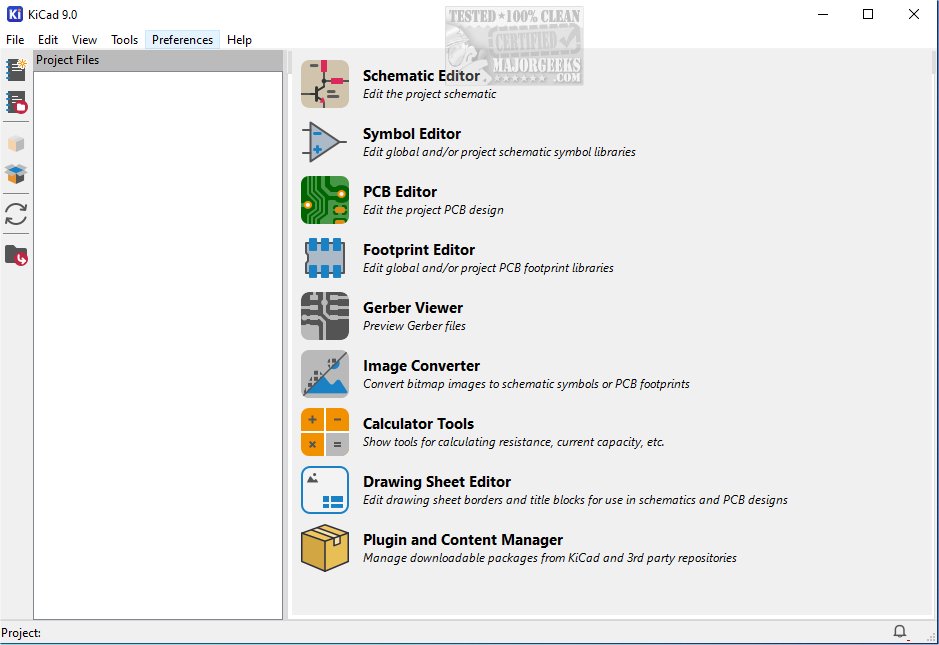
KiCad 10.0.4 has been released, enhancing the capabilities of this cross-platform, open-source suite designed for electronics design automation. KiCad simplifies the process of schematic capture and PCB (printed circuit board) layout, making it an invaluable tool for both hobbyists and professional engineers in the electronics field. The software is equipped to support various output formats, including Gerber files and IPC-2581, which are crucial for manufacturing processes.
KiCad allows users to create and edit electrical schematics that visually represent the connections and components of an electronic circuit. This feature is essential for understanding circuit functionality and planning electronic project layouts. The software offers an integrated workflow that ensures consistency and minimizes errors throughout the design process, from concept to production.
Users of KiCad can benefit from a wide range of tools and utilities. The layout features enable precise placement of components on the virtual board, while advanced routing capabilities allow for the connection of these components with traces that mimic real-life circuit paths. Users can also adjust critical parameters such as trace width and clearances to optimize electrical performance and manufacturability.
Once designs are complete, KiCad generates essential manufacturing files, including Gerber files and a Bill of Materials (BOM), facilitating the transition to production. Additional features, like a PCB calculator for trace width and current capacity calculations, and a built-in Gerber viewer for inspecting manufacturing files, enhance the overall design experience. Moreover, the integrated SPICE simulator allows for detailed circuit analysis, enabling users to validate their designs under various conditions.
KiCad is widely regarded for its robust features and user-friendly interface, making it a preferred choice for those involved in PCB design and electronic circuit development. The availability of a portable version through MajorGeeks adds to its accessibility. For newcomers, it is advisable to consult the provided documentation to ease the transition into using this powerful platform.
In summary, KiCad 10.0.4 offers an extensive suite of tools that empower users to design, simulate, and produce electronic circuits efficiently. Its continuous development and community support ensure it remains a leading choice in the electronics design field, fostering creativity and innovation in various projects. As technology evolves, future updates may further enhance KiCad's capabilities, keeping it at the forefront of electronics design automation
KiCad allows users to create and edit electrical schematics that visually represent the connections and components of an electronic circuit. This feature is essential for understanding circuit functionality and planning electronic project layouts. The software offers an integrated workflow that ensures consistency and minimizes errors throughout the design process, from concept to production.
Users of KiCad can benefit from a wide range of tools and utilities. The layout features enable precise placement of components on the virtual board, while advanced routing capabilities allow for the connection of these components with traces that mimic real-life circuit paths. Users can also adjust critical parameters such as trace width and clearances to optimize electrical performance and manufacturability.
Once designs are complete, KiCad generates essential manufacturing files, including Gerber files and a Bill of Materials (BOM), facilitating the transition to production. Additional features, like a PCB calculator for trace width and current capacity calculations, and a built-in Gerber viewer for inspecting manufacturing files, enhance the overall design experience. Moreover, the integrated SPICE simulator allows for detailed circuit analysis, enabling users to validate their designs under various conditions.
KiCad is widely regarded for its robust features and user-friendly interface, making it a preferred choice for those involved in PCB design and electronic circuit development. The availability of a portable version through MajorGeeks adds to its accessibility. For newcomers, it is advisable to consult the provided documentation to ease the transition into using this powerful platform.
In summary, KiCad 10.0.4 offers an extensive suite of tools that empower users to design, simulate, and produce electronic circuits efficiently. Its continuous development and community support ensure it remains a leading choice in the electronics design field, fostering creativity and innovation in various projects. As technology evolves, future updates may further enhance KiCad's capabilities, keeping it at the forefront of electronics design automation
KiCad 10.0.4 released
KiCad: A cross-platform, Open Source suite for electronics design automation that effectively manages schematic capture and PCB (printed circuit board) layout. MajorGeeks also has the portable version.