Kdenlive 25.12.0 has been officially released, focusing heavily on enhancing user experience based on feedback collected during the Berlin sprint in September. The update introduces a range of significant improvements designed to streamline workflow and make the software more intuitive for users.
One of the standout features is a new docking system that allows for more efficient widget management, enabling users to group and organize their workspace effectively. Additionally, project-specific layouts can now be saved within individual files, though existing custom layouts will need to be recreated due to compatibility challenges. A welcome screen has also been added to assist newcomers, providing shortcuts and fostering an evolving user experience based on ongoing feedback.
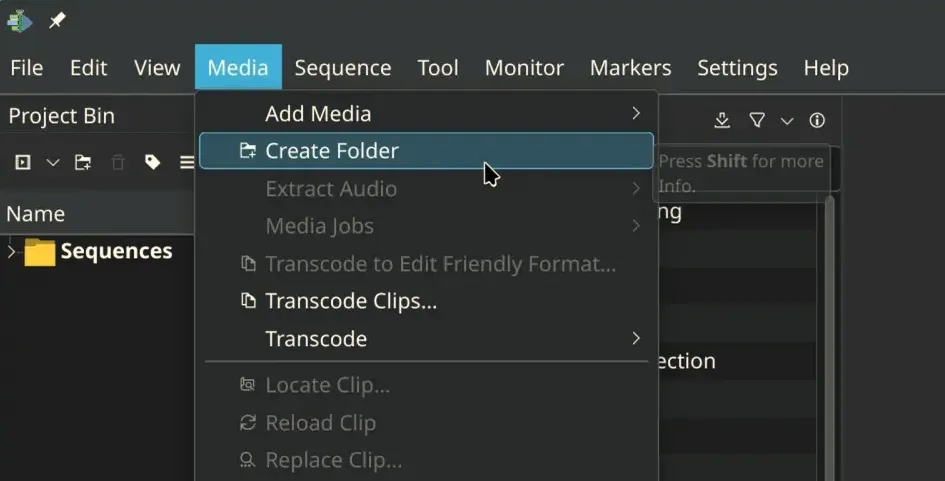
The interface has seen a comprehensive restructuring, particularly in file-related menus, making actions like "Render" and "Project Settings" more accessible and aligned with professional editing practices. Although long-time users might find the changes initially disorienting, future updates are anticipated to further refine these adjustments. Moreover, the software's enhanced translation support makes Kdenlive more accessible to users across different languages.
For users focused on vertical video editing, Kdenlive now offers a dedicated vertical layout along with safe area markers. The audio monitor view has been revamped, featuring a minimap that allows for precise zooming on audio segments, while the timeline guides have been rebranded to display duration and can be adjusted from a dedicated list.
On the technical side, the release addresses over 15 bug fixes, including resolving crash issues and rendering failures on Windows when usernames include special characters. It also tackles project corruption issues that arose when copying elements between files. Improvements in packaging have enhanced VAAPI support in AppImage, enabling faster decoding and rendering, along with several binary updates, including Qt 6.10.1 and FFmpeg 8.0, all contributing to a smoother overall user experience.
In summary, Kdenlive 25.12.0 marks a significant step forward in usability and performance, with a strong focus on user feedback and continuous improvement. For additional details, users can refer to the official announcement. Moving forward, Kdenlive is expected to further refine its features and interface based on user experience, solidifying its position as a go-to tool for video editing
One of the standout features is a new docking system that allows for more efficient widget management, enabling users to group and organize their workspace effectively. Additionally, project-specific layouts can now be saved within individual files, though existing custom layouts will need to be recreated due to compatibility challenges. A welcome screen has also been added to assist newcomers, providing shortcuts and fostering an evolving user experience based on ongoing feedback.
The interface has seen a comprehensive restructuring, particularly in file-related menus, making actions like "Render" and "Project Settings" more accessible and aligned with professional editing practices. Although long-time users might find the changes initially disorienting, future updates are anticipated to further refine these adjustments. Moreover, the software's enhanced translation support makes Kdenlive more accessible to users across different languages.
For users focused on vertical video editing, Kdenlive now offers a dedicated vertical layout along with safe area markers. The audio monitor view has been revamped, featuring a minimap that allows for precise zooming on audio segments, while the timeline guides have been rebranded to display duration and can be adjusted from a dedicated list.
On the technical side, the release addresses over 15 bug fixes, including resolving crash issues and rendering failures on Windows when usernames include special characters. It also tackles project corruption issues that arose when copying elements between files. Improvements in packaging have enhanced VAAPI support in AppImage, enabling faster decoding and rendering, along with several binary updates, including Qt 6.10.1 and FFmpeg 8.0, all contributing to a smoother overall user experience.
In summary, Kdenlive 25.12.0 marks a significant step forward in usability and performance, with a strong focus on user feedback and continuous improvement. For additional details, users can refer to the official announcement. Moving forward, Kdenlive is expected to further refine its features and interface based on user experience, solidifying its position as a go-to tool for video editing
Kdenlive 25.12.0 released
Kdenlive 25.12.0 has been released, emphasizing user experience improvements based on feedback from the Berlin sprint in September. Key updates include a new docking system for widget management, saved layouts per project, and a new welcome screen for users. The interface has been restructured for intuitiveness, particularly with file-related menus. Additional features include a vertical layout for editing vertical videos, enhanced audio monitor views, and rebranded timeline guides. The update also addresses over 15 bug fixes, such as crash resolutions and rendering issues on Windows, while enhancing VAAPI support for improved performance.