Kalmuri 4.1.6 has been released, introducing an intuitive screen capture application designed for ease of use. This versatile tool allows users to capture and record screen activity effortlessly, functioning both as a snapshot utility and a screen recorder. With a discreet presence in the system tray, Kalmuri integrates seamlessly into your workflow without interruptions.
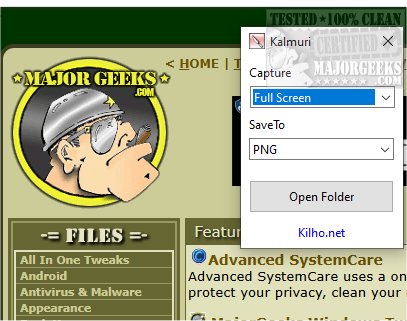
The application boasts a straightforward interface featuring two drop-down menus: the first for selecting the desired action and the second for determining the output format. While the initial display may seem limited, a right-click on the main window reveals a comprehensive menu that unlocks the full range of features. Users can customize file naming, adjust sound settings, set hotkeys for screen capture, and choose the default save location for images and videos.
Kalmuri supports various output formats including PNG for high-quality images, JPG for compressed photos, GIF for animations, and BMP for uncompressed images. This flexibility allows users to select the best format for their specific needs. Screenshots can be saved locally, sent to the clipboard, printed, or uploaded directly to Imgbox. Additionally, Kalmuri includes a built-in browser for capturing snapshots of websites.
As a screen recorder, Kalmuri offers the option to record videos in MP4 format, allowing users to capture the entire screen or a specified area, complete with cursor inclusion. This feature is particularly useful for creating video tutorials.
Overall, Kalmuri stands out as an efficient, user-friendly tool that simplifies the process of screen capturing. Its minimalistic design ensures that users can navigate the application with ease, making it a valuable resource for capturing presentations, tutorials, or important information.
To further enhance user experience, future updates could consider adding advanced features such as cloud storage integration, collaborative tools for sharing captures in real-time, and enhanced editing capabilities for recorded videos. These additions would cater to the growing demand for comprehensive screen capture solutions among professionals and content creators alike
The application boasts a straightforward interface featuring two drop-down menus: the first for selecting the desired action and the second for determining the output format. While the initial display may seem limited, a right-click on the main window reveals a comprehensive menu that unlocks the full range of features. Users can customize file naming, adjust sound settings, set hotkeys for screen capture, and choose the default save location for images and videos.
Kalmuri supports various output formats including PNG for high-quality images, JPG for compressed photos, GIF for animations, and BMP for uncompressed images. This flexibility allows users to select the best format for their specific needs. Screenshots can be saved locally, sent to the clipboard, printed, or uploaded directly to Imgbox. Additionally, Kalmuri includes a built-in browser for capturing snapshots of websites.
As a screen recorder, Kalmuri offers the option to record videos in MP4 format, allowing users to capture the entire screen or a specified area, complete with cursor inclusion. This feature is particularly useful for creating video tutorials.
Overall, Kalmuri stands out as an efficient, user-friendly tool that simplifies the process of screen capturing. Its minimalistic design ensures that users can navigate the application with ease, making it a valuable resource for capturing presentations, tutorials, or important information.
To further enhance user experience, future updates could consider adding advanced features such as cloud storage integration, collaborative tools for sharing captures in real-time, and enhanced editing capabilities for recorded videos. These additions would cater to the growing demand for comprehensive screen capture solutions among professionals and content creators alike
Kalmuri 4.1.6 released
Capture and record your screen with Kalmuri, the easy-to-use screen capture app.