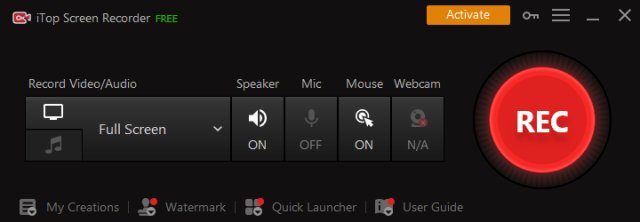
iTop Screen Recorder 7.0.0.3776 has been released, offering users a free and user-friendly solution for screen recording and basic video editing. This software allows users to easily capture their screens, whether it be full-screen, a specific window, or a selected region, while also recording audio from both the microphone and speakers. It supports high-resolution video recording, including 4K, and can include webcam overlays for a more comprehensive video experience.
The recorder is particularly useful for gamers, enabling the capture of high-quality gameplay footage from popular games like Minecraft, PUBG, Roblox, World of Warcraft, and League of Legends at an impressive 60 frames per second without frame drops. Additionally, it features mouse click effects, making it an excellent tool for creating engaging video content for webinars, presentations, and tutorials.
Users can save their recordings in various formats including MP4, AVI, FLV, MKV, MOV, TS, and GIF, and can also take screenshots using a hotkey during recording sessions. The built-in lightweight video editor allows for basic editing functions such as trimming, cutting, and splitting videos, while leveraging GPU hardware acceleration to enhance performance and stability.
Moreover, iTop Screen Recorder facilitates easy sharing of videos to popular platforms like YouTube, Facebook, Instagram, and Twitch, streamlining the process of distributing content.
In summary, iTop Screen Recorder is an ideal choice for anyone seeking a straightforward yet effective tool for screen recording and video editing, perfect for content creators, educators, and gamers alike. Its combination of functionality, ease of use, and sharing capabilities make it a versatile addition to anyone's software toolkit
The recorder is particularly useful for gamers, enabling the capture of high-quality gameplay footage from popular games like Minecraft, PUBG, Roblox, World of Warcraft, and League of Legends at an impressive 60 frames per second without frame drops. Additionally, it features mouse click effects, making it an excellent tool for creating engaging video content for webinars, presentations, and tutorials.
Users can save their recordings in various formats including MP4, AVI, FLV, MKV, MOV, TS, and GIF, and can also take screenshots using a hotkey during recording sessions. The built-in lightweight video editor allows for basic editing functions such as trimming, cutting, and splitting videos, while leveraging GPU hardware acceleration to enhance performance and stability.
Moreover, iTop Screen Recorder facilitates easy sharing of videos to popular platforms like YouTube, Facebook, Instagram, and Twitch, streamlining the process of distributing content.
In summary, iTop Screen Recorder is an ideal choice for anyone seeking a straightforward yet effective tool for screen recording and video editing, perfect for content creators, educators, and gamers alike. Its combination of functionality, ease of use, and sharing capabilities make it a versatile addition to anyone's software toolkit
iTop Screen Recorder 7.0.0.3776 released
iTop Screen Recorder is a free and easy-to-use screen recorder with a light built-in video editor. It enables easy screen recording, screen capture, and video editing.