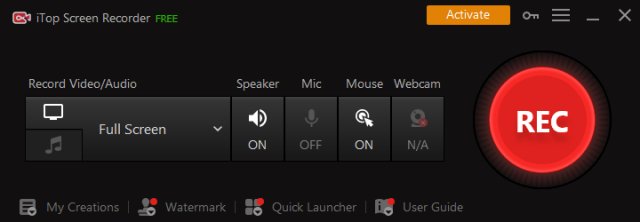
iTop Screen Recorder has released version 6.4.0.64, enhancing its reputation as a free and user-friendly screen recording tool equipped with a built-in video editor. This software allows users to capture their screens, whether for recording tutorials, gaming sessions, or video conferences, with the flexibility to record in high-quality formats up to 4K. Users can capture full-screen, specific windows, or selected areas, along with audio from both their microphone and speakers, and can even include webcam footage in their recordings.
The software is particularly beneficial for gamers, as it supports the recording of various popular 2D and 3D games, such as Minecraft and League of Legends, at high frame rates (up to 60 FPS) without any frame drops. To enhance the viewing experience, iTop Screen Recorder provides features like mouse click effects, allowing users to highlight cursor movements and animate mouse clicks—ideal for tutorials and presentations.
When it comes to saving and sharing recorded content, users have a variety of popular video formats to choose from, including MP4, AVI, and GIF. Furthermore, while recording, users can take screenshots with ease, and the software includes basic video editing functionalities to trim, cut, and split recordings. The incorporation of GPU hardware acceleration ensures that both recording and editing processes remain efficient and stable.
Additionally, iTop Screen Recorder facilitates quick sharing options, enabling users to upload their videos directly to platforms such as YouTube, Facebook, Instagram, and Twitch. Overall, the software stands out as an excellent choice for individuals seeking a straightforward solution for screen recording, basic video editing, and seamless sharing on social media.
Extended Overview: The latest version of iTop Screen Recorder not only caters to casual users but also appeals to educators, content creators, and gamers seeking to produce high-quality videos. The combination of screen recording and editing features allows users to create polished content without needing extensive technical skills. The software's intuitive interface and diverse functionality make it accessible for beginners, while its advanced capabilities can meet the demands of more experienced users. As video content continues to dominate online platforms, tools like iTop Screen Recorder are becoming increasingly essential for effective communication and entertainment in the digital age
The software is particularly beneficial for gamers, as it supports the recording of various popular 2D and 3D games, such as Minecraft and League of Legends, at high frame rates (up to 60 FPS) without any frame drops. To enhance the viewing experience, iTop Screen Recorder provides features like mouse click effects, allowing users to highlight cursor movements and animate mouse clicks—ideal for tutorials and presentations.
When it comes to saving and sharing recorded content, users have a variety of popular video formats to choose from, including MP4, AVI, and GIF. Furthermore, while recording, users can take screenshots with ease, and the software includes basic video editing functionalities to trim, cut, and split recordings. The incorporation of GPU hardware acceleration ensures that both recording and editing processes remain efficient and stable.
Additionally, iTop Screen Recorder facilitates quick sharing options, enabling users to upload their videos directly to platforms such as YouTube, Facebook, Instagram, and Twitch. Overall, the software stands out as an excellent choice for individuals seeking a straightforward solution for screen recording, basic video editing, and seamless sharing on social media.
Extended Overview: The latest version of iTop Screen Recorder not only caters to casual users but also appeals to educators, content creators, and gamers seeking to produce high-quality videos. The combination of screen recording and editing features allows users to create polished content without needing extensive technical skills. The software's intuitive interface and diverse functionality make it accessible for beginners, while its advanced capabilities can meet the demands of more experienced users. As video content continues to dominate online platforms, tools like iTop Screen Recorder are becoming increasingly essential for effective communication and entertainment in the digital age
iTop Screen Recorder 6.4.0.64 released
iTop Screen Recorder is a free and easy-to-use screen recorder with a light built-in video editor. It enables easy screen recording, screen capture, and video editing.