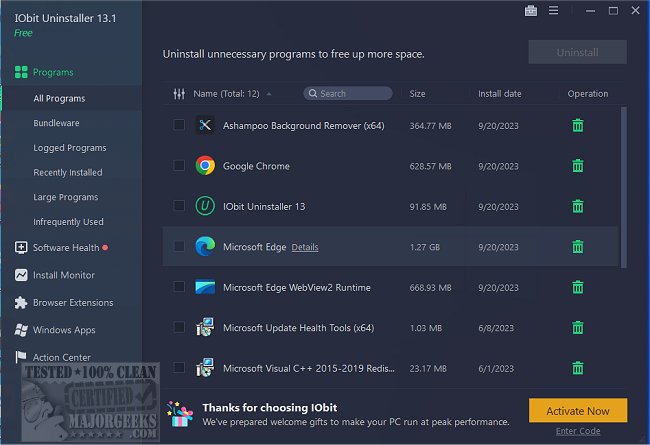
IObit Uninstaller has released version 16.0.0.34, a robust tool designed to thoroughly eliminate unwanted software from your computer, including traditional programs, Windows apps, and stubborn browser extensions. Unlike the built-in Windows uninstaller, which often leaves residual files and registry entries, IObit Uninstaller ensures a complete removal process.
- Bundled Software Detection: The tool can spot and remove bundled software during installation, preventing unwanted toolbars and adware from taking up residence on your system.
- Real-Time Installation Monitoring: This feature tracks changes made by newly installed software, allowing for a complete rollback when you decide to uninstall, ensuring no remnants are left behind.
- Removal of Windows Apps and Browser Extensions: IObit Uninstaller is capable of removing built-in Windows applications and troublesome browser plugins that resist conventional uninstall methods.
- Software Health Management and Updates: It offers a Software Health feature to help manage app permissions, block intrusive pop-ups, and automatically update popular programs to keep them secure and running smoothly.
- Thorough removal of programs, including those that are difficult to uninstall.
- Ability to detect and remove bundled software.
- Real-time installation monitoring allows for complete rollback.
- Capable of uninstalling Windows apps and browser extensions.
- Automatic updates for supported applications.
Cons:
- The free version has limited features, requiring the Pro version for advanced cleaning.
- Some legitimate software may be mistakenly flagged as bundled software.
- The Software Updater feature does not support every application.
Key Features:
- Full Program Removal: It effectively identifies and removes stubborn or broken applications, cleaning out associated files, folders, and registry entries that can clutter your system.- Bundled Software Detection: The tool can spot and remove bundled software during installation, preventing unwanted toolbars and adware from taking up residence on your system.
- Real-Time Installation Monitoring: This feature tracks changes made by newly installed software, allowing for a complete rollback when you decide to uninstall, ensuring no remnants are left behind.
- Removal of Windows Apps and Browser Extensions: IObit Uninstaller is capable of removing built-in Windows applications and troublesome browser plugins that resist conventional uninstall methods.
- Software Health Management and Updates: It offers a Software Health feature to help manage app permissions, block intrusive pop-ups, and automatically update popular programs to keep them secure and running smoothly.
Pros and Cons:
Pros:- Thorough removal of programs, including those that are difficult to uninstall.
- Ability to detect and remove bundled software.
- Real-time installation monitoring allows for complete rollback.
- Capable of uninstalling Windows apps and browser extensions.
- Automatic updates for supported applications.
Cons:
- The free version has limited features, requiring the Pro version for advanced cleaning.
- Some legitimate software may be mistakenly flagged as bundled software.
- The Software Updater feature does not support every application.
Conclusion:
IObit Uninstaller is a powerful and user-friendly tool for anyone looking to maintain a clean and efficient PC. Its comprehensive approach to software removal, coupled with features like real-time monitoring and automatic updates, makes it a standout choice for users who want to avoid the clutter associated with traditional uninstallers. The ability to handle stubborn programs and bundled software adds to its appeal, making it a valuable addition to any tech-savvy individual's toolkit.Extensions:
With the rapid evolution of software and the increasing complexity of applications, tools like IObit Uninstaller are more essential than ever. As users install and uninstall various programs, the need for efficient cleanup solutions becomes critical to maintain system performance. Future updates could potentially expand the range of supported applications for the automatic updater and enhance the user interface for even greater accessibility. Furthermore, incorporating user feedback to improve the accuracy of bundled software detection could elevate the user experience, ensuring that legitimate programs are not incorrectly flagged. As technology continues to advance, the demand for such comprehensive solutions will likely grow, positioning IObit Uninstaller as a key player in the software management spaceIObit Uninstaller 16.0.0.34 released
IObit Uninstaller helps you remove unwanted programs, Windows apps, and browser plug-ins/toolbars entirely, even when Windows Add or Remove Programs fails.