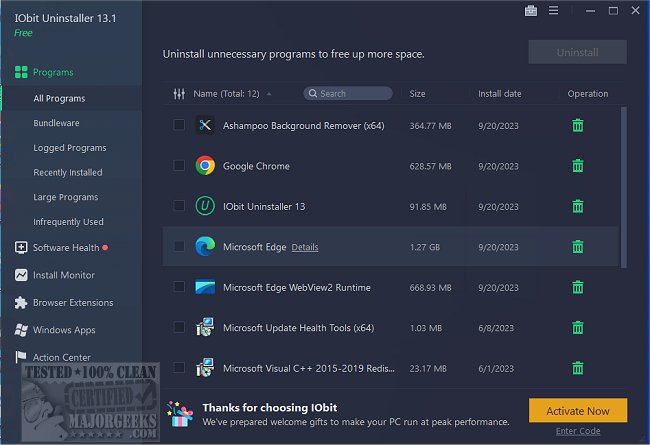
IObit has released version 15.3.0.1 of its uninstaller software, IObit Uninstaller. This application is designed to completely remove unwanted programs, Windows apps, and browser extensions/toolbars, especially in cases where the native Windows Add or Remove Programs feature fails.
IObit Uninstaller goes beyond simple program removal; it acts as a comprehensive cleanup tool to eliminate leftover files, registry entries, and hidden junk that might remain after uninstallation. This software effectively handles stubborn and broken programs that do not uninstall properly, ensuring that all associated files and registry entries are also removed to prevent system slowdowns.
A notable feature of IObit Uninstaller is its real-time installation monitoring capability. This function tracks changes made by newly installed software, allowing the user to roll back these modifications completely when they choose to uninstall the program. This is particularly useful for testing new applications and ensuring that no remnants are left behind after uninstallation.
In addition to third-party programs, IObit Uninstaller can also remove Windows apps, Universal Windows Platform (UWP) apps, and troublesome browser extensions, giving users greater control over their system’s software environment.
The software further includes a Software Health feature, which helps manage software permissions, blocks annoying pop-ups, cleans unnecessary files, and removes potentially malicious software and browser extensions. It also features a built-in Software Updater that automatically keeps popular applications up to date, eliminating the need for manual updates.
Pros and Cons:
Pros:
- Completely removes programs, including stubborn or broken software.
- Detects and uninstalls bundled software before it can cause issues.
- Offers real-time installation monitoring for complete rollback capability.
- Capable of removing Windows apps, browser extensions, and toolbars.
- Built-in Software Updater keeps applications current automatically.
- Cleans up leftover files and registry entries that Windows leaves behind.
Cons:
- The free version has limited features; advanced cleanup requires the Pro version.
- Some legitimate software might be flagged as bundled, requiring user attention.
- Software Updater does not support every application.
Geek Verdict:
IObit Uninstaller is highly regarded as an excellent choice for users seeking to maintain a clean PC. Unlike the built-in Windows uninstaller, IObit ensures that all traces of uninstalled software are eradicated. Its capabilities in removing stubborn programs, detecting bundled software, and rolling back installations position it as one of the most effective uninstaller tools on the market.
Extension:
Given the ongoing advancements in software management tools, future iterations of IObit Uninstaller may include enhanced AI-driven features for smarter detection of unwanted software and optimization suggestions based on user behavior. Additionally, integration with cloud-based services for backup and restoration of software configurations could further enhance user experience, ensuring that users not only clean their systems effectively but also maintain a seamless transition when updating or uninstalling applications. As digital environments grow more complex, tools like IObit Uninstaller will likely evolve to address new challenges in software management and cybersecurity
IObit Uninstaller goes beyond simple program removal; it acts as a comprehensive cleanup tool to eliminate leftover files, registry entries, and hidden junk that might remain after uninstallation. This software effectively handles stubborn and broken programs that do not uninstall properly, ensuring that all associated files and registry entries are also removed to prevent system slowdowns.
A notable feature of IObit Uninstaller is its real-time installation monitoring capability. This function tracks changes made by newly installed software, allowing the user to roll back these modifications completely when they choose to uninstall the program. This is particularly useful for testing new applications and ensuring that no remnants are left behind after uninstallation.
In addition to third-party programs, IObit Uninstaller can also remove Windows apps, Universal Windows Platform (UWP) apps, and troublesome browser extensions, giving users greater control over their system’s software environment.
The software further includes a Software Health feature, which helps manage software permissions, blocks annoying pop-ups, cleans unnecessary files, and removes potentially malicious software and browser extensions. It also features a built-in Software Updater that automatically keeps popular applications up to date, eliminating the need for manual updates.
Pros and Cons:
Pros:
- Completely removes programs, including stubborn or broken software.
- Detects and uninstalls bundled software before it can cause issues.
- Offers real-time installation monitoring for complete rollback capability.
- Capable of removing Windows apps, browser extensions, and toolbars.
- Built-in Software Updater keeps applications current automatically.
- Cleans up leftover files and registry entries that Windows leaves behind.
Cons:
- The free version has limited features; advanced cleanup requires the Pro version.
- Some legitimate software might be flagged as bundled, requiring user attention.
- Software Updater does not support every application.
Geek Verdict:
IObit Uninstaller is highly regarded as an excellent choice for users seeking to maintain a clean PC. Unlike the built-in Windows uninstaller, IObit ensures that all traces of uninstalled software are eradicated. Its capabilities in removing stubborn programs, detecting bundled software, and rolling back installations position it as one of the most effective uninstaller tools on the market.
Extension:
Given the ongoing advancements in software management tools, future iterations of IObit Uninstaller may include enhanced AI-driven features for smarter detection of unwanted software and optimization suggestions based on user behavior. Additionally, integration with cloud-based services for backup and restoration of software configurations could further enhance user experience, ensuring that users not only clean their systems effectively but also maintain a seamless transition when updating or uninstalling applications. As digital environments grow more complex, tools like IObit Uninstaller will likely evolve to address new challenges in software management and cybersecurity
IObit Uninstaller 15.3.0.1 released
IObit Uninstaller helps you remove unwanted programs, Windows apps, and browser plug-ins/toolbars entirely, even when Windows Add or Remove Programs fails.