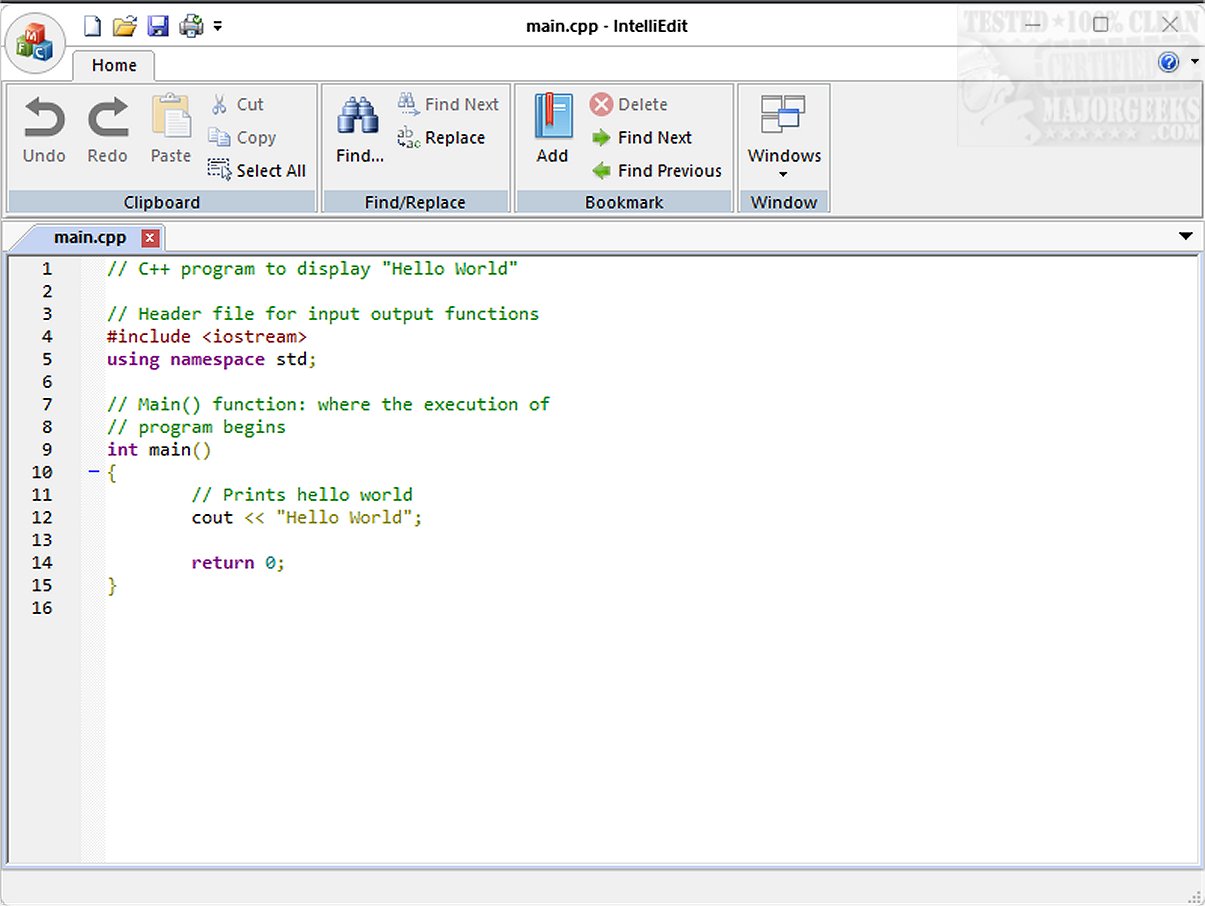
IntelliEdit 1.15 has been released, introducing an enhanced text editing experience that serves as a powerful alternative to the standard Notepad. This versatile open-source editor is equipped with a fast-editing engine and supports a multitude of programming languages from the start, enabling users to write both plain text and code effectively.
IntelliEdit offers a variety of functionalities, including:
- Syntax Highlighting: This feature improves code readability by visually distinguishing keywords, variables, and other elements based on their roles in the code.
- Advanced Search-and-Replace: Users can utilize regular expressions to perform complex search-and-replace operations, making it easier to find and modify text.
- Tabbed Interface: The ability to manage multiple files in tabs allows for seamless navigation and reduces the clutter typically associated with multiple open windows.
- Bookmark Functionality: Users can mark specific lines in documents, which is especially helpful for lengthy texts, facilitating easier navigation through sections of interest.
While the interface may appear somewhat outdated, it is intentionally designed for those who prioritize functionality over aesthetics. The focus is on providing users with practical tools that enhance the editing experience, rather than on trendy design elements.
IntelliEdit is particularly beneficial for programmers, as it utilizes the Scintilla engine, which greatly enhances its capabilities compared to Notepad. It supports syntax highlighting for a wide range of programming languages such as CMake, C/C++, JavaScript, PHP, Markdown, MATLAB, HTML, and R.
Overall, IntelliEdit stands out as a robust tool for users who seek a feature-rich text editor that prioritizes utility and efficiency. It serves as a valuable ally in both coding and general text editing tasks, making it an excellent choice for anyone looking to enhance their editing productivity. For those interested in exploring IntelliEdit further, the developer's GitHub repository offers additional insights and resources to get started.
As IntelliEdit continues to evolve, future updates may introduce even more features, such as enhanced collaboration tools, integration with cloud services for file management, and improved customization options to cater to individual user preferences. The commitment to open-source development ensures that the community can contribute to its growth, potentially leading to a more expansive set of functionalities that can meet the diverse needs of users across various domains
Key Features of IntelliEdit
IntelliEdit offers a variety of functionalities, including:
- Syntax Highlighting: This feature improves code readability by visually distinguishing keywords, variables, and other elements based on their roles in the code.
- Advanced Search-and-Replace: Users can utilize regular expressions to perform complex search-and-replace operations, making it easier to find and modify text.
- Tabbed Interface: The ability to manage multiple files in tabs allows for seamless navigation and reduces the clutter typically associated with multiple open windows.
- Bookmark Functionality: Users can mark specific lines in documents, which is especially helpful for lengthy texts, facilitating easier navigation through sections of interest.
User Interface and Usability
While the interface may appear somewhat outdated, it is intentionally designed for those who prioritize functionality over aesthetics. The focus is on providing users with practical tools that enhance the editing experience, rather than on trendy design elements.
Coding Capabilities
IntelliEdit is particularly beneficial for programmers, as it utilizes the Scintilla engine, which greatly enhances its capabilities compared to Notepad. It supports syntax highlighting for a wide range of programming languages such as CMake, C/C++, JavaScript, PHP, Markdown, MATLAB, HTML, and R.
Conclusion
Overall, IntelliEdit stands out as a robust tool for users who seek a feature-rich text editor that prioritizes utility and efficiency. It serves as a valuable ally in both coding and general text editing tasks, making it an excellent choice for anyone looking to enhance their editing productivity. For those interested in exploring IntelliEdit further, the developer's GitHub repository offers additional insights and resources to get started.
Future Prospects
As IntelliEdit continues to evolve, future updates may introduce even more features, such as enhanced collaboration tools, integration with cloud services for file management, and improved customization options to cater to individual user preferences. The commitment to open-source development ensures that the community can contribute to its growth, potentially leading to a more expansive set of functionalities that can meet the diverse needs of users across various domains
IntelliEdit 1.15 released
IntelliEdit is a versatile text editor that serves as an enhanced alternative to the standard Notepad. It features a fast-editing engine and supports a wide array of programming languages right out of the box, allowing users to write both plain text and code.