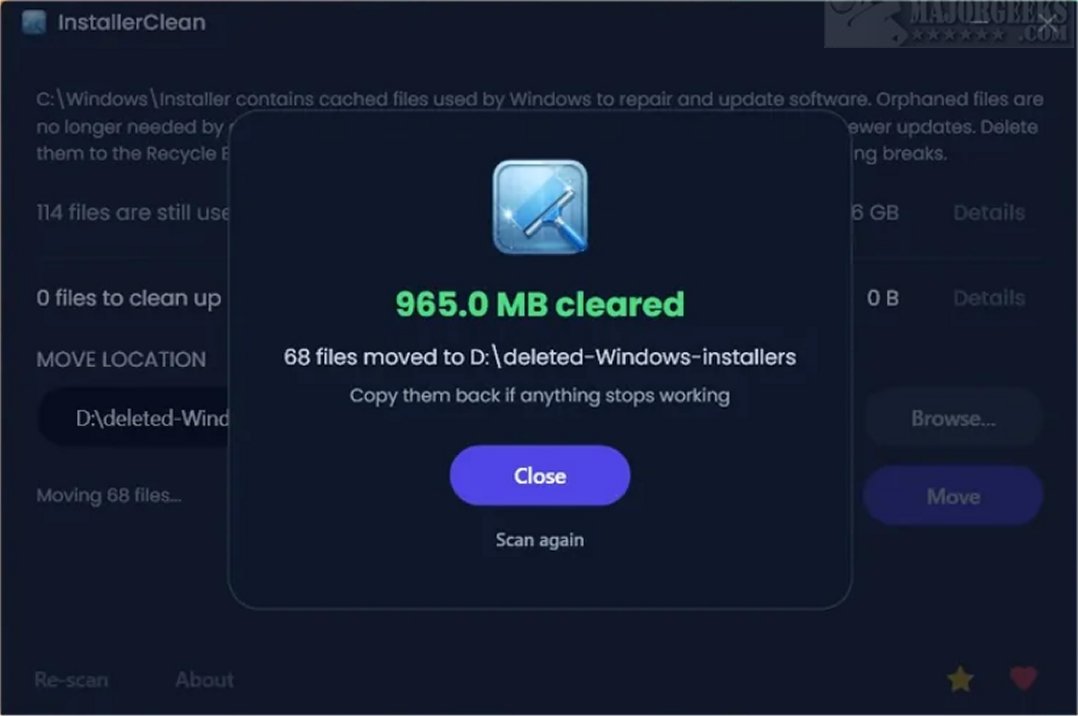
InstallerClean is a newly released tool designed to clean the often-overlooked C:\Windows\Installer folder, which can accumulate an excessive amount of data over time. On many systems, this folder can grow to tens of gigabytes, and in some cases, particularly with software like Adobe Acrobat, it may exceed 100 GB. InstallerClean emerges as a modern alternative to PatchCleaner, a previously popular utility that has not been updated since 2016.
The Importance of Cleaning Residual Files
When new applications are installed or Windows updates are applied, various additional files are created and stored in the Installer folder. As these files accumulate, they can consume significant storage space unknowingly. InstallerClean is specifically designed to identify and remove these leftover files, helping to optimize storage and system performance.
User-Friendly Design
InstallerClean offers a clean and intuitive user interface that simplifies the cleanup process. Upon launching the tool, users are presented with a list of detected installer files, complete with size information that aids in identifying candidates for removal. After the cleanup, the tool transparently displays the total reclaimed storage space, providing a straightforward prompt to finalize the operation.
The application runs a scan for leftover files automatically upon system startup, but it requires explicit user confirmation for any file deletions or movements. This feature ensures users maintain control over what is removed from their system. Before making any changes, InstallerClean shows the number of flagged files and their cumulative size, allowing for informed decision-making.
Verification and Safety Features
One of the standout features of InstallerClean is its verification process. After scanning, the tool cross-references identified files with the operating system to determine which items are safe to delete. This communication with Windows ensures that the deletions are accurate and not based on guesswork. Users are also encouraged to create a current restore point before performing any cleanup as a precautionary measure.
Targeting Orphaned Files and Superseded Patches
InstallerClean is particularly effective in identifying and removing two specific types of unnecessary files: orphaned files (remnants from unlinked previous installations) and superseded patches (older updates replaced by newer ones). By targeting these outdated files, InstallerClean helps clear up valuable storage space.
Download Options Available
InstallerClean offers three download options:
1. InstallerClean: The standard Windows installer, ideal for most users.
2. InstallerClean Portable: A self-contained executable that requires no installation.
3. InstallerClean Slim: For users who already have the .NET 10 Desktop Runtime; installation of this runtime is required for functionality.
Conclusion: A Practical Solution for System Maintenance
InstallerClean is an excellent tool for users looking to periodically tidy up their systems or for those reinstalling multiple applications. While these extraneous files do not accumulate as frequently as one might think, occasional use of InstallerClean can help maintain system efficiency. After cleanup, the tool presents a completion screen detailing the files found and removed, allowing users to review their cleanup efforts comprehensively.
Future Enhancements and User Engagement
Looking ahead, the developers of InstallerClean may consider introducing additional features such as scheduled cleaning options, enhanced reporting capabilities, and integration with cloud storage solutions for backup purposes. Engaging with user feedback through forums or surveys could also provide insights for future updates, ensuring that InstallerClean continues to meet the evolving needs of its user base
The Importance of Cleaning Residual Files
When new applications are installed or Windows updates are applied, various additional files are created and stored in the Installer folder. As these files accumulate, they can consume significant storage space unknowingly. InstallerClean is specifically designed to identify and remove these leftover files, helping to optimize storage and system performance.
User-Friendly Design
InstallerClean offers a clean and intuitive user interface that simplifies the cleanup process. Upon launching the tool, users are presented with a list of detected installer files, complete with size information that aids in identifying candidates for removal. After the cleanup, the tool transparently displays the total reclaimed storage space, providing a straightforward prompt to finalize the operation.
The application runs a scan for leftover files automatically upon system startup, but it requires explicit user confirmation for any file deletions or movements. This feature ensures users maintain control over what is removed from their system. Before making any changes, InstallerClean shows the number of flagged files and their cumulative size, allowing for informed decision-making.
Verification and Safety Features
One of the standout features of InstallerClean is its verification process. After scanning, the tool cross-references identified files with the operating system to determine which items are safe to delete. This communication with Windows ensures that the deletions are accurate and not based on guesswork. Users are also encouraged to create a current restore point before performing any cleanup as a precautionary measure.
Targeting Orphaned Files and Superseded Patches
InstallerClean is particularly effective in identifying and removing two specific types of unnecessary files: orphaned files (remnants from unlinked previous installations) and superseded patches (older updates replaced by newer ones). By targeting these outdated files, InstallerClean helps clear up valuable storage space.
Download Options Available
InstallerClean offers three download options:
1. InstallerClean: The standard Windows installer, ideal for most users.
2. InstallerClean Portable: A self-contained executable that requires no installation.
3. InstallerClean Slim: For users who already have the .NET 10 Desktop Runtime; installation of this runtime is required for functionality.
Conclusion: A Practical Solution for System Maintenance
InstallerClean is an excellent tool for users looking to periodically tidy up their systems or for those reinstalling multiple applications. While these extraneous files do not accumulate as frequently as one might think, occasional use of InstallerClean can help maintain system efficiency. After cleanup, the tool presents a completion screen detailing the files found and removed, allowing users to review their cleanup efforts comprehensively.
Future Enhancements and User Engagement
Looking ahead, the developers of InstallerClean may consider introducing additional features such as scheduled cleaning options, enhanced reporting capabilities, and integration with cloud storage solutions for backup purposes. Engaging with user feedback through forums or surveys could also provide insights for future updates, ensuring that InstallerClean continues to meet the evolving needs of its user base
InstallerClean 1.6.0 released
InstallerClean is a tool designed to effectively clean the hidden C:\Windows\Installer folder, which can potentially accumulate significant data over time. On many systems, this folder can grow to tens of gigabytes, and in cases where Adobe Acrobat is installed, it may exceed 100 GB.