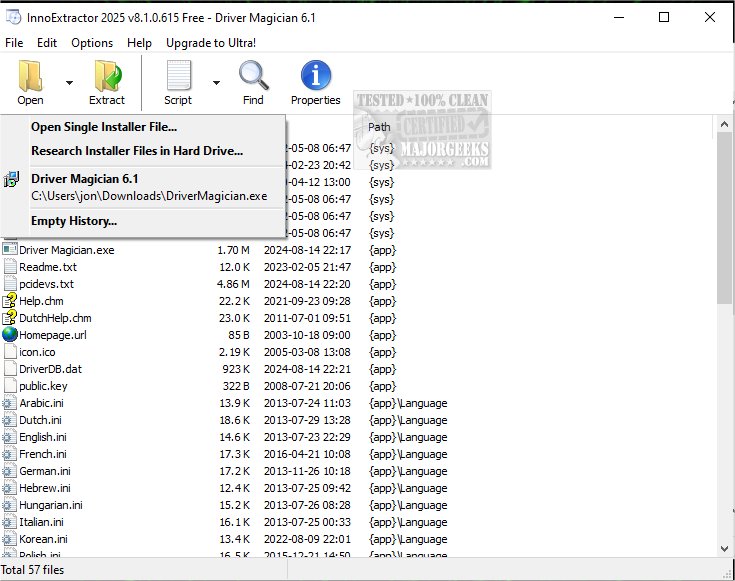
InnoExtractor version 12.1.0.182 has been released as a powerful tool for extracting contents from Inno Setup installers using InnoUnp technology. This software enables users to explore the internal components of installers thoroughly, making it possible to extract individual files to local storage or portable devices without requiring the actual installation process. This feature is particularly beneficial for users lacking administrative rights.
The application is designed with a user-friendly interface, allowing easy navigation through its features. Users can simply drag and drop an executable file onto the interface to preview its internal files and even conduct an automatic scan of folders to extract Inno Setup packages efficiently. InnoExtractor provides detailed file management capabilities, enabling users to view, inspect, and verify file attributes such as name, size, and location. Additionally, it allows for the extraction of files in their original formats or packaging them into ZIP archives or self-extracting modules.
Key features of InnoExtractor include:
- A straightforward graphical user interface (GUI).
- Drag-and-drop functionality for quick access to installer files.
- Options to extract embedded files and scripts to various formats.
- The ability to decompile installer scripts for advanced users.
- A built-in text viewer and script viewer with syntax highlighting.
- Support for searching files and handling encrypted installers.
- Integration with the Windows Explorer context menu for easy access.
InnoExtractor also offers additional functionalities, such as extracting setup file icons, decrypting password-protected installers, and managing cache effectively. It operates efficiently with minimal system resource usage, ensuring a smooth experience for users.
In summary, InnoExtractor 12.1.0.182 is an efficient tool for accessing and managing files within Inno Setup installers, equipped with a range of user-friendly features that enhance the extraction process. Users at any skill level will find it easy to utilize, making it an essential tool for software developers and IT professionals alike.
Extension: As software installation processes become increasingly complex, tools like InnoExtractor play a crucial role in allowing users to manage and manipulate installation packages effectively. The ability to extract files without executing the installer not only saves time but also provides valuable insights into what components are included in a software package. Furthermore, as cybersecurity concerns grow, having a built-in malware scanning feature enhances user confidence in the integrity of the extracted files. With continued updates, InnoExtractor is likely to expand its capabilities to support new file formats and security protocols, ensuring it remains a relevant tool in software management for years to come
The application is designed with a user-friendly interface, allowing easy navigation through its features. Users can simply drag and drop an executable file onto the interface to preview its internal files and even conduct an automatic scan of folders to extract Inno Setup packages efficiently. InnoExtractor provides detailed file management capabilities, enabling users to view, inspect, and verify file attributes such as name, size, and location. Additionally, it allows for the extraction of files in their original formats or packaging them into ZIP archives or self-extracting modules.
Key features of InnoExtractor include:
- A straightforward graphical user interface (GUI).
- Drag-and-drop functionality for quick access to installer files.
- Options to extract embedded files and scripts to various formats.
- The ability to decompile installer scripts for advanced users.
- A built-in text viewer and script viewer with syntax highlighting.
- Support for searching files and handling encrypted installers.
- Integration with the Windows Explorer context menu for easy access.
InnoExtractor also offers additional functionalities, such as extracting setup file icons, decrypting password-protected installers, and managing cache effectively. It operates efficiently with minimal system resource usage, ensuring a smooth experience for users.
In summary, InnoExtractor 12.1.0.182 is an efficient tool for accessing and managing files within Inno Setup installers, equipped with a range of user-friendly features that enhance the extraction process. Users at any skill level will find it easy to utilize, making it an essential tool for software developers and IT professionals alike.
Extension: As software installation processes become increasingly complex, tools like InnoExtractor play a crucial role in allowing users to manage and manipulate installation packages effectively. The ability to extract files without executing the installer not only saves time but also provides valuable insights into what components are included in a software package. Furthermore, as cybersecurity concerns grow, having a built-in malware scanning feature enhances user confidence in the integrity of the extracted files. With continued updates, InnoExtractor is likely to expand its capabilities to support new file formats and security protocols, ensuring it remains a relevant tool in software management for years to come
InnoExtractor 12.1.0.182 released
InnoExtractor is a software tool designed to extract the contents of Inno Setup installers utilizing InnoUnp technology.