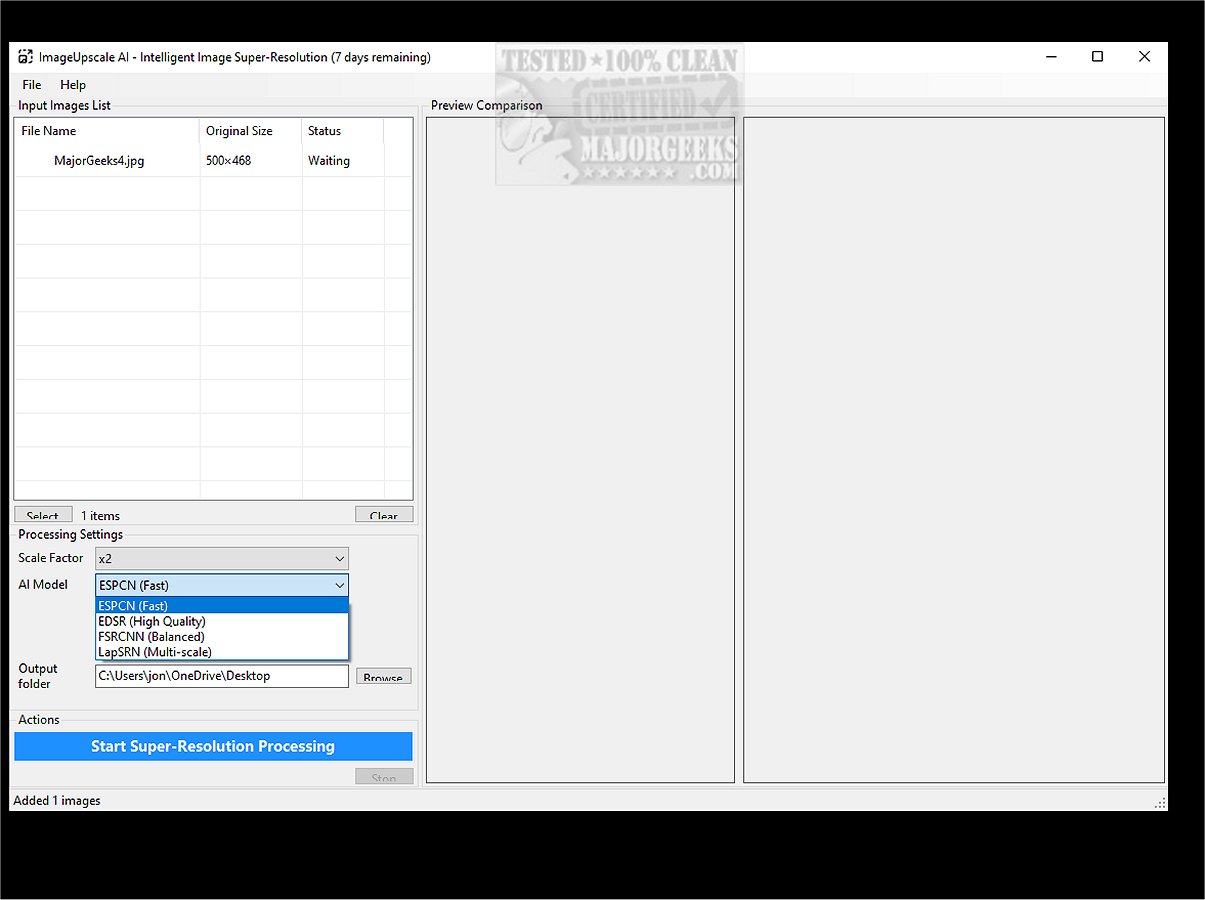
ImageUpscale AI is a powerful desktop application designed to convert low-resolution images into high-resolution ones, leveraging advanced artificial intelligence technology. This software offers a seamless user experience, allowing users to create visually striking images with ease.
Key Features and Capabilities
1. AI-Powered Image Enhancement: Utilizing sophisticated neural networks trained on millions of images, ImageUpscale AI employs super-resolution technology that enhances image quality by preserving intricate details and textures, resulting in a natural and polished appearance.
2. User-Friendly Interface: The application is designed with usability in mind, featuring drag-and-drop functionality, a before-and-after comparison viewer, and smart file management tools. Users can customize output settings and utilize one-click processing for quick enhancements.
3. Diverse Upscaling Options: Users can upscale images by 2x, 3x, 4x, or 8x, with an intelligent algorithm selection that ensures optimal results. The real-time preview feature enables side-by-side comparisons, making it suitable for enlarging photographs, artwork, and various digital content.
4. Performance Optimization: ImageUpscale AI is optimized for speed, featuring CPU acceleration for fast processing. Batch processing capabilities enable users to upscale multiple images simultaneously, while efficient memory management supports large files. Background processing with progress tracking enhances the overall user experience.
5. Advanced Functionalities:
- Batch Processing: Upscale entire folders of images at once.
- Smart File Management: Automatic naming and organization of files.
- Quality Comparison: Side-by-side previews with zoom functionality.
- Progress Monitoring: Real-time updates on processing status.
- Flexible Output: Users can choose destination folders and naming conventions.
6. Technical Highlights:
- Variety of AI models tailored for different image types.
- Focus on visual quality rather than mere pixel enlargement.
- Resource-efficient, optimized for modern multi-core processors.
- Reliable results across diverse image formats.
- Continuous updates to enhance algorithms.
7. Supported Formats:
- Input: JPG, JPEG, PNG, BMP, TIFF, WEBP.
- Output: Same as input while preserving quality.
- Batch Conversion: Process different formats in a single operation.
- Lossless Quality: Maintain original image integrity.
Target Audience
ImageUpscale AI is particularly beneficial for creative professionals such as photographers, digital artists, and tech enthusiasts who need to upscale old or low-resolution images. It is also ideal for family historians looking to restore cherished photographs, social media users seeking improved image quality, and hobbyists managing digital collections.
Conclusion
ImageUpscale AI empowers users to elevate their images through the transformative capabilities of artificial intelligence. By downloading ImageUpscale AI, users can access professional-quality image upscaling in just a few clicks. Whether for artistic, professional, or personal use, this tool serves as a gateway to stunning visual enhancements, making it an essential asset for anyone who values high-quality imagery.
Future Directions
As technology continues to evolve, future versions of ImageUpscale AI could integrate even more advanced algorithms, support additional file formats, and introduce features such as cloud processing for enhanced performance. Continuous user feedback may also drive enhancements in the interface and functionality, ensuring that the application remains relevant and effective in meeting the diverse needs of its users
Key Features and Capabilities
1. AI-Powered Image Enhancement: Utilizing sophisticated neural networks trained on millions of images, ImageUpscale AI employs super-resolution technology that enhances image quality by preserving intricate details and textures, resulting in a natural and polished appearance.
2. User-Friendly Interface: The application is designed with usability in mind, featuring drag-and-drop functionality, a before-and-after comparison viewer, and smart file management tools. Users can customize output settings and utilize one-click processing for quick enhancements.
3. Diverse Upscaling Options: Users can upscale images by 2x, 3x, 4x, or 8x, with an intelligent algorithm selection that ensures optimal results. The real-time preview feature enables side-by-side comparisons, making it suitable for enlarging photographs, artwork, and various digital content.
4. Performance Optimization: ImageUpscale AI is optimized for speed, featuring CPU acceleration for fast processing. Batch processing capabilities enable users to upscale multiple images simultaneously, while efficient memory management supports large files. Background processing with progress tracking enhances the overall user experience.
5. Advanced Functionalities:
- Batch Processing: Upscale entire folders of images at once.
- Smart File Management: Automatic naming and organization of files.
- Quality Comparison: Side-by-side previews with zoom functionality.
- Progress Monitoring: Real-time updates on processing status.
- Flexible Output: Users can choose destination folders and naming conventions.
6. Technical Highlights:
- Variety of AI models tailored for different image types.
- Focus on visual quality rather than mere pixel enlargement.
- Resource-efficient, optimized for modern multi-core processors.
- Reliable results across diverse image formats.
- Continuous updates to enhance algorithms.
7. Supported Formats:
- Input: JPG, JPEG, PNG, BMP, TIFF, WEBP.
- Output: Same as input while preserving quality.
- Batch Conversion: Process different formats in a single operation.
- Lossless Quality: Maintain original image integrity.
Target Audience
ImageUpscale AI is particularly beneficial for creative professionals such as photographers, digital artists, and tech enthusiasts who need to upscale old or low-resolution images. It is also ideal for family historians looking to restore cherished photographs, social media users seeking improved image quality, and hobbyists managing digital collections.
Conclusion
ImageUpscale AI empowers users to elevate their images through the transformative capabilities of artificial intelligence. By downloading ImageUpscale AI, users can access professional-quality image upscaling in just a few clicks. Whether for artistic, professional, or personal use, this tool serves as a gateway to stunning visual enhancements, making it an essential asset for anyone who values high-quality imagery.
Future Directions
As technology continues to evolve, future versions of ImageUpscale AI could integrate even more advanced algorithms, support additional file formats, and introduce features such as cloud processing for enhanced performance. Continuous user feedback may also drive enhancements in the interface and functionality, ensuring that the application remains relevant and effective in meeting the diverse needs of its users
ImageUpscaleAI 1.0.0 released
ImageUpscale AI is a robust desktop application designed to enhance low-resolution images into high-resolution versions. Utilizing advanced artificial intelligence, it offers a user-friendly experience for transforming images into visually impressive masterpieces.