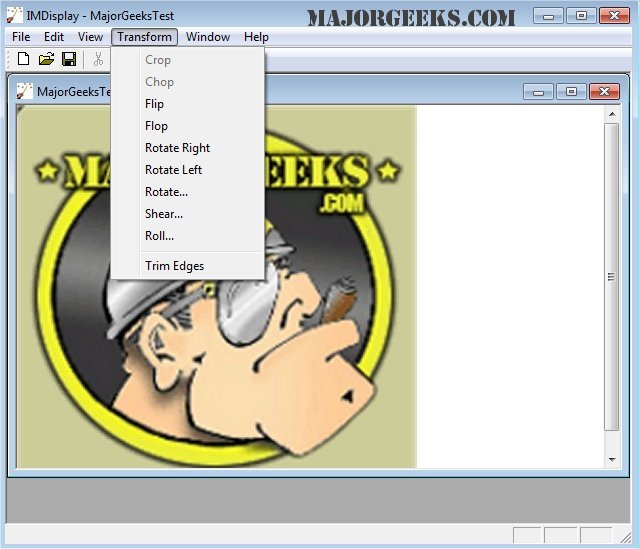
ImageMagick 7.1.2-15 has been released, enhancing its capabilities as a comprehensive freeware graphics software suite that allows users to create, edit, compose, and convert images across multiple operating systems, including Windows, Linux, and Mac. It supports over 100 image formats, such as DPX, EXR, GIF, JPEG, JPEG-2000, PDF, PhotoCD, PNG, Postscript, SVG, and TIFF.
Key functionalities of ImageMagick include:
- Format Conversion: Easily convert images between different formats (e.g., PNG to JPEG).
- Transformations: Resize, rotate, crop, flip, or trim images.
- Transparency: Make parts of images invisible.
- Drawing Tools: Add shapes or text to images.
- Decorative Features: Introduce borders or frames.
- Special Effects: Apply blurring, sharpening, or color tinting.
- Animation Creation: Generate GIF animations from multiple images.
- Image Identification: Analyze and describe image formats and attributes.
- Composite and Montage: Overlay images or arrange thumbnails on a canvas.
- Image Distortion: Correct or induce distortions, including perspective changes.
- Shape Morphology: Extract features and recognize patterns.
- Motion Picture Support: Handle image formats commonly used in digital cinema.
- Image Calculations: Perform mathematical operations on images.
- Color Management: Utilize accurate color profiles and manage gamma adjustments.
- High Dynamic Range (HDR) Support: Accurately represent a wide range of light intensities.
- Encryption: Convert images into unreadable forms and back.
- Large Image Support: Process images of mega-, giga-, or tera-pixel sizes.
- Threading and Distributed Processing: Optimized for multicore processors and supports remote pixel caching and OpenCL-enabled algorithms for heterogeneous computing.
Additionally, ImageMagick provides functionality for iOS devices, allowing users to edit and compose images directly on iPhones and iPads.
Overall, ImageMagick stands as a powerful tool for both casual users and professionals needing advanced image manipulation features. The versatility and extensive capabilities make it a popular choice for graphic design, photography, and digital media work.
Future enhancements could include improved user interfaces for easier access to tools, advanced AI-driven features for automated image editing, and enhanced support for emerging image formats to stay ahead of technological advancements in the graphics field
Key functionalities of ImageMagick include:
- Format Conversion: Easily convert images between different formats (e.g., PNG to JPEG).
- Transformations: Resize, rotate, crop, flip, or trim images.
- Transparency: Make parts of images invisible.
- Drawing Tools: Add shapes or text to images.
- Decorative Features: Introduce borders or frames.
- Special Effects: Apply blurring, sharpening, or color tinting.
- Animation Creation: Generate GIF animations from multiple images.
- Image Identification: Analyze and describe image formats and attributes.
- Composite and Montage: Overlay images or arrange thumbnails on a canvas.
- Image Distortion: Correct or induce distortions, including perspective changes.
- Shape Morphology: Extract features and recognize patterns.
- Motion Picture Support: Handle image formats commonly used in digital cinema.
- Image Calculations: Perform mathematical operations on images.
- Color Management: Utilize accurate color profiles and manage gamma adjustments.
- High Dynamic Range (HDR) Support: Accurately represent a wide range of light intensities.
- Encryption: Convert images into unreadable forms and back.
- Large Image Support: Process images of mega-, giga-, or tera-pixel sizes.
- Threading and Distributed Processing: Optimized for multicore processors and supports remote pixel caching and OpenCL-enabled algorithms for heterogeneous computing.
Additionally, ImageMagick provides functionality for iOS devices, allowing users to edit and compose images directly on iPhones and iPads.
Overall, ImageMagick stands as a powerful tool for both casual users and professionals needing advanced image manipulation features. The versatility and extensive capabilities make it a popular choice for graphic design, photography, and digital media work.
Future enhancements could include improved user interfaces for easier access to tools, advanced AI-driven features for automated image editing, and enhanced support for emerging image formats to stay ahead of technological advancements in the graphics field
ImageMagick 7.1.2-15 released
ImageMagick is an all-in-one freeware graphics software suite for creating, editing, composing, or converting images in Windows, Linux, and Mac.