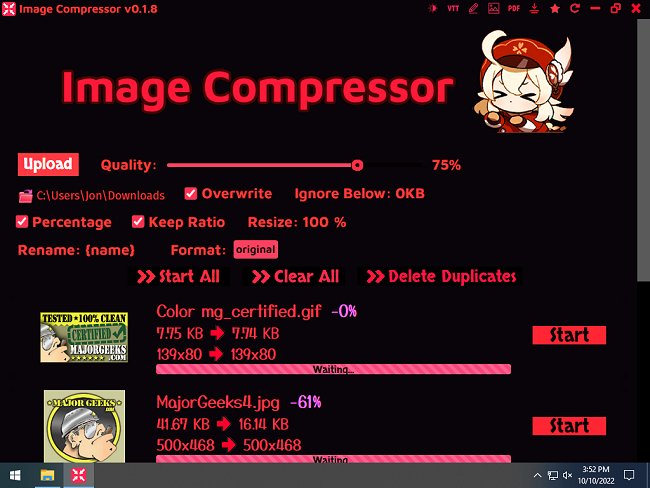
Version 0.2.5 of Image Compressor has been released, offering users an efficient tool for bulk image compression, resizing, and renaming through a user-friendly interface. This software is particularly beneficial for artists and collectors looking to organize their image collections. Users can easily reduce the file sizes of images and GIFs, remove duplicate files—keeping only the larger dimensions—and rename images based on their sources, such as titles or artist IDs from SauceNAO.
The application supports various formats including PNG, JPG, WEBP, and GIF, making it versatile for different image types. Additionally, it includes a dark mode option for those who prefer a less bright interface. Users can manage their files more effectively by flattening folders, which moves all files from subdirectories to the main directory and deletes the empty subfolders. There is also a PDF conversion feature that allows users to convert selected images or entire directories into PDF files.
To ensure optimal performance, it is recommended to run Image Compressor with administrative privileges. Key features include the ability to overwrite existing images or save them to a specified folder, previewing images before and after compression, and a note that quality settings only affect JPG and WEBP formats, while PNG and GIF compression is applied automatically.
To enhance user experience, Image Compressor provides the option to skip specific files during the compression process, preventing over-compression of important images.
In summary, Image Compressor 0.2.5 not only simplifies image management tasks but also provides useful functionalities for creatives and casual users alike, making it a valuable addition to any workflow focused on digital media organization and optimization.
Future updates could enhance the software further by incorporating features such as cloud integration for easier access across devices, advanced filtering options for image selection, and AI-driven suggestions for optimal compression settings based on file content
The application supports various formats including PNG, JPG, WEBP, and GIF, making it versatile for different image types. Additionally, it includes a dark mode option for those who prefer a less bright interface. Users can manage their files more effectively by flattening folders, which moves all files from subdirectories to the main directory and deletes the empty subfolders. There is also a PDF conversion feature that allows users to convert selected images or entire directories into PDF files.
To ensure optimal performance, it is recommended to run Image Compressor with administrative privileges. Key features include the ability to overwrite existing images or save them to a specified folder, previewing images before and after compression, and a note that quality settings only affect JPG and WEBP formats, while PNG and GIF compression is applied automatically.
To enhance user experience, Image Compressor provides the option to skip specific files during the compression process, preventing over-compression of important images.
In summary, Image Compressor 0.2.5 not only simplifies image management tasks but also provides useful functionalities for creatives and casual users alike, making it a valuable addition to any workflow focused on digital media organization and optimization.
Future updates could enhance the software further by incorporating features such as cloud integration for easier access across devices, advanced filtering options for image selection, and AI-driven suggestions for optimal compression settings based on file content
Image Compressor 0.2.5 released
Image Compressor performs bulk image compression, resizing, and renaming from an uncomplicated interface.