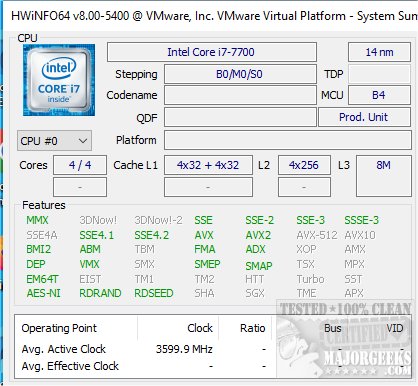
HWiNFO 8.42 has been released, offering users an extensive suite of tools for detailed system information, including hardware analysis, system monitoring, and comprehensive reporting for both Windows and DOS environments. The application is also available in a portable version for convenience.
Key features of HWiNFO include:
1. In-Depth Hardware Information: Users can access detailed information about their hardware, with support for the latest technologies and standards.
2. Real-Time System Monitoring: The software enables accurate monitoring of system components, providing insights into their current status and predicting potential failures. It features a customizable interface to cater to various user preferences.
3. Extensive Reporting: HWiNFO allows for multiple report types, enabling status logging and integration with other tools or add-ons for enhanced functionality.
For users who prefer visual learning, a video tutorial is available to help them navigate the features of HWiNFO effectively.
In addition to these main features, HWiNFO is accompanied by related guides that help users identify hardware components, find serial numbers, and check specifications such as CPU cores and RAM details.
Overall, HWiNFO 8.42 is a powerful tool for anyone looking to gain insights into their computer’s hardware and performance, making it essential for tech enthusiasts, IT professionals, and casual users alike. Whether you're troubleshooting, upgrading, or simply curious about your system, HWiNFO provides the tools you need to understand your hardware better
Key features of HWiNFO include:
1. In-Depth Hardware Information: Users can access detailed information about their hardware, with support for the latest technologies and standards.
2. Real-Time System Monitoring: The software enables accurate monitoring of system components, providing insights into their current status and predicting potential failures. It features a customizable interface to cater to various user preferences.
3. Extensive Reporting: HWiNFO allows for multiple report types, enabling status logging and integration with other tools or add-ons for enhanced functionality.
For users who prefer visual learning, a video tutorial is available to help them navigate the features of HWiNFO effectively.
In addition to these main features, HWiNFO is accompanied by related guides that help users identify hardware components, find serial numbers, and check specifications such as CPU cores and RAM details.
Overall, HWiNFO 8.42 is a powerful tool for anyone looking to gain insights into their computer’s hardware and performance, making it essential for tech enthusiasts, IT professionals, and casual users alike. Whether you're troubleshooting, upgrading, or simply curious about your system, HWiNFO provides the tools you need to understand your hardware better
HWiNFO 8.42 released
HWiNFO provides you with comprehensive system information details, including hardware analysis, monitoring, and Windows and DOS reporting. Also available as a portable app. Video tutorial available.